CM5-IO-WIRELESS-BASE
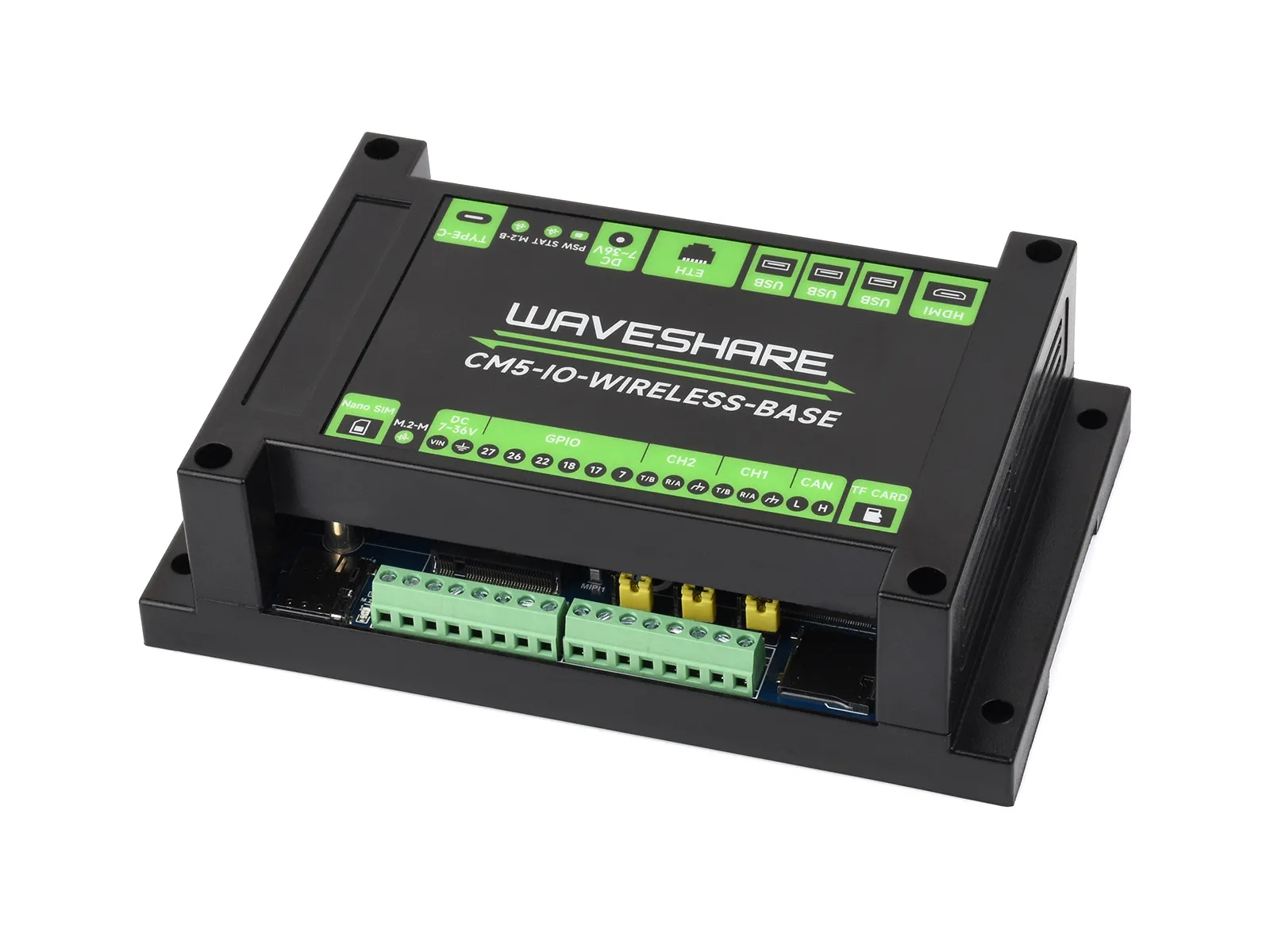
The CM5-IO-WIRELESS-BASE is a carrier board for the Raspberry Pi Compute Module 5. It is a powerful board featuring one USB 3.2 Gen1 port, two USB 2.0 ports, an M.2 M KEY, an M.2 B KEY (for 4G/5G modules), a miniPCIe (via an adapter board), and an Ethernet port. Some GPIOs are brought out via a green terminal block (these GPIOs are directly connected to the CM5 core; take care to reserve protection components when performing special control operations). Additionally, two isolated RS485 ports and one isolated CAN interface are provided via GPIO expansion for user convenience.
| SKU | Product |
|---|---|
| 34618 | CM5-IO-WIRELESS-BASE |
Features
- Do not plug or unplug any devices other than USB and HDMI while the system is powered on
- The Type-C port can be used as a USB SLAVE interface for flashing images or powering the device
- Onboard 3 USB ports: two USB 2.0 ports with a combined maximum output current of 2A, and one USB 3.0 port capable of delivering 2A independently (1x USB 3.2 Gen1 + 2x USB 2.0 ports)
- Supports 3 displays with independent content; when a MIPI DSI driver is added, the system will default to a dual-screen extended display regardless of whether a screen is connected (this depends on the system version)
- Onboard M.2 M KEY interface, supports NVMe SSD (or PCIe-based AI modules)
- Onboard M.2 B KEY interface, supports 4G/5G communication modules or connecting a Lora module via an adapter board
- 2 isolated RS485 ports + 1 isolated CAN interface
- Onboard BOOT switch: before powering on, set the BOOT switch to ON, then connect to a computer via Type-C to put the device into programming mode
- When using Type-C for programming, do not connect any other devices, otherwise insufficient power may prevent the device from being recognized
Onboard Resources
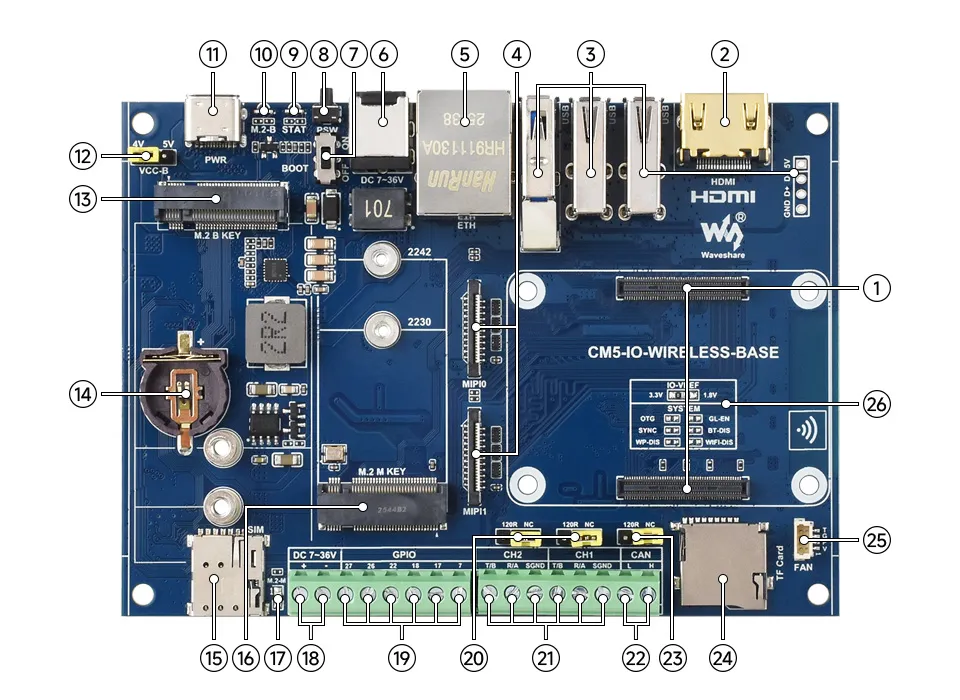
1. CM5 Socket
Compatible with all versions of Compute Module 5
2. HDMI Interface
Supports 4K output
3. USB Ports
2 standard USB 2.0 Type-A ports, 1 USB 2.0 4PIN port, 1 USB 3.2 Gen1 Type-A port, USB 3.2 Gen1 supports up to 5 Gbps
4. Dual MIPI Interfaces
Supports connecting DSI displays or CSI cameras
5. 1000M Ethernet Port
RJ45 1000M port, supports 10M / 100M / 1000M network connections
6. DC Power Supply Jack
Supports DC 7V ~ 36V power input (do not connect power simultaneously with the screw terminal)
7. BOOT Button
Set to ON before power-up; the board will enter programming mode on power-up
8. PSW Power Button
Long press to force power off, short press for soft shutdown or power on
9. System Status LED
10. M.2 B KEY Status LED
11. PWR & USB Port
5V DC power input; can also be used as an eMMC programming interface or USB OTG port
12. M.2 B KEY Supply Voltage Selection
Selects the operating voltage range for M.2 B KEY. 4G/5G modules require 4V; LoRa modules require 5V.
13. M.2 B KEY
Supports M.2 B KEY 4G/5G or other USB-based communication modules; can be used with an adapter to connect a Mini-PCIe LoRa module
14. RTC Battery Header
Can accept an ML / CR1220 coin cell battery
15. SIM Card Slot
Accepts a standard Nano-SIM card for 5G, 4G, 3G, or 2G connectivity
16. M.2 M KEY
Supports 2242 / 2230 NVMe SSDs or AI modules
17. M.2 M KEY Status LED
18. DC Power Screw Terminal
Supports DC 7V ~ 36V power input (do not connect power simultaneously with the DC power supply jack)
19. GPIO Screw Terminal
Directly connected to the Compute Module 5 core; take care to reserve protection components when performing special control operations
20. RS485 120R Terminal Resistor Selection
RS485 termination resistor jumper
21. Isolated CAN Screw Terminal
Dual RS485 with 600W lightning/surge protection and 15kV ESD protection (120Ω optional balance resistor jumpers are provided)
22. Isolated CAN Screw Terminal
ESD protection and transient spike voltage protection (reserved 120R balancing resistor selection)
23. CAN 120R Terminal Resistor Selection
CAN termination resistor jumper
24. TF Card Slot
For inserting a system-loaded TF card to boot the Compute Module 5 Lite
25. FAN Header
5V 4PIN JST-SH PWM fan connector for connecting a cooling fan
26. System Function Configuration Resistor
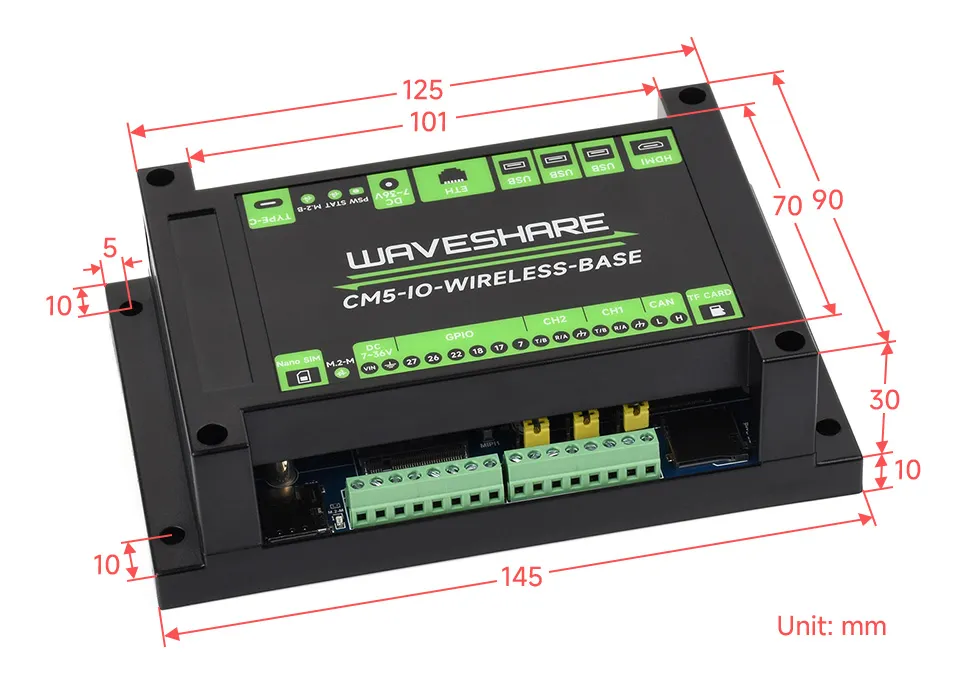
Dimensions
Development Related
Image Flashing
- Entering Download Mode
- Onboard BOOT switch: slide the BOOT switch to ON before power-up, then connect the board to a computer via Type-C; it will enter programming mode
- Flashing Images for LITE Versions: LITE Version Tutorial
- Flashing Images for EMMC Versions: EMMC Version Tutorial
NVMe(M.2 M KEY)
- The product supports all features in this tutorial: NVMe Usage Tutorial
- Includes: Formatting the Hard Drive | Hard Drive Partitioning | Manual Mounting | Auto-mount on Boot | Read/Write Test
NVMe SSD Boot
- First, boot the Raspberry Pi using a TF card, mount and test the NVMe SSD to ensure the hardware functions correctly
- NVMe SSD Boot: Boot Configuration Tutorial
MIPI
- You can add specific content to config.txt to select using DSI or CSI connection
- MIPI - DSI
- The product supports all features in this tutorial: DSI Interface Usage Tutorial
- DSI includes: DSI Interface Selection
- MIPI - CSI
- The product supports all features in this tutorial: CSI Interface Usage Tutorial
- CSI includes: CSI Interface Selection (Driver Settings) | Camera Detection | Displaying Real-time Preview | Taking a Photo | Recording a Video
Fan Control
- The product supports all features in this tutorial: Fan Usage Tutorial
- Includes: Manual Speed Control | View Current Speed | Restore Automatic Temperature Control
RTC
- With an RTC battery connected, the product supports all features in this tutorial: RTC Usage Tutorial
- Includes: Get RTC Time | Set RTC Time | Synchronize RTC Clock | Scheduled Shutdown | Scheduled Power-on - Low Power Wake-up | RTC Battery Charging
RS485
- The product has 2 isolated RS485 interfaces
- The product supports all features in this tutorial: RS485 Usage Tutorial
CAN
- The product has an onboard CAN interface (supports up to 1Mbps).
- The product supports all features in this tutorial: CAN Usage Guide
GPIO Screw Terminal
warning
The brought-out GPIOs are directly connected to the CM5 core. Take care to reserve protection components when performing special control operations.
- The GPIOs are directly connected to the CM5 core; the default GPIO control voltage is 3.3V. Applying a higher voltage will damage the CM5 core.
4G/5G
danger
Before connecting a 4G/5G module, switch Reference Designator 12 (M.2 B KEY supply voltage selection) to the 4V position. The 4G/5G module requires 4V.
- The product has an onboard M.2 M KEY interface, supporting 4G / 5G communication modules.
- The product supports all features in this tutorial: 4G / 5G Usage Guide
Lora
danger
Before connecting a Lora module, switch Reference Designator 12 (M.2 B KEY supply voltage selection) to the 5V position. The Lora module requires 5V.
- The product features an onboard M.2 B KEY interface that supports connecting a Lora module via the included adapter board.
- The product supports all features in this tutorial: Lora User Guide