Working with Raspberry Pi Pico
This chapter contains the following sections. Please read as needed:
Setting Up Development Environment
1. Installation and Configuration
- For setting up the Raspberry Pi Pico environment and basic usage, please refer to the following links:
- After setting up the environment, connect the sensor and download the example package.
Hardware Connection
Connect according to the table below.
| Core2021-XF | Raspberry Pi Pico/Pico2 |
|---|---|
| CLK | 10 |
| MISO | 11 |
| MOSI | 12 |
| CS | 13 |
| DIO11 | 15 |
| RESET | 5 |
| BUSY | 14 |
Example
- Raspberry Pi Pico example programs are located in the
core2021-xf\examples\picodirectory of the example package. - Examples 01, 02, and 03 require two Core2021-XF modules: one for transmission and one for reception.
| Example | Basic Description | Dependency Library |
|---|---|---|
| 01_lr2021_tx | LR2021 Transmit | RadioLib |
| 02_lr2021_rx | LR2021 Receive | RadioLib |
| 03_lr2021_pingpong | LR2021 Ping-Pong | RadioLib |
| 04_lr2021_tx_cw | LR2021 CW Mode Transmit | RadioLib |
| 05_lr2021_LoRaWAN | LoRaWAN | RadioLib |
Arduino Pico Examples
-
Navigate to
core2021-xf\examples\pico\arduinoand select the example program you wish to test. -
Select the chip model and port.
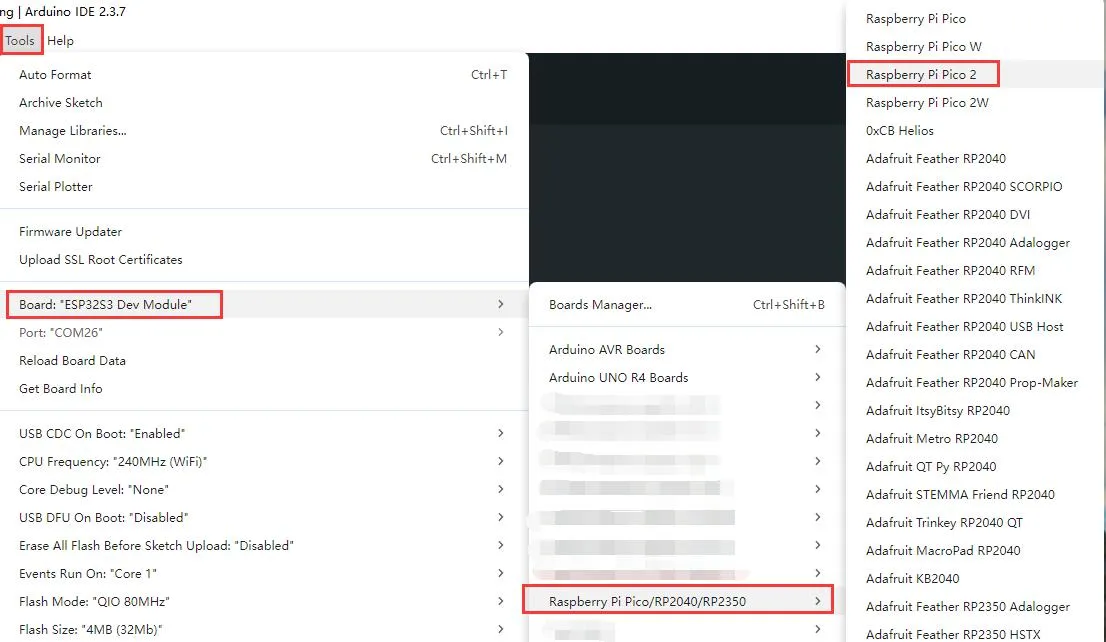
-
After uploading, open the serial port monitor, and the relevant information will be output.
01_lr2021_tx_arduino
Example Description
- Based on the Raspberry Pi Pico + Core2021-XF module, implements periodic LoRa packet transmission using interrupts.
- Uses the Pico/Pico2 hardware SPI1 port with custom SPI pin mapping.
- Uses non-blocking transmission, does not occupy CPU resources in the main loop.
- After each packet is sent, automatically delays 1 second before sending the next packet.
- Supports string data transmission, with a built-in packet sequence number for easy debugging.
Code Analysis
SPI1.setSCK / setRX / setTX: Remaps pins for RP2040 hardware SPI1.SPI1.begin(): Starts the Raspberry Pi Pico hardware SPI1.radio.irqDioNum = 11: Configures the LR2021 interrupt mapping pin; must be set before initialization.radio.XTAL = true: Enables the external crystal oscillator to ensure frequency accuracy.setFlag(void): Interrupt callback function triggered automatically after the module finishes transmission, sets a transmission-complete flag.radio.setPacketSentAction(setFlag): Binds the transmission-complete interrupt function.radio.startTransmit("content"): Starts asynchronous LoRa transmission (supports string / byte array).radio.finishTransmit(): Cleanup after transmission, turns off the transmit circuit and resets the module state.loop()main logic: Check transmission-complete flag → print status → delay → send next packet with sequence number.
Operation Result
-
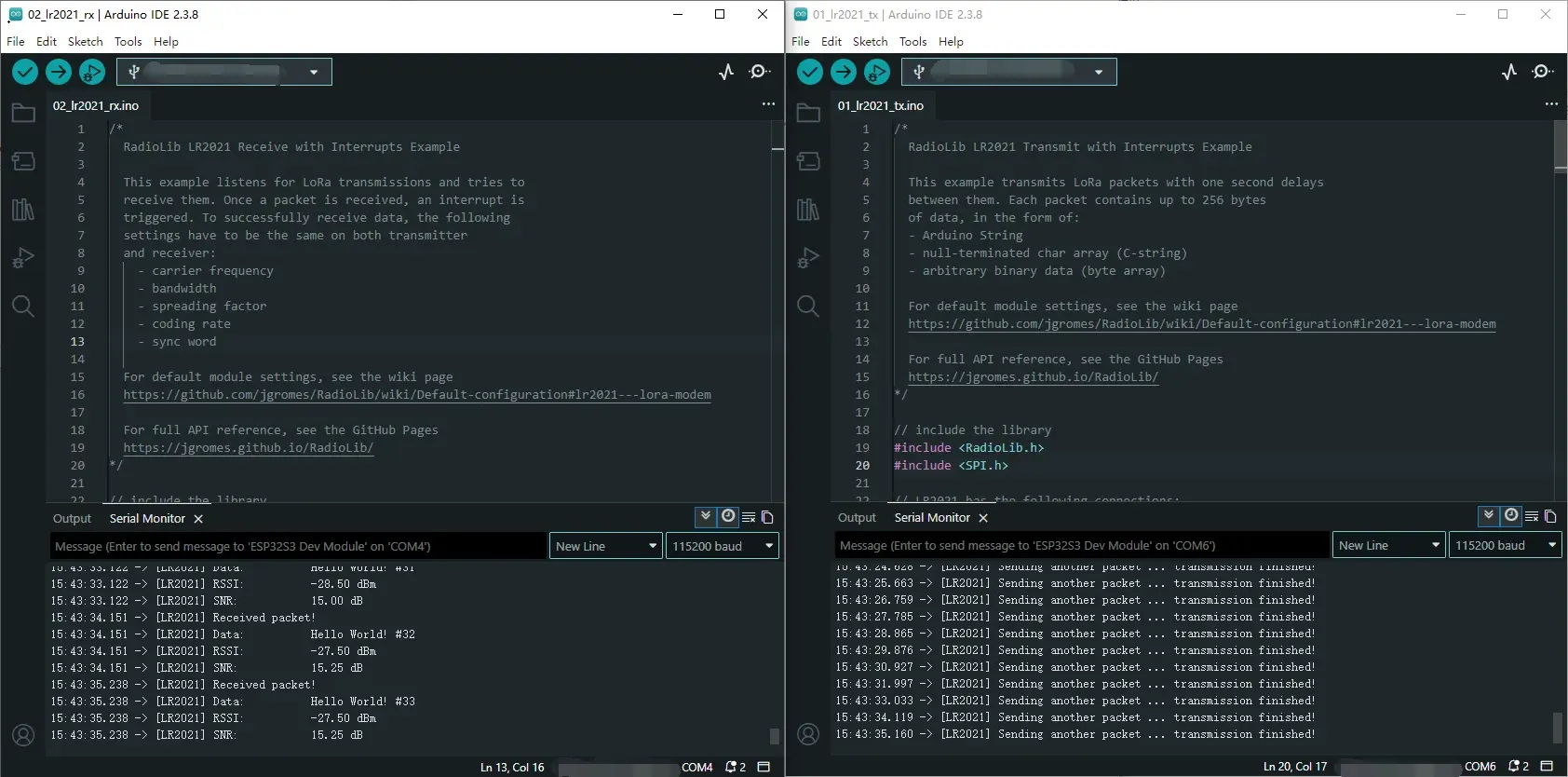
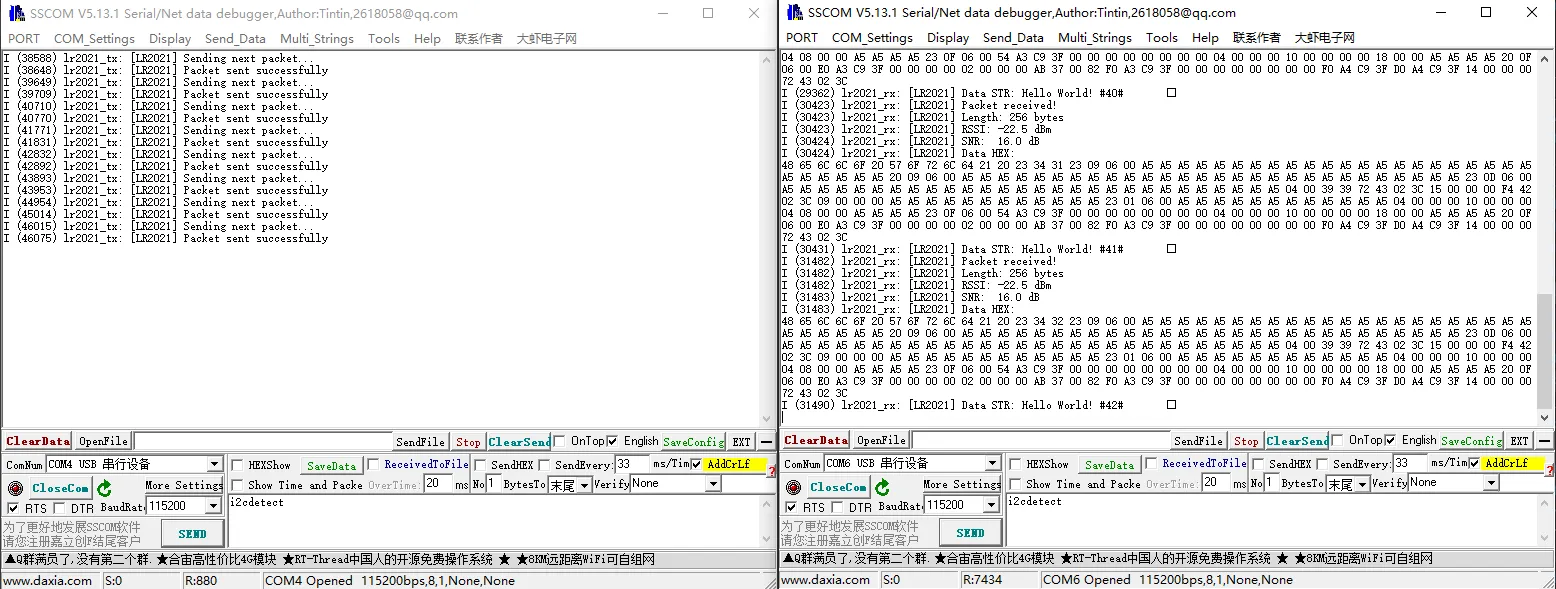
After compiling and uploading, open the serial monitor to see logs indicating transmission completion, as shown below (in combination with 02_lr2021_rx):
02_lr2021_rx_arduino
Example Description
- Based on the Raspberry Pi Pico + Core2021-XF module, implements wireless LoRa packet reception using interrupts.
- Uses the Pico/Pico2 hardware SPI1 port with custom pin mapping.
- Uses non-blocking listening mode; the module automatically waits for data without consuming CPU resources.
- After successful reception, automatically parses the data and prints the packet content, RSSI, and SNR.
- The same frequency, spreading factor, bandwidth, and coding rate must be configured on both the transmitter and receiver for successful communication.
Code Analysis
SPI1.setSCK / setRX / setTX: Remaps pins for RP2040 hardware SPI1.SPI1.begin(): Initializes the Raspberry Pi Pico hardware SPI1 bus.radio.irqDioNum = 11: Configures the LR2021 interrupt mapping pin; must be set before initialization.radio.XTAL = true: Enables the external crystal oscillator to ensure frequency accuracy and improve reception stability.setFlag(void): Interrupt callback function triggered automatically after a complete packet is received.radio.setPacketReceivedAction(setFlag): Binds the reception-complete interrupt service function.radio.startReceive(): Starts continuous LoRa reception mode, enters a data-waiting state.radio.readData(str): Reads the received wireless data (supports string parsing).radio.getRSSI()/radio.getSNR(): Retrieves signal quality parameters for debugging and link evaluation.loop()main logic: Check reception-complete flag → read data → parse and print → continue listening.
Operation Result
-
After compiling and uploading, open the serial monitor to see real-time reception logs including data content, RSSI, and SNR, as shown below (in combination with 01_lr2021_tx):
03_lr2021_pingpong
Example Description
- Based on the Raspberry Pi Pico + Core2021-XF module, implements LoRa automatic ping-pong (question-answer) two-way communication.
- Uses the Pico/Pico2 hardware SPI1 port with arbitrary pin mapping.
- Two modules can send and receive to each other without manual control.
- Enabling
INITIATING_NODEsets the module as the initiator; the other module acts as the responder. - Automatically switches between transmit and receive states, driven by non-blocking interrupts.
Code Analysis
SPI1.setSCK / setRX / setTX: Remaps pins for Raspberry Pi Pico SPI1.SPI1.begin(): Initializes the hardware SPI1 bus.radio.irqDioNum = 11: Configures the LR2021 interrupt mapping pin; must be set before initialization.radio.XTAL = true: Enables the external crystal oscillator to ensure communication frequency accuracy.setFlag(void): General interrupt callback, triggered on either transmit or receive completion.radio.setIrqAction(setFlag): Binds the shared transmit/receive interrupt function.INITIATING_NODEmacro: Used to distinguish the initiating node.radio.startTransmit(): Starts packet transmission.radio.startReceive(): Switches the module to listening (receive) mode.radio.readData(str): Reads the received LoRa packet.loop()main logic: Transmit complete → enter receive; receive complete → delay reply → transmit again.
Operation Result
- Flash the program onto two modules, enabling the
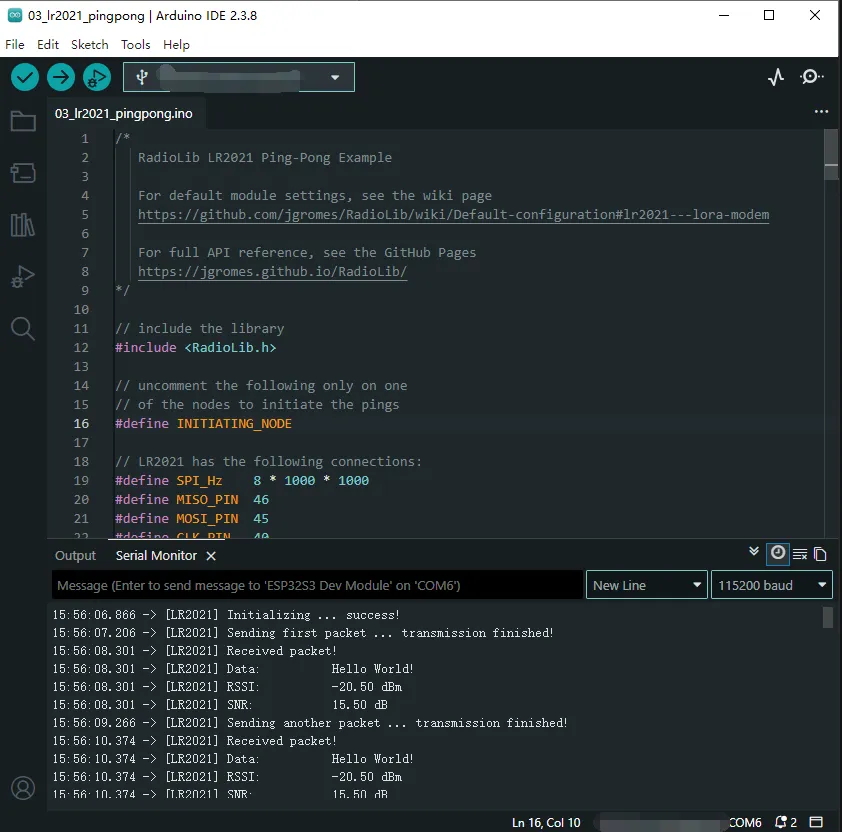
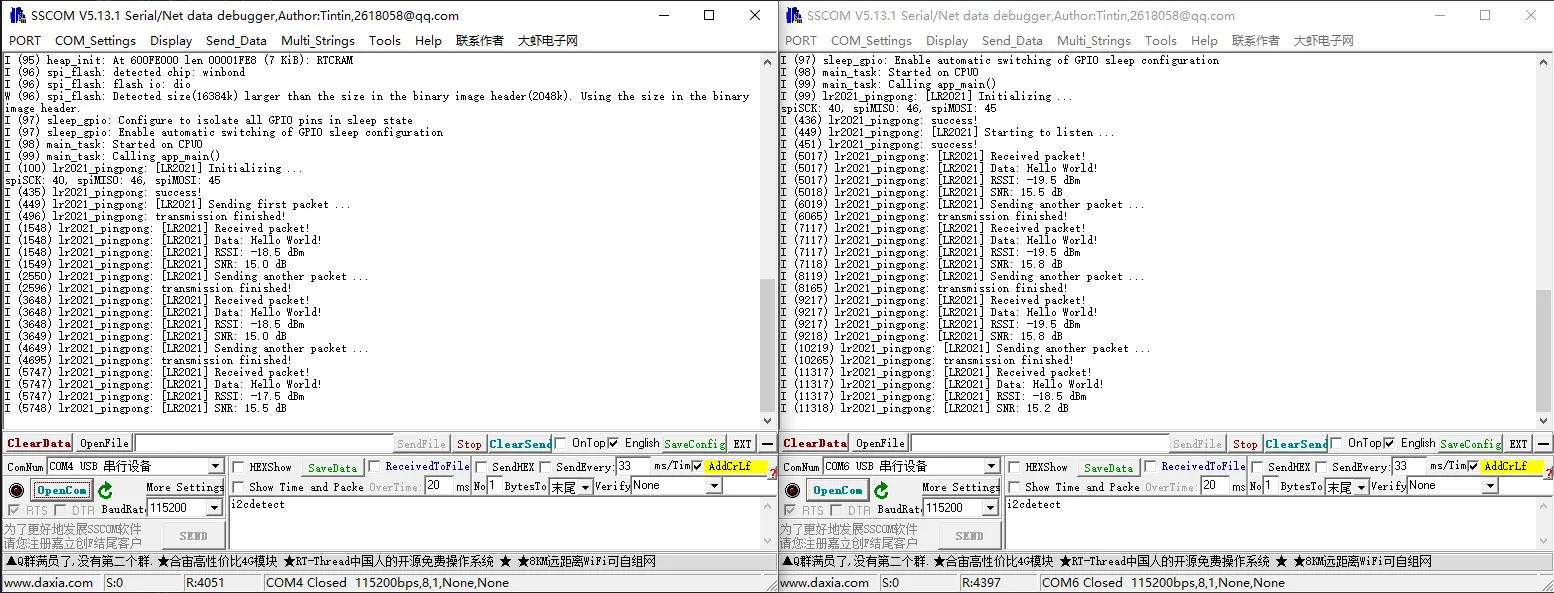
INITIATING_NODEmacro on one of them. - After power-on, they automatically send and receive to each other; the serial monitor prints the transmit/receive status, data, RSSI, and SNR, as shown below:
04_lr2021_tx_cw
Example Description
- Based on the Raspberry Pi Pico + Core2021-XF module, implements LoRa continuous wave (CW) / direct transmit.
- Uses the Pico/Pico2 hardware SPI1 port with arbitrary pin mapping.
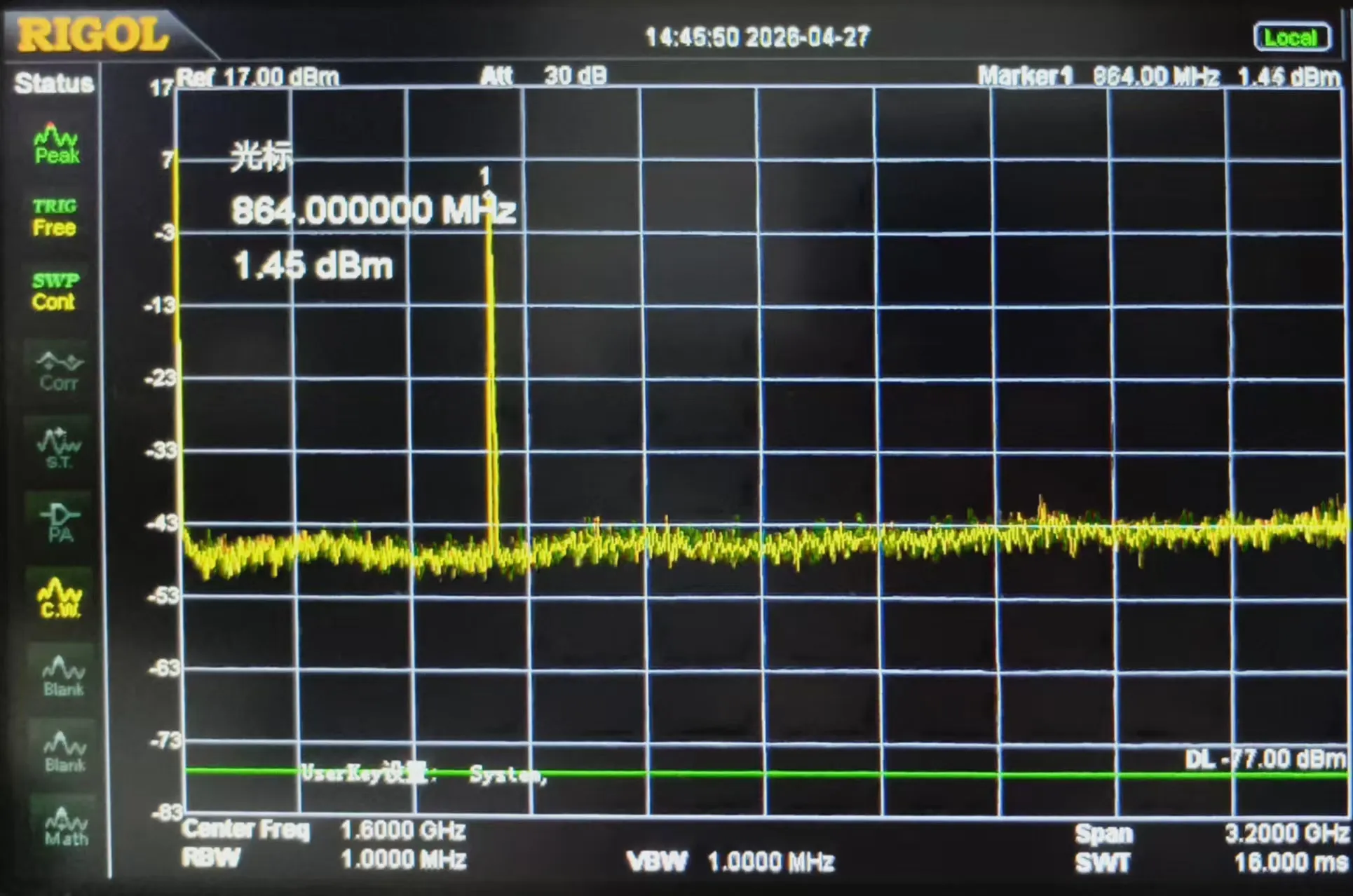
- Outputs a fixed-frequency carrier signal without packet formatting, used for band testing, signal detection, and instrument calibration.
- Fixed frequency 868 MHz, transmit power 22 dBm.
- Upon power-up, transmits continuously with no additional logic.
Code Analysis
SPI1.setSCK / setRX / setTX: Remaps pins for Raspberry Pi Pico SPI1.SPI1.begin(): Initializes the hardware SPI1 bus.radio.XTAL = true: Enables the external crystal oscillator to ensure carrier frequency accuracy.OUT_HZ 868000000UL: Defines the direct transmit frequency (868 MHz); can be modified.radio.setOutputPower(22): Sets the transmit power to 22 dBm.radio.transmitDirect(OUT_HZ): Enters continuous direct transmission mode, outputting a fixed-frequency carrier.loop(): No business logic; the carrier continues to transmit without program intervention.
Operation Result
-
After flashing, the module immediately outputs a fixed-frequency carrier signal.
-
The serial port prints initialization and transmission start status; a spectrum analyzer or receiving module can detect the continuous RF signal, as shown below:
05_lr2021_LoRaWAN
Example Description
- Based on the Raspberry Pi Pico + Core2021-XF module, implements LoRaWAN OTAA join and uplink/downlink communication.
- Uses EEPROM emulation storage to save session information, allowing fast reconnection after power-off reboot.
- Custom SPI1 pin mapping fully adapted to Pico/Pico2 hardware design.
- Periodically sends uplink data (default every 5 minutes) and automatically listens for server downlink messages.
- Supports HEX/ASCII formatting of received data for debugging and link verification.
Code Analysis
SPI1.setSCK/setRX/setTX: Remaps pins for RP2040 hardware SPI1.SPI1.begin(): Initializes the Raspberry Pi Pico hardware SPI1 bus.radio.irqDioNum = 11: Configures the LR2021 interrupt mapping pin; must be set before initialization.radio.XTAL = true: Enables the external crystal oscillator to ensure LoRaWAN frequency accuracy.EEPROM.begin(256): Initializes the RP2040 on-chip Flash to emulate EEPROM.restoreLoRaWANState(): Recovers session information from EEPROM for fast reconnection.node.beginOTAA()/activateOTAA(): OTAA join key functions.saveLoRaWANState(): Saves session information to EEPROM after successful join.node.sendReceive(): Sends uplink data and automatically listens for downlink messages.printHex / printAscii: Formats and prints downlink data.
Operation Result
-
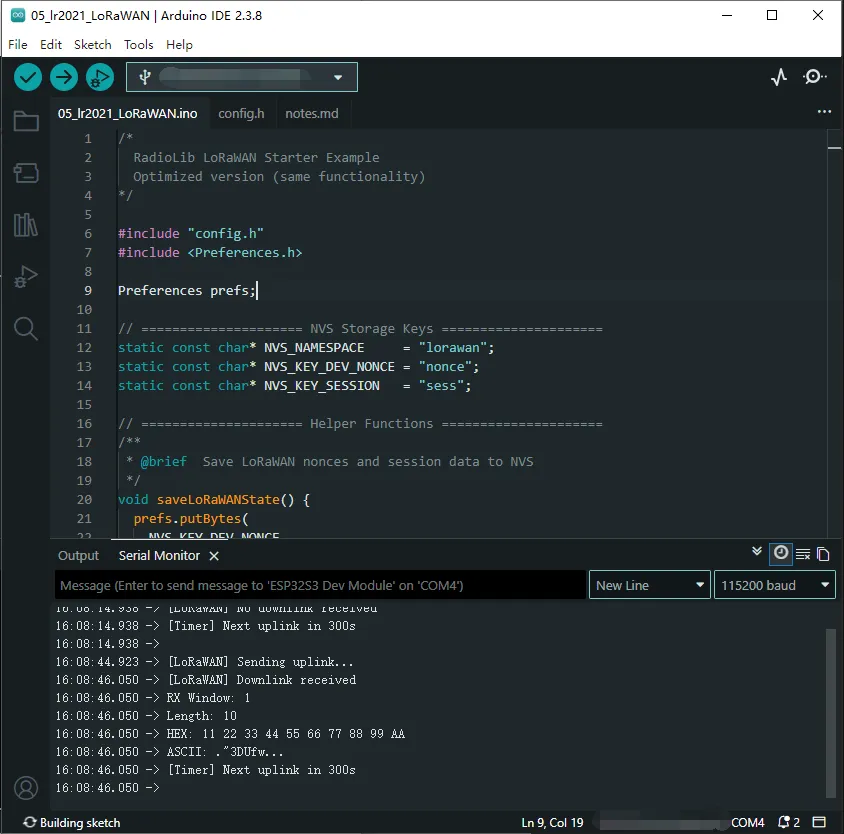
After flashing, the module automatically completes OTAA join, periodically reports data, and listens for downlink messages.
-
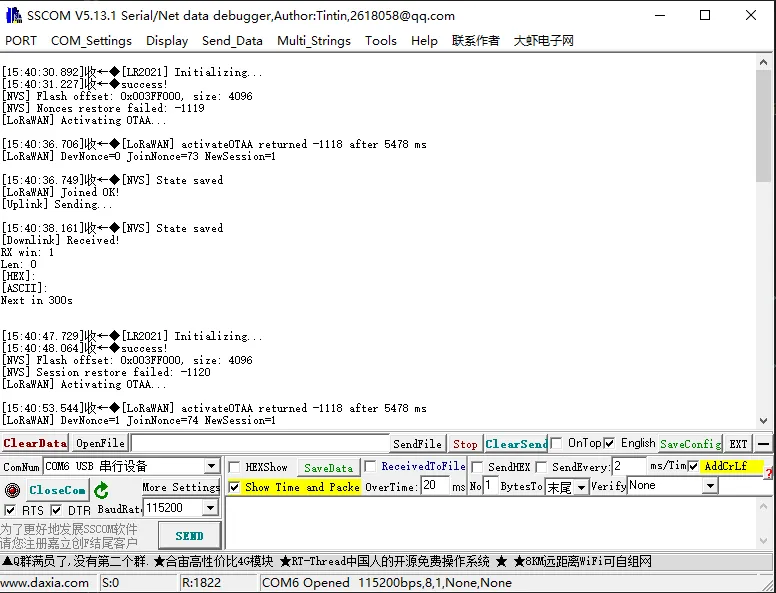
The serial port prints join status, uplink/downlink data, signal quality, etc., as shown below:
C/C++ Examples
-
Navigate to
core2021-xf\examples\pico\cand select the example program you wish to test. -
Select the chip model and port.
-
After uploading, open the serial port monitor, and the relevant information will be output.
01_lr2021_tx
Example Description
- Based on the Raspberry Pi Pico + Core2021-XF module, runs the RadioLib library directly on the Pico in a non-Arduino environment.
- Uses the hardware SPI1 port with custom SPI pins (SCK=10, MOSI=11, MISO=12).
- Configures LR2021 pins:
- NSS=13, IRQ(DIO0)=15, RESET=5, BUSY=14
- Supports interrupt callbacks, automatically triggered when a packet transmission is complete.
- Non-blocking transmission; the main loop can check the transmission-complete flag for further operations.
- Supports sending C-strings or byte arrays, up to 256 bytes.
- Can continuously send packets with sequence numbers for easy debugging.
Code Analysis
PicoHal* hal = new PicoHal(SPI_PORT, SPI_MISO, SPI_MOSI, SPI_SCK): Creates a Pico hardware abstraction layer instance and binds the SPI port.LR2021 radio = new Module(hal, RFM_NSS, RFM_IRQ, RFM_RST, RFM_BUSY): Initializes the LR2021 module object.radio.irqDioNum = 11: Configures the interrupt mapping pin.radio.XTAL = true: Enables the external crystal oscillator for better frequency accuracy.radio.begin(): Initializes the module and returns an error code.radio.setPacketSentAction(setFlag): Binds the transmission-complete callback functionsetFlag().radio.setFrequency(868.0),setOutputPower(22),setBandwidth(125.0),setSpreadingFactor(7),setCodingRate(5),setSyncWord(...),setPreambleLength(8): Configures LoRa parameters.radio.startTransmit("Hello World!"): Starts the first packet transmission.setFlag(): SetstransmittedFlag = truewhen transmission is complete; this flag is polled in the main loop.- Main loop
for(;;):- Check
transmittedFlag - Print success/failure status
- Call
radio.finishTransmit()to clean up the transmission - Delay 1 second
- Build a new packet with an incremented sequence number and continue transmitting
- Check
Operation Result
-
After startup, the serial port prints initialization status (paired with 02_lr2021_rx):
02_lr2021_rx
Example Description
- Based on the Raspberry Pi Pico + Core2021-XF module, runs the RadioLib library directly on the Pico in a non-Arduino environment to receive data.
- Uses the hardware SPI1 port with custom SPI pins (SCK=10, MOSI=11, MISO=12).
- Configures LR2021 pins:
- NSS=13, IRQ(DIO0)=15, RESET=5, BUSY=14
- Supports interrupt callbacks, automatically triggered when a packet is received.
- Continuous listening mode, automatically re-enters receive state after each packet.
- Received data can be printed in HEX format or as a string.
Code Analysis
PicoHal* hal = new PicoHal(SPI_PORT, SPI_MISO, SPI_MOSI, SPI_SCK): Creates a Pico hardware abstraction layer instance and binds the SPI port.LR2021 radio = new Module(hal, RFM_NSS, RFM_IRQ, RFM_RST, RFM_BUSY): Initializes the LR2021 module object.radio.irqDioNum = 11: Configures the interrupt mapping pin.radio.XTAL = true: Enables the external crystal oscillator for better frequency accuracy.radio.begin(): Initializes the module and returns an error code.radio.setPacketSentAction(setFlag): Binds the transmission-complete callback functionsetFlag().radio.setFrequency(868.0),setOutputPower(22),setBandwidth(125.0),setSpreadingFactor(7),setCodingRate(5),setSyncWord(...),setPreambleLength(8): Configures LoRa parameters.radio.startReceive(): Starts receive mode and enters listening state.setFlag(): SetsreceivedFlag = truewhen a packet is received; this flag is polled in the main loop.- Main loop
for(;;):- Check
receivedFlag - Read packet length
radio.getPacketLength()and callradio.readData(rxBuf, len) - Based on the return status, print:
- On success: packet length, RSSI, SNR, HEX dump, and string content
- On CRC error: indicate CRC error
- On other errors: print error code
- Automatically re-enter receive mode
radio.startReceive() - Delay 10 ms to avoid excessive CPU usage
- Check
Operation Result
-
After startup, the serial port prints initialization status (paired with 01_lr2021_tx):
03_lr2021_pingpong
Example Description
- Based on the Raspberry Pi Pico + Core2021-XF module, implements LoRa automatic ping-pong (question-answer) two-way communication.
- Uses the hardware SPI1 port with custom SPI pins (SCK=10, MOSI=11, MISO=12).
- Configures LR2021 pins:
- NSS=13, IRQ(DIO0)=15, RESET=5, BUSY=14
- Supports interrupt callbacks, triggered when a transmission or reception is complete.
- Automatically switches between transmit and receive states without manual intervention.
- The first transmission is controlled by the
#define INITIATING_NODEmacro; the other module automatically enters receive mode. - Supports sending and receiving string data continuously, and prints RSSI/SNR.
Code Analysis
PicoHal* hal = new PicoHal(SPI_PORT, SPI_MISO, SPI_MOSI, SPI_SCK): Creates a Pico hardware abstraction layer instance and binds the SPI port.LR2021 radio = new Module(hal, RFM_NSS, RFM_IRQ, RFM_RST, RFM_BUSY): Initializes the LR2021 module object.radio.irqDioNum = 11: Configures the interrupt mapping pin.radio.XTAL = true: Enables the external crystal oscillator for better frequency accuracy.radio.begin(): Initializes the module and returns an error code.radio.setPacketSentAction(setFlag): Binds the transmit/receive complete callback function.- The macro
INITIATING_NODEdetermines whether the node first sends data. - Main loop
for(;;):- Check the
operationDoneflag. - If transmission is complete:
- Print transmission status
- Switch to receive mode
radio.startReceive()
- If reception is complete:
- Read the packet
radio.readData(rxBuffer, rxLen) - Print the received string, RSSI, SNR
- Delay 1 second, then send again
- Read the packet
- Delay 5 ms at the end of each iteration to avoid high CPU usage
- Check the
Operation Result
- Two modules are flashed separately; one defines
INITIATING_NODE. - After power-up, modules automatically send and receive to each other:
04_lr2021_tx_cw
Example Description
- Based on the Raspberry Pi Pico + Core2021-XF module, implements LoRa continuous wave (CW) / direct transmit.
- Uses the hardware SPI1 port with custom SPI pins (SCK=10, MOSI=11, MISO=12).
- Configures LR2021 pins:
- NSS=13, IRQ(DIO0)=15, RESET=5, BUSY=14
- Outputs a fixed-frequency carrier signal without packet formatting, used for band testing, signal detection, and instrument calibration.
- Fixed frequency 868 MHz, transmit power 22 dBm.
- Upon power-up, the module transmits continuously with no additional logic.
Code Analysis
PicoHal* hal = new PicoHal(SPI_PORT, SPI_MISO, SPI_MOSI, SPI_SCK): Creates a Pico hardware abstraction layer instance and binds the SPI port.LR2021 radio = new Module(hal, RFM_NSS, RFM_IRQ, RFM_RST, RFM_BUSY): Initializes the LR2021 module object.radio.irqDioNum = 11: Configures the interrupt mapping pin.radio.XTAL = true: Enables the external crystal oscillator for better frequency accuracy.radio.begin(): Initializes the module and returns an error code.radio.setOutputPower(22): Sets the transmit power to 22 dBm.radio.transmitDirect(OUT_HZ): Enters continuous direct transmission mode, outputting a fixed-frequency carrier.- The main loop has no business logic; the carrier continues to transmit without program intervention.
Operation Result
-
After flashing, the module immediately outputs a fixed-frequency carrier signal.
-
The serial port prints initialization and transmission start status; a spectrum analyzer or receiving module can detect the continuous RF signal, as shown below:
05_lr2021_LoRaWAN
Example Description
- Based on the Raspberry Pi Pico + Core2021-XF module, implements LoRaWAN OTAA join and uplink/downlink communication.
- Uses the hardware SPI1 port with custom SPI pins (SCK=10, MOSI=11, MISO=12).
- Supports EEPROM emulation storage, allowing fast reconnection after power-off reboot.
- Periodically sends uplink data (random 3-byte payload, default period
uplinkIntervalSeconds). - Automatically receives server downlink messages and prints the data in HEX/ASCII.
- Supports continuous uplink/downlink and automatically saves LoRaWAN session state to prevent DevNonce reuse.
Code Analysis
PicoHal* hal = new PicoHal(SPI_PORT, SPI_MISO, SPI_MOSI, SPI_SCK): Creates a Pico hardware abstraction layer instance and binds the SPI port.LR2021 radio = new Module(hal, RFM_NSS, RFM_IRQ, RFM_RST, RFM_BUSY): Initializes the LR2021 module object.LoRaWANNode node(&radio, &Region, subBand): Creates a LoRaWAN node instance.- Flash EEPROM emulation:
FLASH_TARGET_OFFSET: storage offsetFLASH_EMULATE_EEPROM_SIZE: emulation sizesaveLoRaWANState()/restoreLoRaWANState(): saves/restores LoRaWAN session state
node.beginOTAA(joinEUI, devEUI, nwkKey, appKey): Initializes OTAA parameters.joinLoRaWAN(restored): Attempts to join the network and saves DevNonce/Session.- Uplink/downlink transmission:
node.sendReceive(tx, sizeof(tx), 1, rx, &rxLen): Sends uplink data and receives downlink.- After successful transmission, saves the session to prevent counter rollback.
- Downlink data is printed in HEX/ASCII.
- Loop logic:
- Send a random payload.
- Check if a downlink message is received.
- Save the state.
- Delay for
uplinkIntervalSecondsseconds before the next transmission.
Operation Result
-
After flashing, the module automatically completes OTAA join, periodically reports data, and listens for downlink messages.
-
The serial port prints join status, uplink/downlink data, signal quality, etc., as shown below: