DSI Interface
DSI (Display Serial Interface) is a high-speed serial display interface based on the MIPI standard. It is used to transmit image data generated by a processor (such as Raspberry Pi) to an LCD display driver chip at high speed to achieve image display.
It has the following characteristics:
- High-speed transmission: single data lane can reach several Gbps
- Low power consumption: uses low-voltage differential signaling and enters low-power mode when idle or during low-speed transmission
- Reduced pin count: significantly fewer traces compared to RGB interface
- The DSI interface relies on driver support and initialization configuration; it is not a plug-and-play interface.
- Different main controllers and screens are generally not interchangeable; driver matching is required.
DSI Interface Physical Specifications
DSI interfaces come in various physical forms. The main differences are the number of pins, pitch, and the number of supported data lanes.
Common specifications are as follows:
| Item | 15 Pin | 22 Pin |
|---|---|---|
| Pitch | 1.0 mm | 0.5 mm |
| Data Lanes | 2 Lanes | 4 Lanes |
| Bandwidth | Lower | Higher |
| Connector Size | Wider | More compact |
In general, the 22PIN interface supports more data lanes (usually 4 lanes), providing higher display bandwidth, suitable for high-resolution or high-refresh-rate displays.
- Even with a 22Pin interface, the actual number of supported lanes still depends on the main controller's capabilities.
- Interfaces between different models are not directly compatible; dedicated cables or adapter boards are required.
Raspberry Pi DSI Interface Description
On the Raspberry Pi, the DSI interface is mainly used to connect LCD displays that are officially supported or have specific drivers. The corresponding driver must be loaded via a Device Tree Overlay. Raspberry Pi DSI interfaces come in two physical forms: 15Pin and 22Pin, with pitches of 1.0mm and 0.5mm respectively.
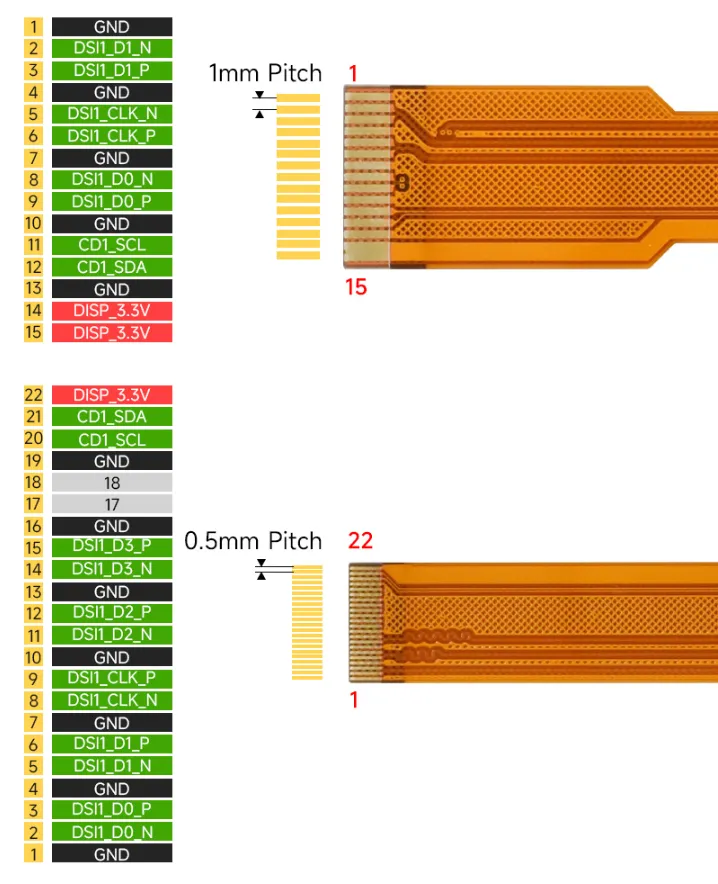
Raspberry Pi platforms use either 15Pin or 22Pin DSI interfaces. The interface specifications for different models are as follows:
- Raspberry Pi 3 / 4: 15 Pin (2 Lanes)
- Raspberry Pi 5 / CM4 / CM5: 22 Pin (supports up to 4 Lanes)
- The DSI (display) and CSI (camera) connectors on the Raspberry Pi have the same physical appearance, but their signal definitions are different; cables cannot be interchanged.
- Incorrect connection may cause the device to malfunction or be damaged.
- 15 Pin and 22 Pin connectors cannot be directly connected to each other; an adapter board or dedicated cable is required.
Video Tutorial
⚠ Safety and Precautions
To avoid any malfunction or damage to this product, please follow the following instructions:
- Before connecting the device, turn off your Raspberry Pi computer and disconnect external power.
- If the cable becomes detached, pull the locking mechanism on the connector forward, insert the ribbon cable (ensure the metal contacts are oriented correctly according to the interface definition), then push the locking mechanism back into place.
- Be careful not to fold or strain the ribbon cable.
- Exercise caution when screwing in parts. Misalignment of threads may cause irreparable damage and void the warranty.
- The device should be operated in a dry environment at 0–60°C. Do not expose the device to water or humid environments, nor place it on conductive surfaces.
- Do not expose the device to excessive heat. Store in a cool, dry place. Avoid sudden temperature changes, which may cause moisture to accumulate inside the device.
- Handle with care to avoid mechanical or electrical damage to the printed circuit board and connectors. The display surface is fragile and may shatter.