ESP32-C6-Pico
- ESP32-C6-Pico (Standard Version)
- ESP32-C6-Pico-M (Header version)
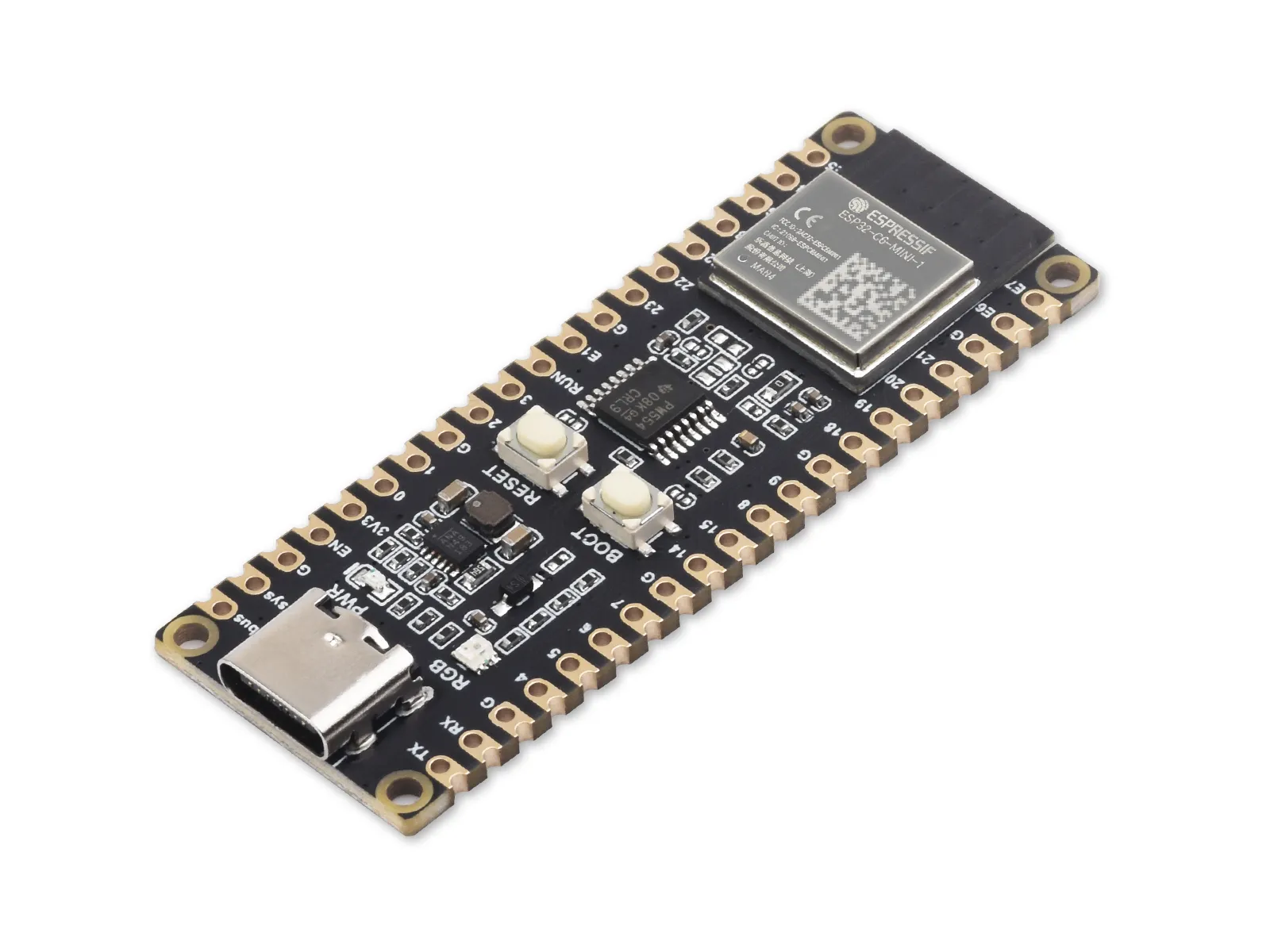
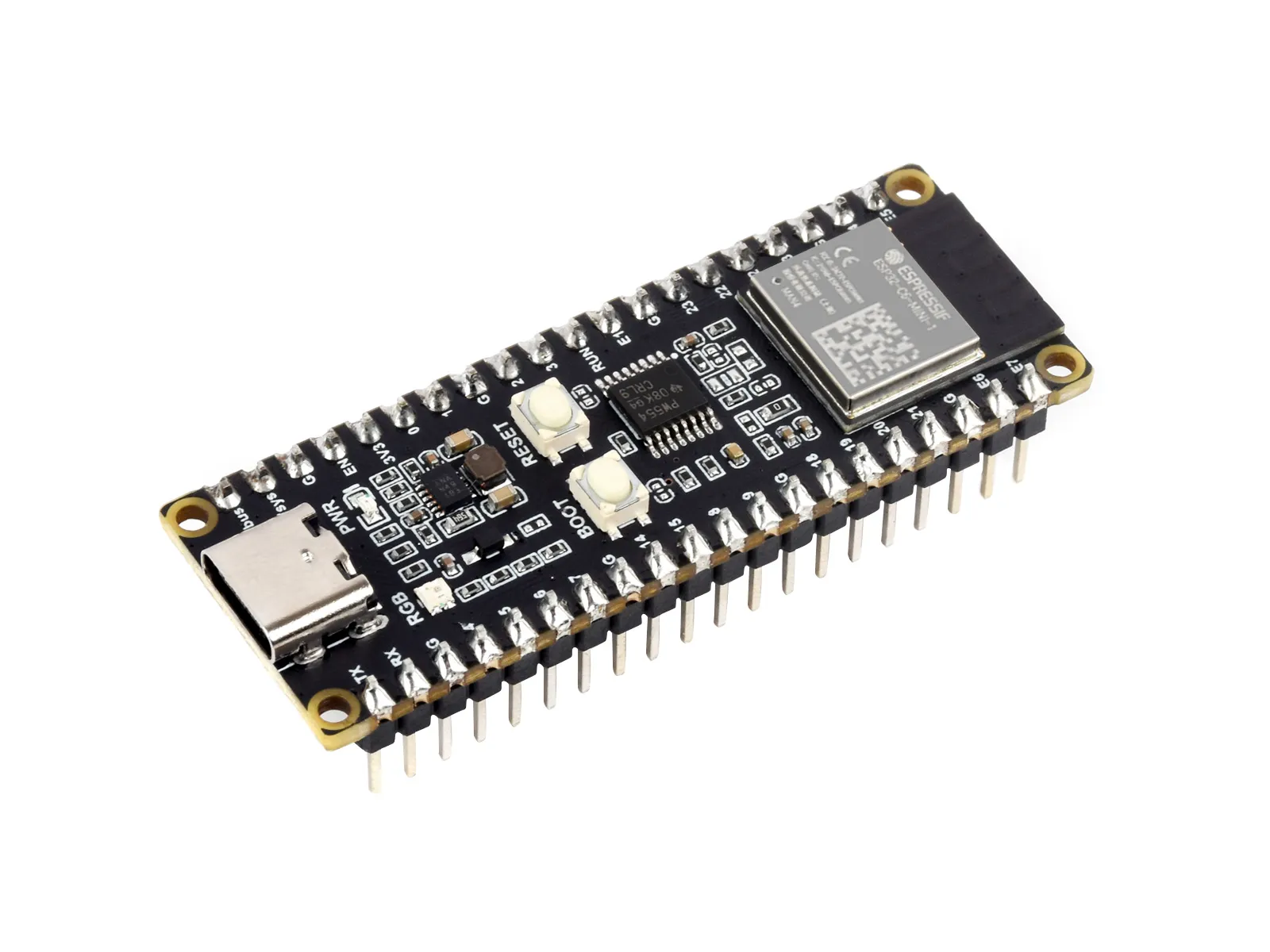
Product Overview
The ESP32-C6-Pico is a compact microcontroller development board equipped with multiple digital interfaces.
Hardware-wise, it uses the ESP32-C6-MINI-1 module, which integrates a RISC-V 32-bit single-core processor supporting clock frequencies up to 160 MHz, with built-in 320KB ROM, 512KB HP SRAM, 16KB LP SRAM, and 4MB Flash. Its pinout is compatible with the Raspberry Pi Pico development board, enabling expansion with various peripherals for greater convenience.
Software-wise, you can choose the ESP-IDF development environment or Arduino IDE for development, making it easy to get started quickly and integrate into your products.
| SKU | Product |
|---|---|
| 26866 | ESP32-C6-Pico |
| 26845 | ESP32-C6-Pico-M |
Features
- ESP32-C6-MINI-1 module with RISC-V 32-bit single-core processor supporting clock frequencies up to 160 MHz
- Integrated 320KB ROM, 512KB HP SRAM, 16KB LP SRAM, and 4MB Flash
- Integrated 2.4 GHz Wi-Fi 6 and Bluetooth LE dual-mode wireless communication with excellent RF performance
- USB Type-C interface, eliminating concerns about plug orientation
- Rich peripheral interfaces brought out; pin-compatible with the Raspberry Pi Pico board for strong compatibility and expandability
- Castellated module design allows direct soldering and integration onto user-designed carrier boards
- Supports multiple low-power operating states, balancing communication distance, data rate, and power consumption to meet the power needs of various application scenarios
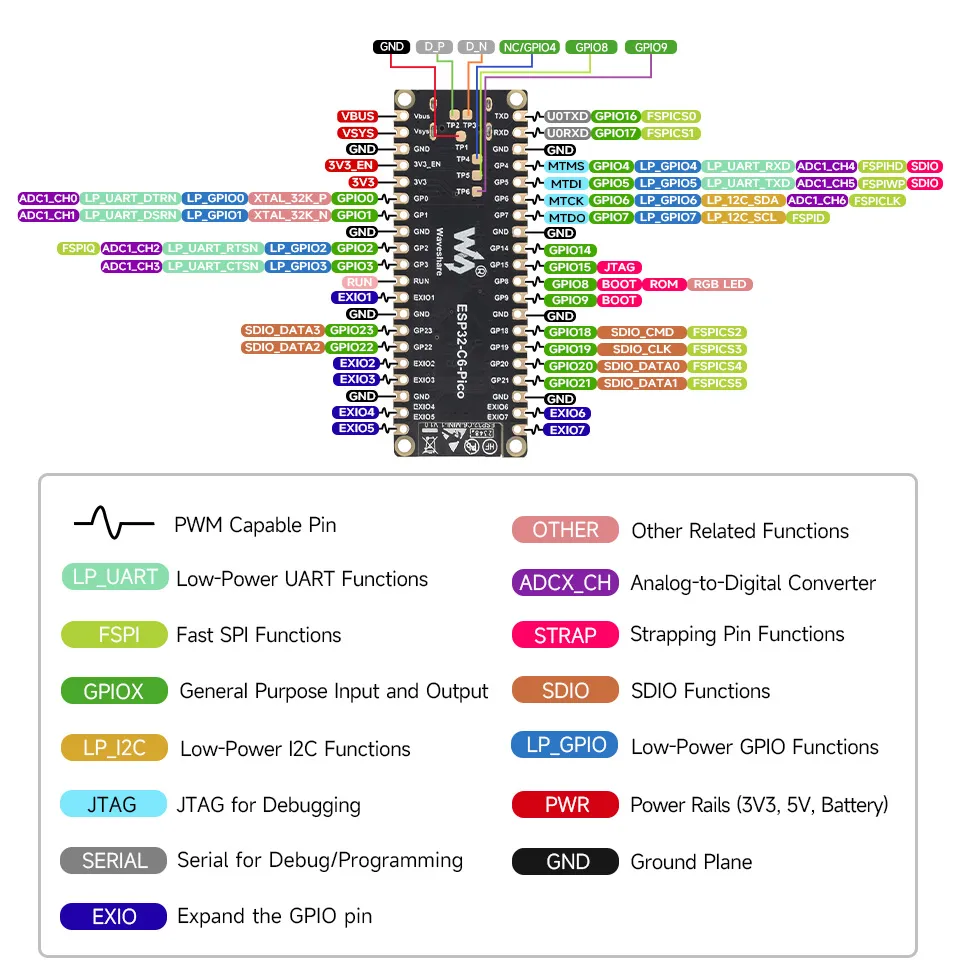
To ensure functional integrity, you must use the provided WS_TCA9554PWR file to configure GPIO22 (SDA) and GPIO23 (SCL) as I2C functions for GPIO expansion.
GPIO22 (SDA) and GPIO23 (SCL) are already used by the TCA9554PWR. Only I2C slave devices may be connected to these pins; do not use these pins for any other functions.
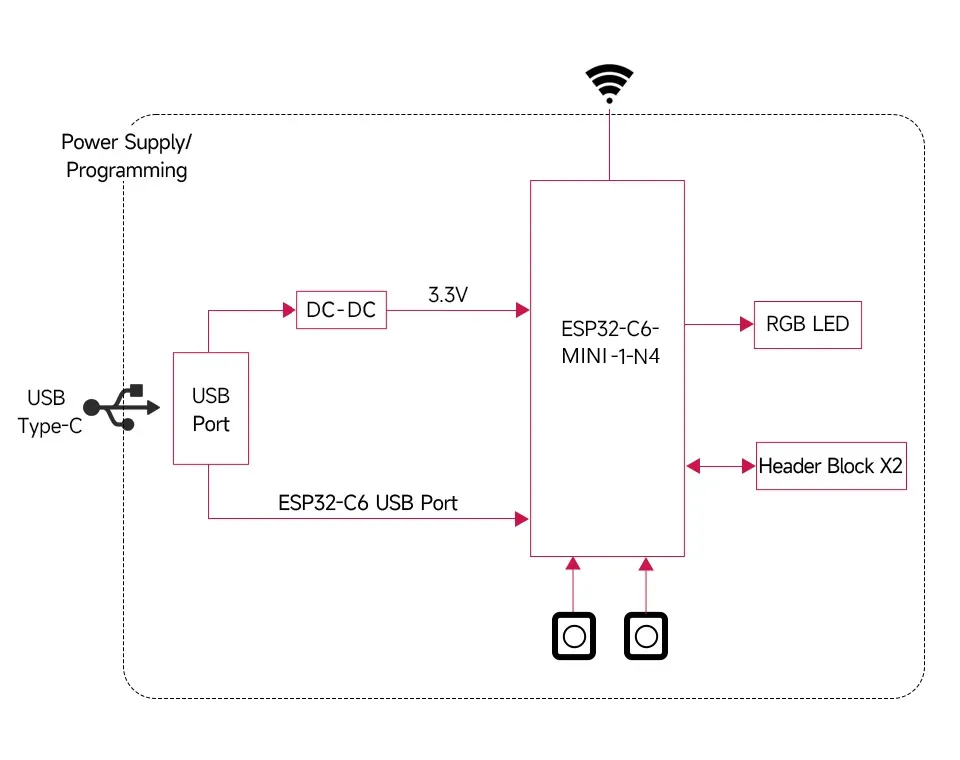
Functional Block Diagram
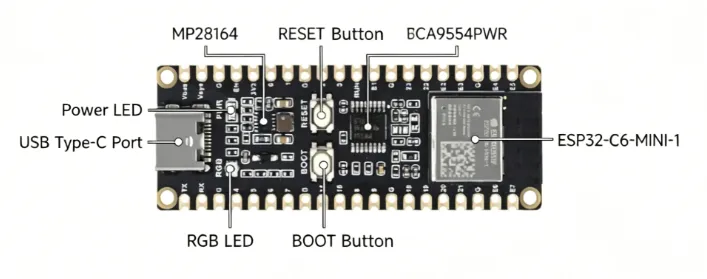
Resource Interfaces
Pinout Definition
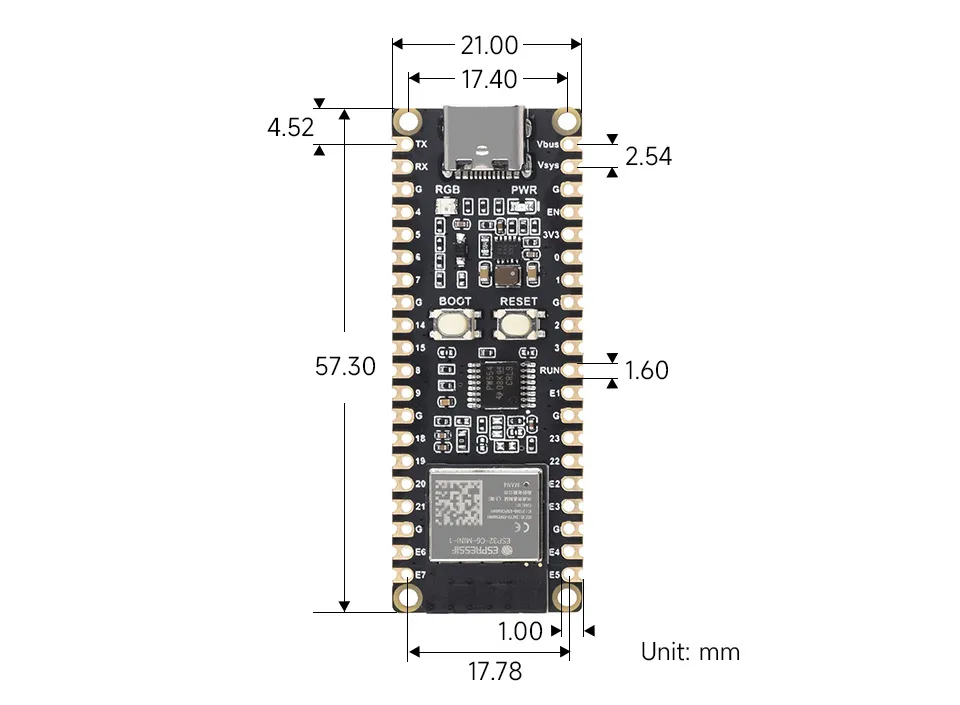
Dimensions
TCA9554PWR Function Description
To use EXIO1 ~ EXIO7, you must include the corresponding library files (add the TCA9554PWR library in VSCode, add the TCA9554PWR library in Arduino IDE).
| Function | Function Name | Function Parameters | Description |
|---|---|---|---|
| Initialize TCA9554PWR | TCA9554PWR_Init | uint8_t PinState | Initialize all pins of TCA9554PWR with PinState as the mode |
| Register operation | Read_REG | uint8_t REG | Read the value from the REG register of TCA9554PWR |
| Register operation | Write_REG | uint8_t REG, uint8_t Data | Write Data to the REG register of TCA9554PWR |
| Initialize EXIO mode | Mode_EXIO | uint8_t Pin, uint8_t State | Set the mode of a specific Pin of TCA9554PWR |
| Initialize EXIO mode | Mode_EXIOS | uint8_t PinState | Set the mode of all pins of TCA9554PWR |
| Read EXIO level | Read_EXIO | uint8_t Pin | Read the input level of a specific Pin of TCA9554PWR |
| Read EXIO level | Read_EXIOS | void | Read the input levels of all pins of TCA9554PWR |
| Set EXIO output level | Set_EXIO | uint8_t Pin, uint8_t State | Set the output level of a specific Pin of TCA9554PWR |
| Set EXIO output level | Set_EXIOS | int8_t PinState | Set the output levels of all pins of TCA9554PWR |
| Toggle EXIO output level | Set_Toggle | uint8_t Pin | Toggle the output level of a specific Pin of TCA9554PWR |
Development Methods
The ESP32-C6-Pico supports both the Arduino IDE and ESP-IDF development frameworks, giving developers flexible options. You can choose the development tool that best suits your project needs and personal preferences.
Arduino generally offers a gentler learning curve and may be more approachable for beginners and hobbyists. ESP-IDF provides advanced tooling and finer control over system behavior, making it better suited to complex projects and applications with demanding performance requirements.
-
Arduino IDE is a convenient, flexible, and easy-to-use open-source electronics prototyping platform. It requires minimal foundational knowledge, allowing for rapid development after a short learning period. Arduino has a huge global user community, providing a vast amount of open-source code, project examples, and tutorials, as well as a rich library ecosystem that encapsulates complex functions, enabling developers to implement various features rapidly. You can refer to the Working with Arduino to complete the initial setup, and the tutorial also provides related example programs for reference.
-
ESP-IDF, short for Espressif IoT Development Framework, is a professional development framework launched by Espressif Systems for its ESP series of chips. It is based on C language development and includes compilers, debuggers, flashing tools, etc. It supports development via command line or integrated development environments (such as Visual Studio Code with the Espressif IDF plugin), which provides features like code navigation, project management, and debugging. We recommend using VS Code for development. For the specific configuration process, please refer to the Working with ESP-IDF. The tutorial also provides relevant example programs for reference.