ESP32-C6-Touch-LCD-1.83
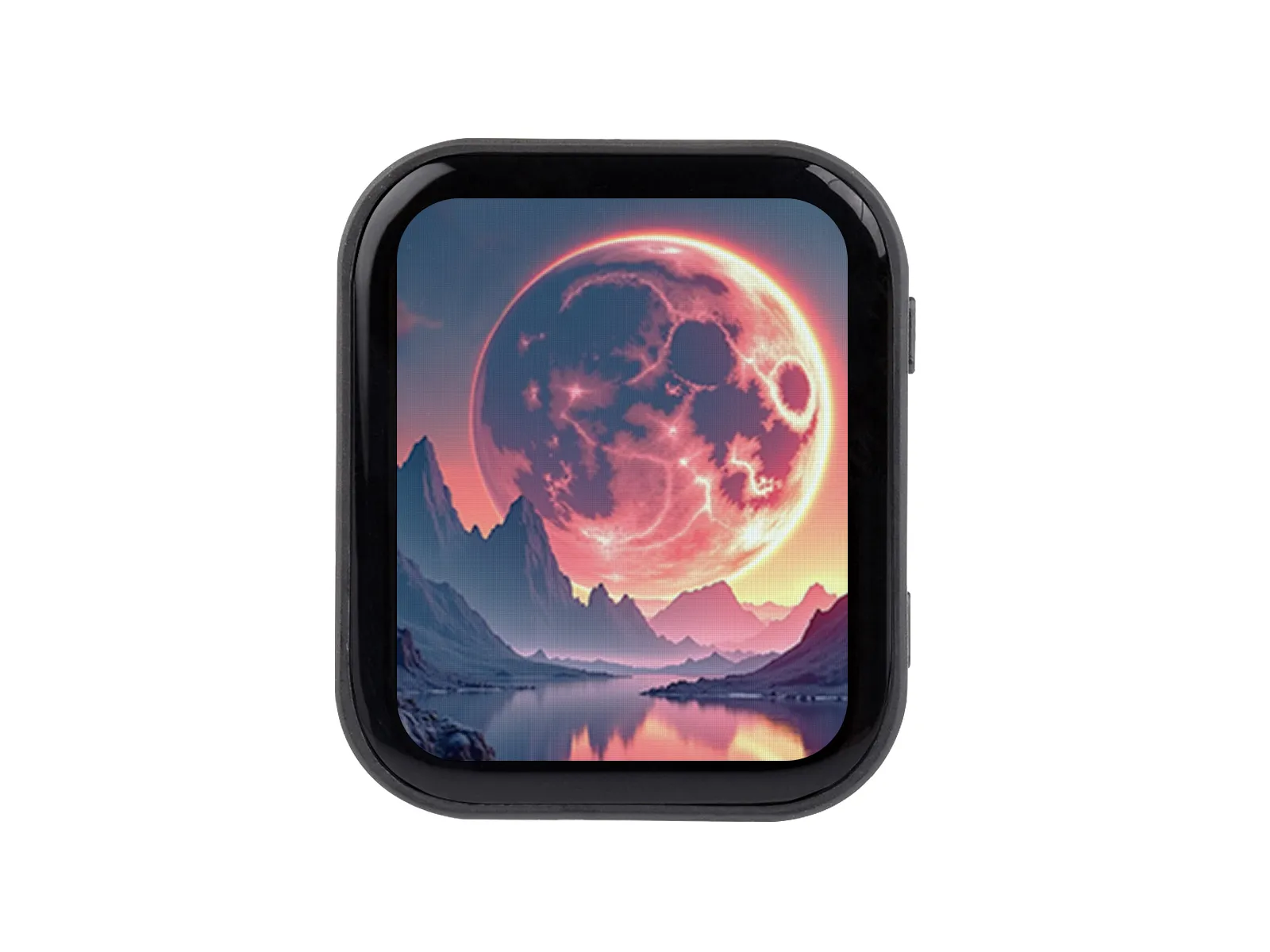
The ESP32-C6-Touch-LCD-1.83 is a low-cost, high-performance microcontroller development board designed by Waveshare. It features a tiny size with onboard 1.83inch capacitive LCD display, Lithium battery recharge chip, 6-axis IMU (3-axis accelerometer and 3-axis gyroscope), RTC chip, and so on, specifically designed for the prototype development and embedded applications.
| SKU | Product |
|---|---|
| 32793 | ESP32-C6-Touch-LCD-1.83 |
| 32794 | ESP32-C6-Touch-LCD-1.83-EN |
Features
- Powered by the ESP32-C6 high-performance RISC-V 32-bit single-core processor, with a main frequency of up to 160 MHz
- Supports 2.4 GHz Wi-Fi 6 (802.11 b/g/n/ax), Bluetooth® 5 (LE), and IEEE 802.15.4 (supports Thread and Zigbee protocols), with optional onboard PCB antenna or external antenna connector
- Built-in 512 KB SRAM, 320 KB ROM, and 16 KB low-power SRAM, with support for external Flash (typically 4MB, 8MB, or 16MB)
- Features a Type-C interface, enhancing user convenience and device compatibility
- Onboard 1.83inch capacitive touch screen with 240 × 284 resolution and 65K colors
- Embedded with ST7789P driver chip and CST816D capacitive touch chip, communicating through SPI and I2C interfaces respectively, minimizes required IO pins
- Onboard QMI8658 six-axis inertial measurement unit (3-axis accelerometer, 3-axis gyroscope) for motion posture detection, step counting, etc.
- Onboard PCF85063 RTC chip, powered by the AXP2101 with battery backup for uninterrupted operation
- Onboard PWR and BOOT side buttons, configurable for custom function development
- Onboard 3.7V 1.2mm lithium battery charging/discharging interface
- Exposes 1-ch I2C, 1-ch USB and 1-ch UART pads for external devices connection and debugging, enabling flexible peripheral configuration
- Onboard TF card slot supporting storage expansion and high-speed data transfer, facilitating functions like data logging and media playback while simplifying circuit design
- The AXP2101 provides an efficient power management solution, supporting multiple configurable output voltages and integrating charging and battery management functions to help extend battery life
- Touch screen offers high transmittance, fast response, and long life
Onboard Resources
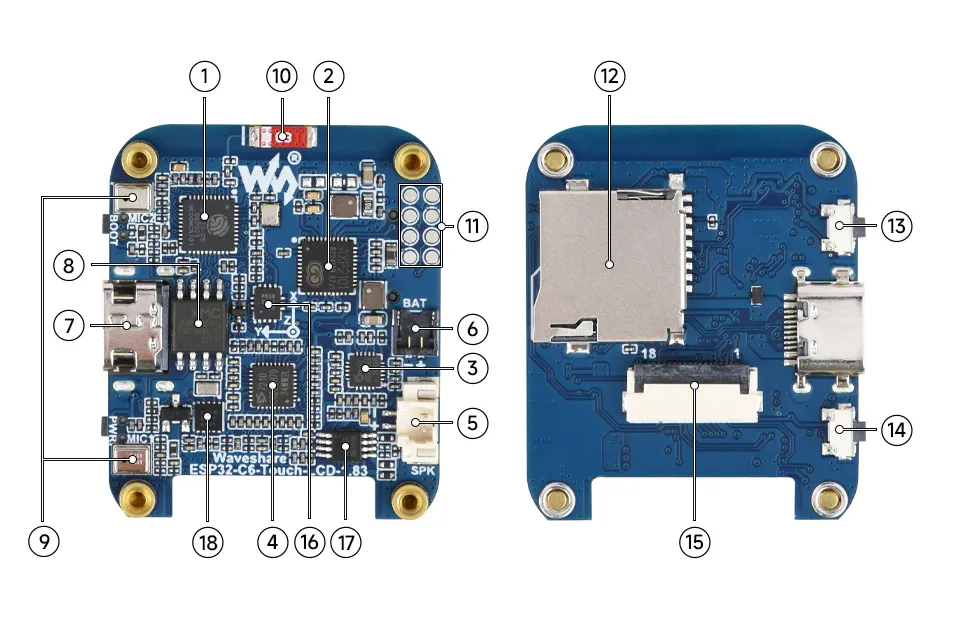
- ESP32-C6 supports Wi-Fi and Bluetooth SoC, operating at 160MHz
- AXP2101 Highly integrated power management chip
- ES8311 Low-power audio codec chip
- ES7210 ADC chip implements echo cancellation circuit
- MX1.25 Speaker Header Non-polarized
- 1.2mm Lithium battery header 1.2mm 2PIN connector for 3.7V Lithium battery, supports charging and discharging. The battery with 6 × 25 × 25 mm dimensions is recommended for installation inside the case.
- Type-C port USB port, for program flashing and log printing
- 16MB NOR-Flash for data storage
- Onboard Microphone Array Microphone input and echo cancellation
- Onboard Chip Antenna Supports 2.4GHz Wi-Fi (802.11 b/g/n) and Bluetooth 5 (LE)
- Reserved GPIO pads Adapting available I/O function pins for easy expansion
- TF Card Slot
- BOOT Button Used for device startup and functional debugging
- PWR button Long press for 6s to shut down, short press to power on, supports custom functions
- 1.83inch Display Panel Connector
- QMI8658 6-axis IMU includes a 3-axis gyroscope and a 3-axis accelerometer
- Speaker amplifier chip
- PCF85063 RTC clock chip
LCD and Its Controller
- The LCD uses the built‑in ST7789P controller, which is a 240 × RGB × 320 pixel LCD controller. The LCD itself has a resolution of 240(H) × RGB × 284(V), so the internal RAM of the LCD is not fully used.
- The LCD supports 12‑bit, 16‑bit, and 18‑bit per pixel input color formats, i.e., RGB444, RGB565, and RGB666. The examples use the RGB565 color format, which is the most common RGB format.
- The LCD uses a 4‑wire SPI interface, which saves GPIO pins and also provides high communication speed.
- The module resolution is 240(H) × RGB × 284(V), but because the four corners are rounded (see dimensions for details), some parts of an input image may not be displayed.
SPI Communication Protocol:
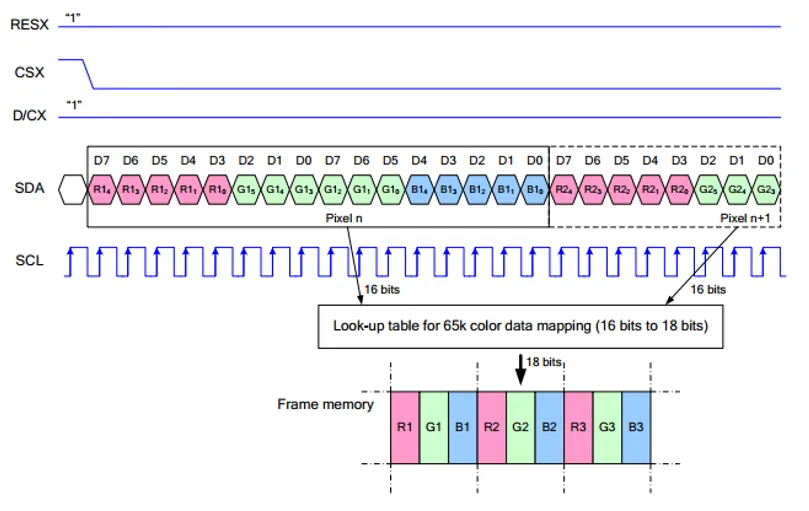
Note: The SPI interface here is specifically designed for screen display, therefore the data line from slave to master (MISO) is omitted.
-
RESX is the Reset pin; it is pulled low during module power-up and is normally set to 1.
-
CSX is the slave chip select pin; the chip is enabled only when CS is low
-
D/CX is the data/command control pin of the chip. When DC = 0, commands are written; when DC = 1, data is written.
-
SDA is the data transmission pin, specifically for RGB data.
-
SCL is the SPI communication clock pin.
For SPI communication, data transmission follows a specific timing sequence, which are determined by the combination of clock phase (CPHA) and clock polarity (CPOL):
-
The level of CPHA determines whether data is captured on the first or second clock transition edge of the serial synchronous clock. When CPHA = 0, data is captured on the first transition edge;
-
The level of CPOL determines the idle level of the serial synchronous clock. CPOL = 0 means the idle state is low level.
As can be seen from the diagram, data transmission begins at the first falling edge of SCL. One clock cycle transmits 1 bit of data, using SPI0 mode, transmitted bit by bit with the Most Significant Bit (MSB) first and the Least Significant Bit (LSB) last.
Touch and Its Controller
- This touch screen is equipped with CST816D self-capacitive touch control chip, supports the standard I2C communication protocol, and communication speed can be configured as 10Khz~400Khz.
Pinout Definition
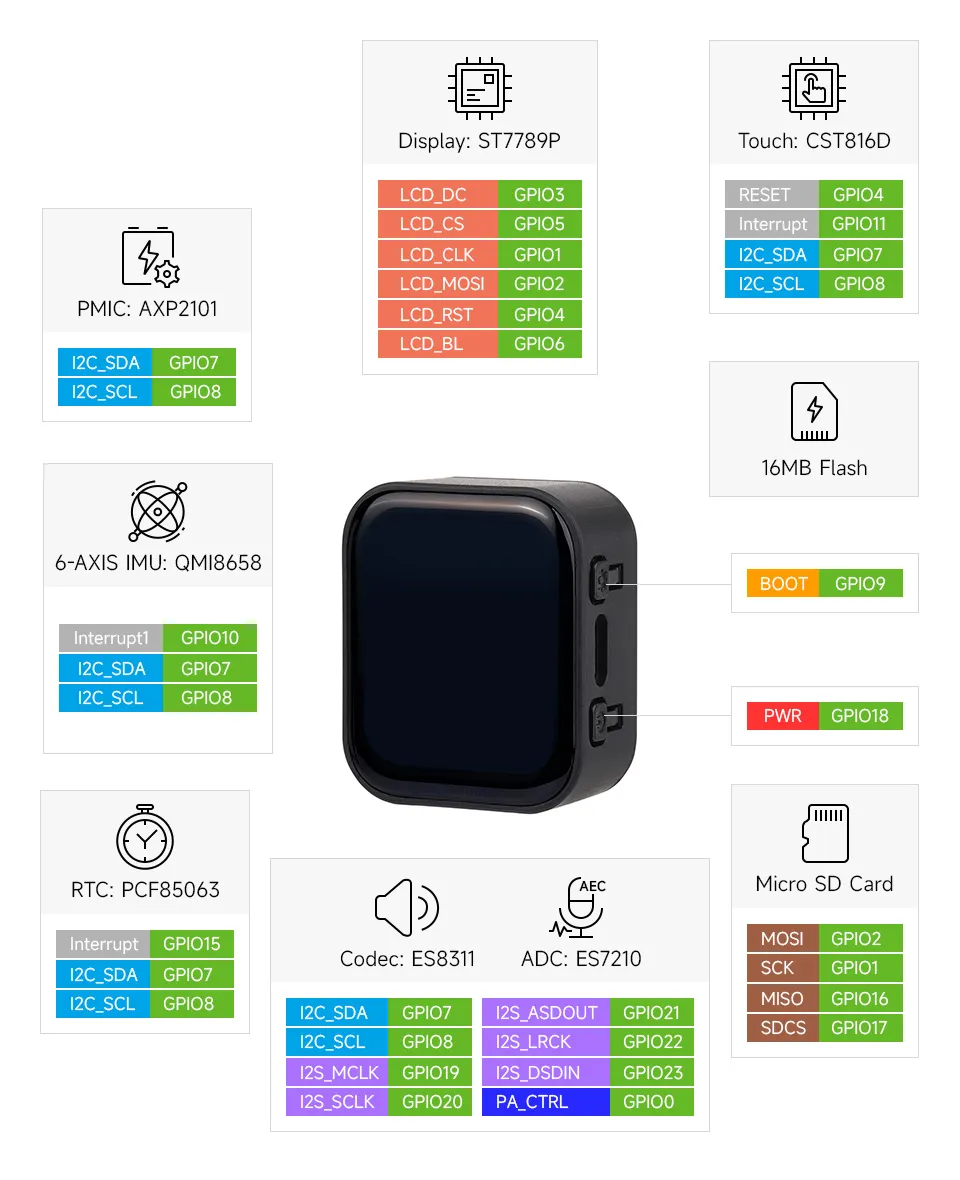
When using the GPIO pins reserved on the ESP32-C6-Touch-LCD-1.83 board, pay attention to the wire colors and corresponding functions to avoid burnout of the development board due to wiring habits
Dimensions
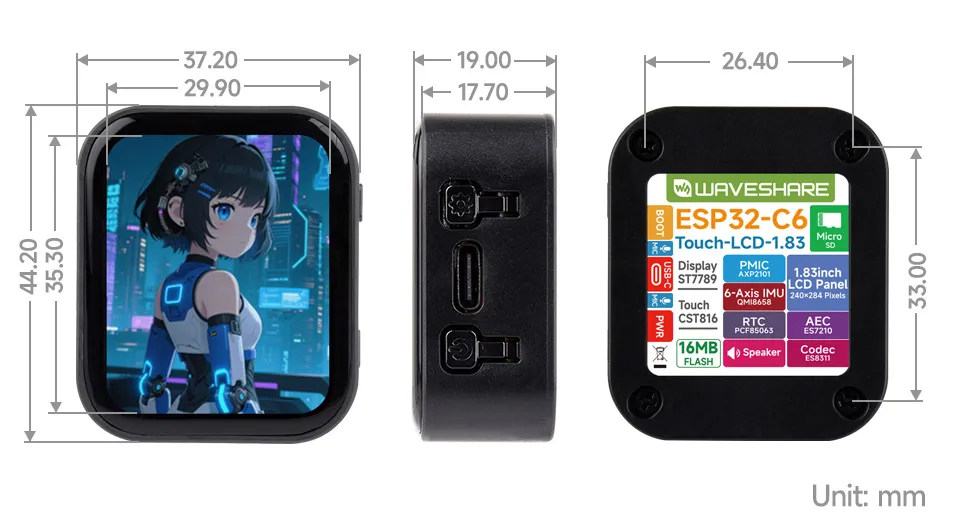
Development Methods
The ESP32-C6-Touch-LCD-1.83 supports both the Arduino IDE and ESP‑IDF development frameworks, giving developers flexible options. You can choose the development tool that best suits your project needs and personal preferences.
Both development methods have their own advantages. Developers can choose based on their needs and skill levels. Arduino is simple to learn and quick to start, suitable for beginners and non-professionals. ESP-IDF provides more advanced development tools and stronger control capabilities, suitable for developers with professional backgrounds or higher performance requirements, and is more appropriate for complex project development.
-
Arduino IDE is a convenient, flexible, and easy-to-use open-source electronics prototyping platform. It requires minimal foundational knowledge, allowing for rapid development after a short learning period. Arduino has a huge global user community, providing a vast amount of open-source code, project examples, and tutorials, as well as a rich library ecosystem that encapsulates complex functions, enabling developers to implement various features rapidly. You can refer to the Working with Arduino to complete the initial setup, and the tutorial also provides related example programs for reference.
-
ESP-IDF, short for Espressif IoT Development Framework, is a professional development framework launched by Espressif Systems for its ESP series of chips. It is based on C language development and includes compilers, debuggers, flashing tools, etc. It supports development via command line or integrated development environments (such as Visual Studio Code with the Espressif IDF plugin), which provides features like code navigation, project management, and debugging. We recommend using VS Code for development. For the specific configuration process, please refer to the Working with ESP-IDF. The tutorial also provides relevant example programs for reference.