FAQ
Q: What is the standby time when powered by the lithium battery?
- In low-power mode, waking up every 60 seconds, it can run for approximately 4 days.
- When continuously in low-power mode, it can run for approximately 10 days.
- In low-power mode, measured total board current is 1mA.
Q: What is the lithium battery charging time?
- It takes 30 minutes to charge to 4.1V.
- It takes 44 minutes to fully charge.
Q: The example program is successfully flashed but won't run?
- First, check if the example program version matches the product version.
Q: Error when compiling an Arduino program?
-
Check if the Arduino IDE -> Tools is properly configured.
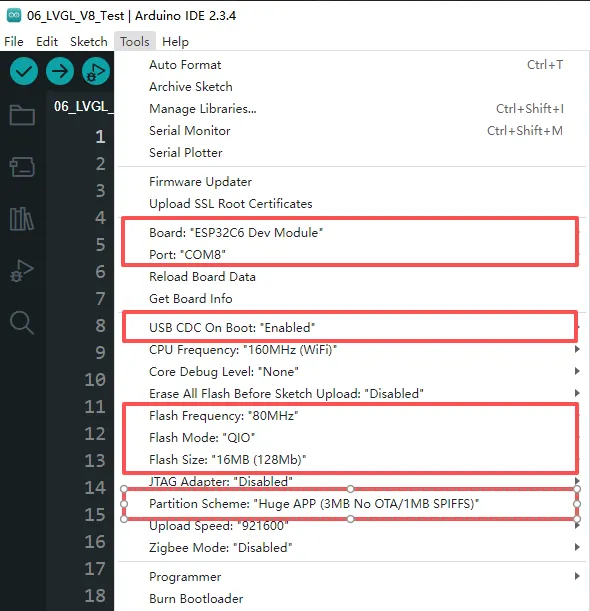
Q: After downloading a program to the module, when trying to download again, sometimes it fails to connect to the serial port or the flashing fails?
- You can press and hold the BOOT button to power on again, and the module can enter the download mode at this time, which can solve most of the problems that cannot be downloaded.
Q: Failed to set up the VSCode environment?
- First consider the network issue, try switching to another network.
Q: The first program compilation is extremely slow. How to handle it?
- It's normal for the first compilation to be slow, just wait patiently.
Q: What should I do if I can't find the AppData folder?
- Some AppData folders are hidden by default and can be set to be displayed.
- English System: File Explorer -> View -> Check "Hidden items".
- Chinese System: File Explorer -> View -> Display -> Check "Hidden Items".
Q: How can I check which COM port I am using?
Windows System:
- Through Device Manager: Press Windows + R to open the "Run" dialog box. Type
devmgmt.mscand press Enter to open Device Manager. Expand the "Ports (COM & LPT)" section. All COM ports and their current status will be listed here. - Using Command Prompt: Open the Command Prompt (CMD), enter the mode command, which will display status information for all COM ports.
- Check the hardware connection: If an external device is already connected to a COM port, the device typically occupies a port number. You can determine which port is being used by checking the connected hardware.
Linux System:
- Check using the
dmesgcommand: Open the terminal. - Check using the
lscommand: Typels /dev/ttyS*orls /dev/ttyUSB*to list all serial devices. - Use the
setserialcommand: Typesetserial -g /dev/ttyS*to view configuration information for all serial devices.
Q: How to use SquareLine Studio to design interfaces?
- Please refer to SquareLine Studio Tutorial.