Clock Tree
The core logic of this tutorial applies to all ESP32 boards, but all the operation steps are explained using the example of the Waveshare ESP32-S3-Zero mini development board. If you are using a development board of another model, please modify the corresponding settings according to the actual situation.
1. Clock Tree Overview
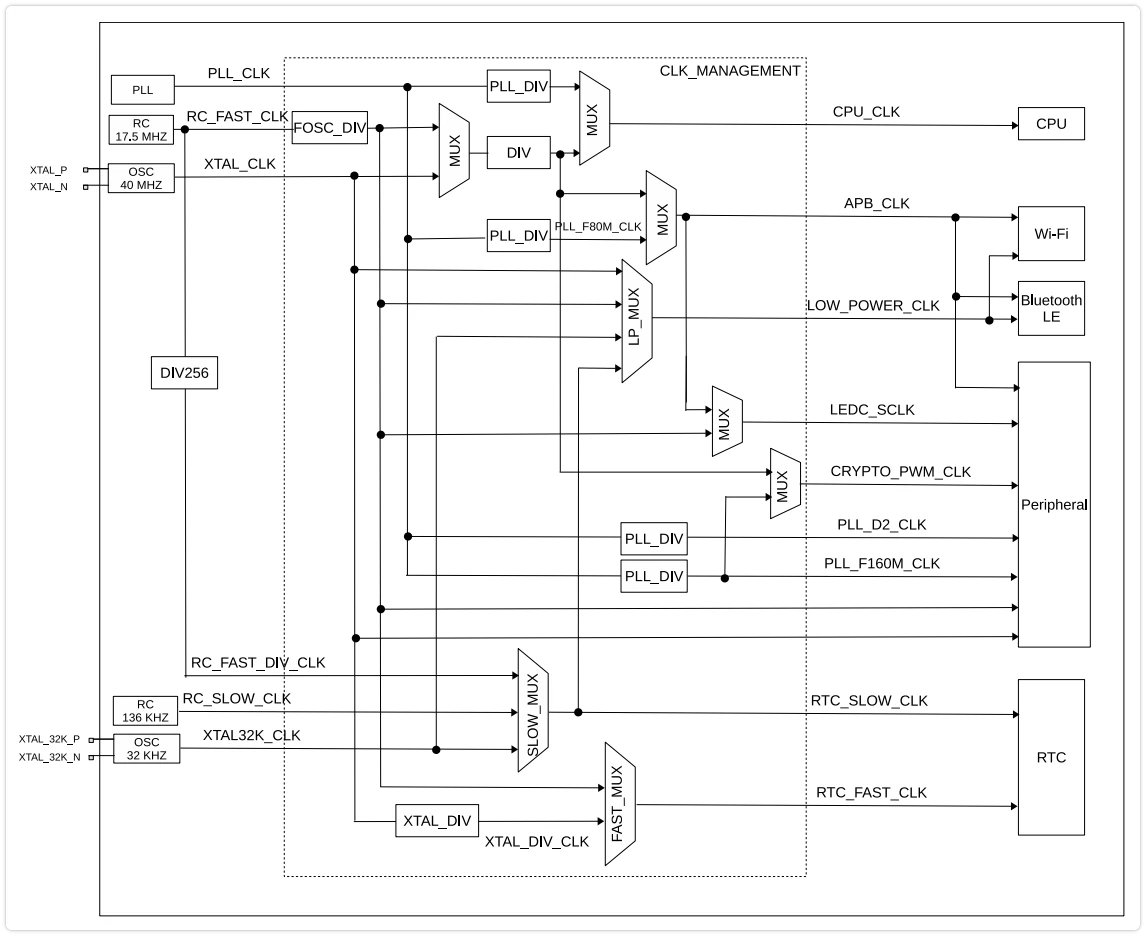
An SoC like the ESP32 does not rely on just a single crystal oscillator. Multiple clock sources (with different frequencies, accuracies, and power consumption) and multiple clock consumers (CPU, Wi-Fi, various peripherals, low-power modules) coexist inside the chip, connected through a clock tree: high-frequency clocks are divided down to produce lower-frequency clocks, and clock selectors can switch a given module to different clock sources.
Understanding the clock tree explains many everyday development phenomena — why the UART baud rate doesn't need adjustment after changing the CPU frequency from 240 MHz to 80 MHz; why the CPU cannot drop too low when Wi-Fi is active; why LEDC can continue outputting PWM in low-power mode when using RC_FAST as its clock source; and why the actual I2C frequency always deviates from the configured value. The root cause of all these behaviors lies in the connections between clock sources and clock dividers.
2. Root Clocks of ESP32-S3
Root clocks are the most upstream sources in the clock tree, directly generated by physical circuits (crystal oscillators / RC oscillators / PLLs). ESP32-S3 has 4 types of root clocks:
| Root Clock | Frequency | Source | Characteristics |
|---|---|---|---|
| XTAL | 40 MHz | External crystal | High accuracy (typical ±10 ppm), default CPU clock |
| PLL | 320 / 480 MHz | Internal PLL, multiplied from XTAL | High speed; must be enabled when Wi-Fi / BLE is active |
| RC_FAST | ~17.5 MHz | Internal RC oscillator | Available in low-power mode; poor accuracy, frequency drifts with temperature |
| XTAL32K | 32.768 kHz | External 32.768 kHz crystal (optional) | RTC clock source, maintains time accuracy during long sleep periods |
There is also RC_SLOW (~136 kHz, internal low-power RC), used for the RTC slow clock.
Root clocks are not directly usable by peripherals. They must pass through dividers, selectors, and gating stages to become the module clocks that actually drive the CPU and peripherals.
3. CPU Clock and APB Clock
CPU_CLK
The ESP32-S3's main CPU clock CPU_CLK can be switched among three root clock sources:
| CPU_CLK Source | CPU Frequency |
|---|---|
| XTAL | 40 MHz / 20 MHz / 10 MHz... (divided) |
| PLL | 80 MHz / 160 MHz / 240 MHz |
| RC_FAST | 17.5 MHz / lower (divided) |
Running at higher frequencies (160 MHz / 240 MHz) requires PLL as the clock source. ESP-IDF defaults to 160 MHz after application startup, controlled by CONFIG_ESP_DEFAULT_CPU_FREQ_MHZ.
APB_CLK
APB_CLK is the working clock for most digital peripherals. Its frequency is entirely determined by the CPU_CLK source:
| CPU_CLK Source | APB_CLK Frequency |
|---|---|
| PLL | 80 MHz (fixed, does not change with CPU frequency) |
| XTAL | = CPU_CLK |
| RC_FAST | = CPU_CLK |
Key point: When the CPU uses PLL as its clock source, regardless of whether the CPU frequency is 80, 160, or 240 MHz, APB_CLK always stays at 80 MHz. This is the fundamental reason why "adjusting CPU frequency doesn't affect peripheral baud rates" — peripherals depend on APB_CLK, not CPU_CLK.
Only when the CPU switches to XTAL or RC_FAST (which typically happens when dynamic frequency scaling drops to the lowest tier or when preparing to enter low-power mode) does APB_CLK drop to the same low frequency.
4. Peripheral Clock Source Selection
Different peripherals can select different clock sources, controlled by the driver's clk_source field:
| Peripheral | Available Clock Sources | Notes |
|---|---|---|
| UART | XTAL / APB / RC_FAST | Choosing XTAL keeps baud rate unaffected by CPU frequency changes |
| I2C | XTAL / RC_FAST | XTAL provides higher accuracy |
| SPI | XTAL / APB | High-speed SPI needs APB |
| LEDC | XTAL / APB / RC_FAST | RC_FAST enables PWM output to continue in low-power mode |
| RMT | XTAL / APB / RC_FAST | XTAL decouples resolution from CPU frequency |
| I2S | PLL_F160M / PLL_D2 / XTAL | Audio applications typically use PLL-derived clocks for precise division |
In ESP-IDF peripheral drivers, the clock source field is usually called clk_source. Passing ..._CLK_SRC_DEFAULT lets the driver select the most commonly used source (usually APB). The UART_SCLK_DEFAULT, I2C_CLK_SRC_DEFAULT, SPI_CLK_SRC_DEFAULT, etc. seen in example code all mean the same thing.
Two Effects of Clock Source on Peripherals
- Accuracy and stability: XTAL and PLL-derived clocks are high-accuracy and temperature-independent; RC_FAST has lower accuracy and its frequency drifts with temperature. Choose XTAL when precise baud rates or I2C frequencies are needed.
- Low-power interaction: In low-power modes like Light-sleep, PLL and APB_CLK are shut down. If a peripheral uses the APB clock source, it stops when entering sleep; peripherals using XTAL / RC_FAST may continue to operate (whether they actually can depends on the specific peripheral's support).
5. Configuration in menuconfig
The most commonly used clock-related configuration is the CPU frequency:
-
Click
 to open the SDK Configuration Editor. Search for "CPU frequency" and find Component config → ESP System Settings → CPU frequency: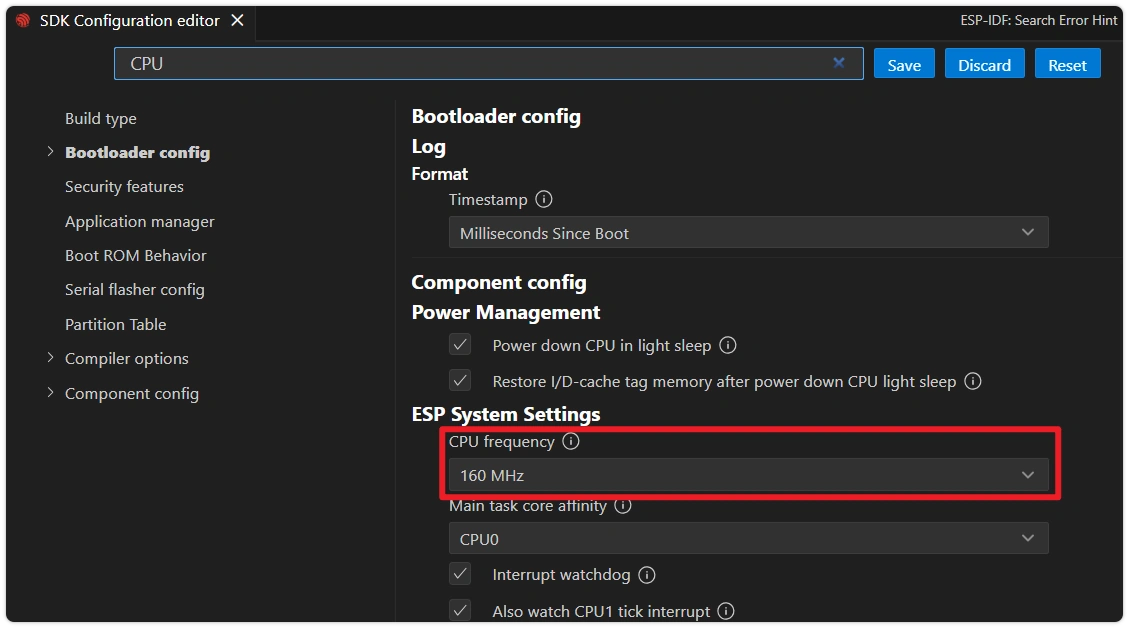
-
The dropdown menu offers
80 MHz / 160 MHz / 240 MHz. This option corresponds to the Kconfig optionCONFIG_ESP_DEFAULT_CPU_FREQ_MHZ, which determines the CPU frequency at application startup.
When power management is enabled (CONFIG_PM_ENABLE), the CPU frequency dynamically switches between the configured maximum and minimum values, controlled by "power management locks" held by various drivers. See ESP-IDF Programming Guide - Power Management for details.
Peripheral clock sources are generally not changed in menuconfig — they are specified via the clk_source field in the initialization struct. Some components expose Kconfig options (e.g., CONFIG_RMT_ENABLE_DEBUG_LOG), but the clock source itself is typically controlled by code.
6. Querying Actual Values at Runtime
If you need to confirm the current actual frequency of a module clock at runtime (e.g., for timing calculations), you can call:
#include "esp_clk_tree.h"

uint32_t freq_hz = 0;
esp_clk_tree_src_get_freq_hz(
    SOC_MOD_CLK_APB,                            // Module clock to query
    ESP_CLK_TREE_SRC_FREQ_PRECISION_CACHED,     // Precision level (cached/calibrated)
    &freq_hz);
The soc_module_clk_t enum contains all queryable module clocks. The calibrated precision mode triggers an internal measurement, suitable for scenarios sensitive to runtime frequency drift, but with slightly higher overhead.
7. Reference Links
- ESP-IDF Programming Guide - ESP32-S3 Clock Tree — Complete root clock and module clock enumerations
- ESP-IDF Programming Guide - Power Management — Dynamic frequency scaling and Light-sleep configuration
- Espressif Hardware Design Guidelines - Clock Sources — Selection and layout of external 40 MHz and 32.768 kHz crystals