Partition Table
The core logic of this tutorial applies to all ESP32 boards, but all the operation steps are explained using the example of the Waveshare ESP32-S3-Zero mini development board. If you are using a development board of another model, please modify the corresponding settings according to the actual situation.
1. What is a Partition Table
The external Flash of an ESP32 typically contains multiple regions with different purposes: bootloader, application code (app), Wi-Fi calibration data (phy_init), key-value storage (nvs), (optional) OTA upgrade backups, etc. The positions and sizes of these regions are described by a data structure called the partition table.
The partition table occupies a 4 KB sector in Flash. On ESP32-S3, it is flashed at offset address 0x8000 by default. At system startup, the bootloader first reads the partition table to determine the location of each partition, then jumps to the app partition to execute the code.
Each partition is described by the following fields:
| Field | Description |
|---|---|
| Name | Partition name (max 16 bytes, for identification) |
| Type | Partition type: app (program) or data |
| SubType | Sub-type: e.g., factory / ota_0 / nvs / phy |
| Offset | Offset address in Flash |
| Size | Partition size (bytes, supports K and M suffixes) |
| Flags | Optional flags, such as encrypted |
2. Default Partition Tables
ESP-IDF comes with several predefined partition tables. New projects use the simplest one by default — "Single factory app, no OTA":
# ESP-IDF Partition Table
# Name,   Type, SubType, Offset,  Size,   Flags
nvs,      data, nvs,     0x9000,  0x6000,
phy_init, data, phy,     0xf000,  0x1000,
factory,  app,  factory, 0x10000, 1M,
What it means:
nvs(24 KB, starting at 0x9000): Key-value storage for Wi-Fi configuration, user parameters, etc.phy_init(4 KB, starting at 0xf000): RF calibration data.factory(1 MB, starting at 0x10000): Your application code. The bootloader executes the program in this partition by default.
This table is suitable for 2 MB or larger Flash without OTA, covering the vast majority of learning projects.
Another commonly used predefined table is "Factory app, two OTA definitions":
# Name,   Type, SubType, Offset,   Size,
nvs,      data, nvs,     0x9000,   0x4000,
otadata,  data, ota,     0xd000,   0x2000,
phy_init, data, phy,     0xf000,   0x1000,
factory,  app,  factory, 0x10000,  1M,
ota_0,    app,  ota_0,   0x110000, 1M,
ota_1,    app,  ota_1,   0x210000, 1M,
Compared to the previous table, it adds:
otadata(8 KB): Records "which OTA partition is currently running."ota_0andota_1(1 MB each): Two OTA application backups. During an upgrade, the new firmware is written to the idle partition, and the next boot runs from the new partition; on failure, it can roll back to the other one.
This table requires approximately 3.2 MB total — Flash must be at least 4 MB.
3. Switching Partition Tables
-
Click
 to open the SDK Configuration Editor. Select Partition Table from the left panel: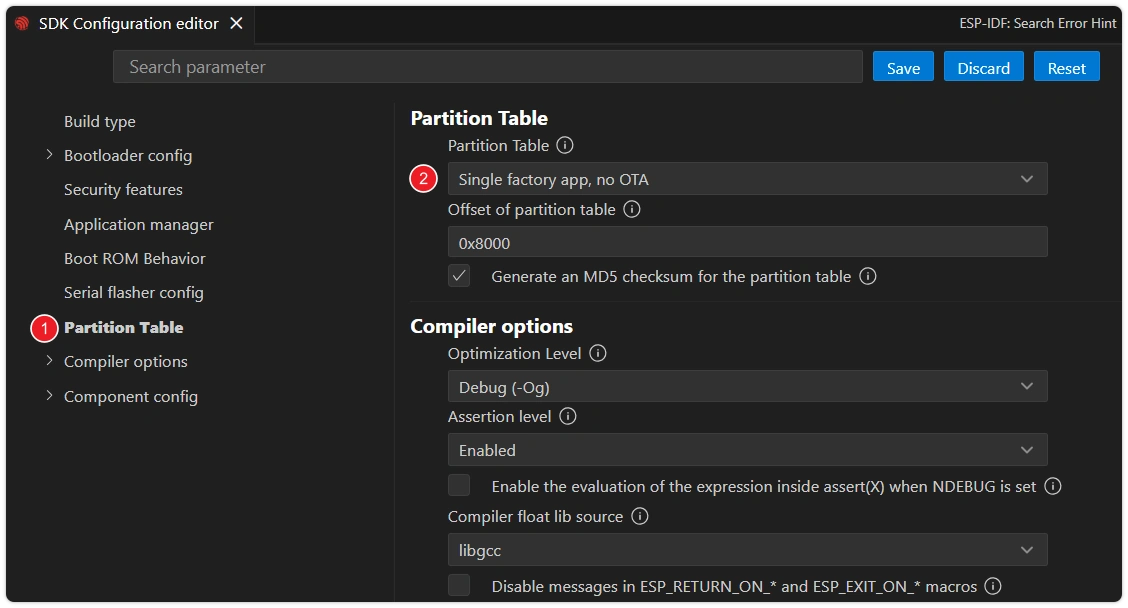
-
The Partition Table dropdown on the right includes:
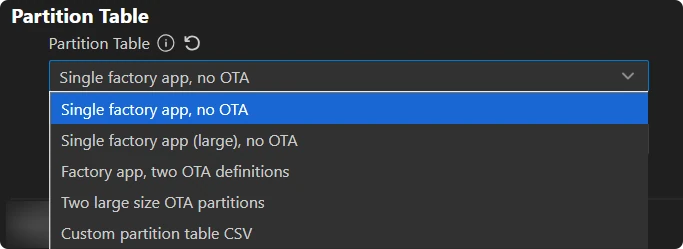
Single factory app, no OTA(default)Single factory app (large), no OTA(app region expanded to 1.5 MB)Factory app, two OTA definitions(OTA enabled)Two large size OTA partitions(no factory, only two 1700 KB OTA regions)Custom partition table CSV(custom, see next section)
-
After selecting, click the "Save" button. The next build will regenerate the binary according to the new partition table, which will be written during flashing.
noteAfter switching partition tables, the relevant Flash sectors may need to be fully erased (
idf.py erase-flashthenidf.py flash). Otherwise, remnants of the old partition table may prevent the bootloader from finding the new partitions.
4. Custom Partition Table
When none of the predefined tables are sufficient (e.g., application > 1.5 MB, need to mount a SPIFFS / LittleFS filesystem on Flash, want to reserve a custom data region, etc.), you can write your own CSV.
Steps:
-
Create a
partitions.csvfile in the project root directory, following the predefined table format. For example, expanding the app region to 2 MB and reserving 1 MB for SPIFFS:# Name, Type, SubType, Offset, Size, Flagsnvs, data, nvs, 0x9000, 0x6000,phy_init, data, phy, 0xf000, 0x1000,factory, app, factory, 0x10000, 2M,storage, data, spiffs, , 1M,When
Offsetis left blank, the tool automatically calculates and aligns it. -
In the SDK Configuration Editor, open Partition Table, change the Partition Table dropdown to
Custom partition table CSV, and fill inpartitions.csv(relative to the project root) in the Custom partition CSV file path field below.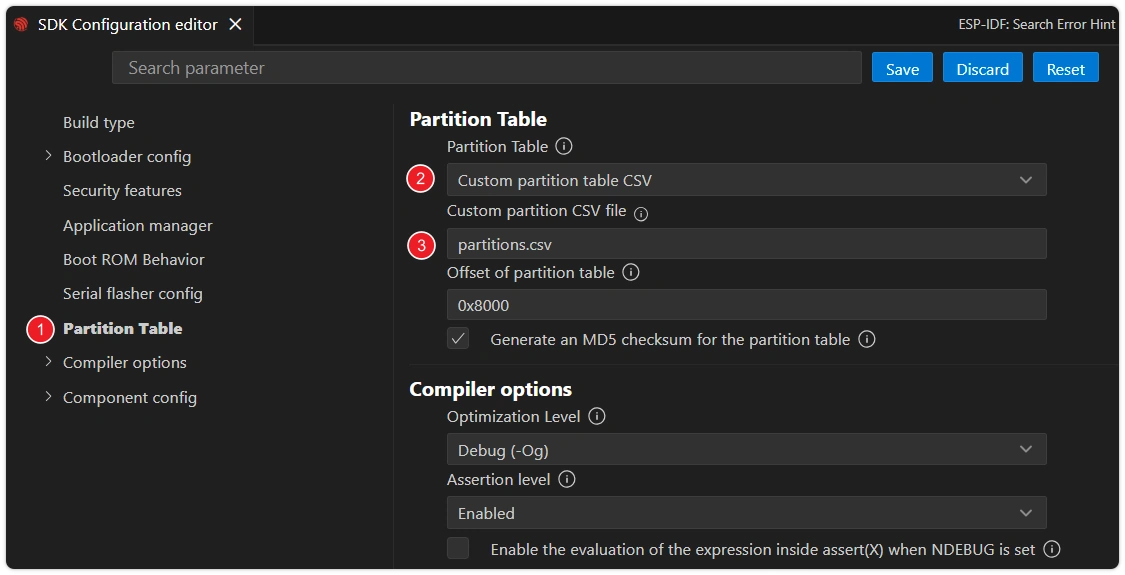
-
Check Flash size: In the SDK Configuration Editor, select Serial flasher config on the left and set Flash size to a capacity no less than the total of all partitions, without exceeding the actual Flash capacity of the development board (ESP32-S3-Zero has 4 MB onboard Flash, so select
4 MB). Then click the "Save" button.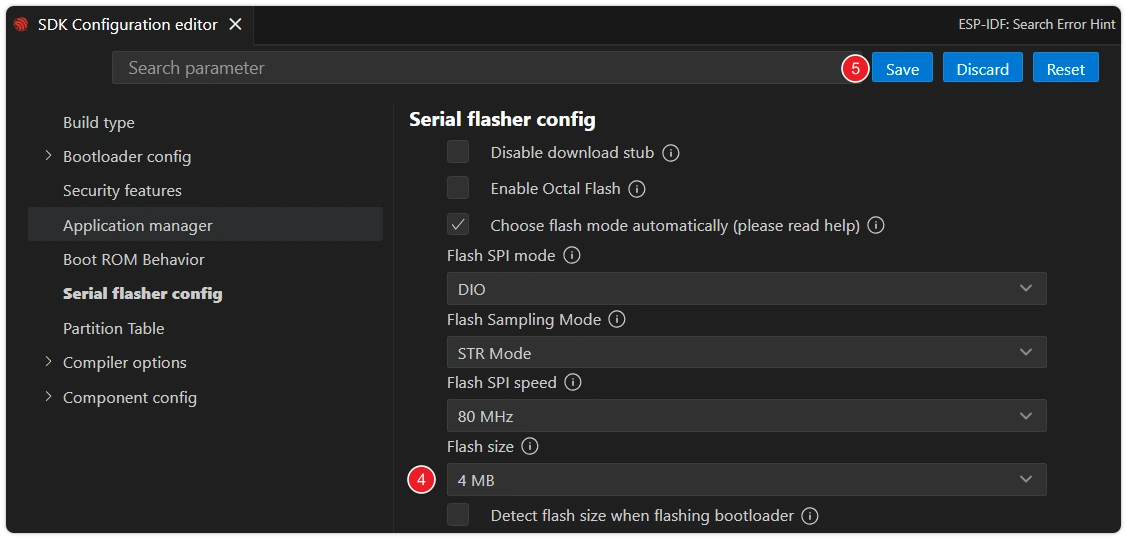
-
Build and flash. Open the ESP-IDF terminal and run
idf.py partition-tableto print the current active partition table and verify it.*******************************************# ESP-IDF Partition Table# Name, Type, SubType, Offset, Size, Flagsnvs,data,nvs,0x9000,24K,phy_init,data,phy,0xf000,4K,factory,app,factory,0x10000,2M,storage,data,spiffs,0x210000,1M,*******************************************
5. Common Scenarios
| Scenario | Solution |
|---|---|
| Application doesn't fit in the default 1 MB partition | Switch to "Single factory app (large)" or customize the table to expand factory |
| Need over-the-air (OTA) updates | Switch to "Factory app, two OTA definitions" and configure Flash to ≥ 4 MB |
| Want to mount a filesystem on Flash | Custom CSV — add a data partition with spiffs or fat sub-type |
| Occasional "partition not found" on boot | Forgot to idf.py erase-flash after switching partition tables; erase and reflash |
6. Reference Links
- ESP-IDF Programming Guide - Partition Tables — Field semantics, all predefined table comparisons, encrypted NVS variants
- ESP-IDF Programming Guide - OTA — APIs used with OTA partitions
esp_partitionAPI — Finding partitions by name/type in code, reading/writing Flash sectors