FAQ
Q: Which example repository does ESP32-P4-Core-DEV-KIT use?
A: It uses the ESP32-P4 Platform example repository. The examples/esp-idf/ directory in that repository includes ESP32-P4-Core-DEV-KIT in its compatibility matrix.
Q: Why are some Platform examples marked as unsupported on the ESP32-P4-Core-DEV-KIT?
A: In the current Platform matrix, ESP32-P4-Core-DEV-KIT does not cover SDMMC, Wi-Fi, Ethernet, I2S Codec, eth2ap, or simple_video_server. These examples depend on the corresponding peripheral paths. To verify them, you'll need external hardware and must modify menuconfig and example code according to the schematic.
Q: Which displays are supported by the development board?
A: First check the component documentation for compatible display types: esp32_p4_platform
If you need to adapt other displays or have questions about specific display support, you can reach out through Waveshare's official after-sales support or submit an issue at:
Q: How to check the ESP32-P4 chip version?
A: You can use Espressif's official Flash Download Tool to read the ESP32-P4 chip version. On a Windows PC, connect the ESP32-P4 download interface following the product hardware wiring to put the ESP32-P4 into download mode, and close the serial monitor occupying the corresponding port.
- Download and extract Espressif Flash Download Tool.
- Run the extracted
.exefile. Select "ESP32-P4" for "ChipType". Choose the remaining options according to your actual download interface, then click "OK".
- Switch to the "chipInfoDump" tab. In the "Device" section, select the port number corresponding to the ESP32-P4 under "port", and set "baudrate" to
115200.COM9shown in the figure is only an example; use the port recognized by your PC. - Click "Chip Info". Check the log below for
Chip is ESP32-P4 (revision vX.X). The value afterrevisionis the chip version. The figure showsv3.2as the read result; your actual version depends on the device reading.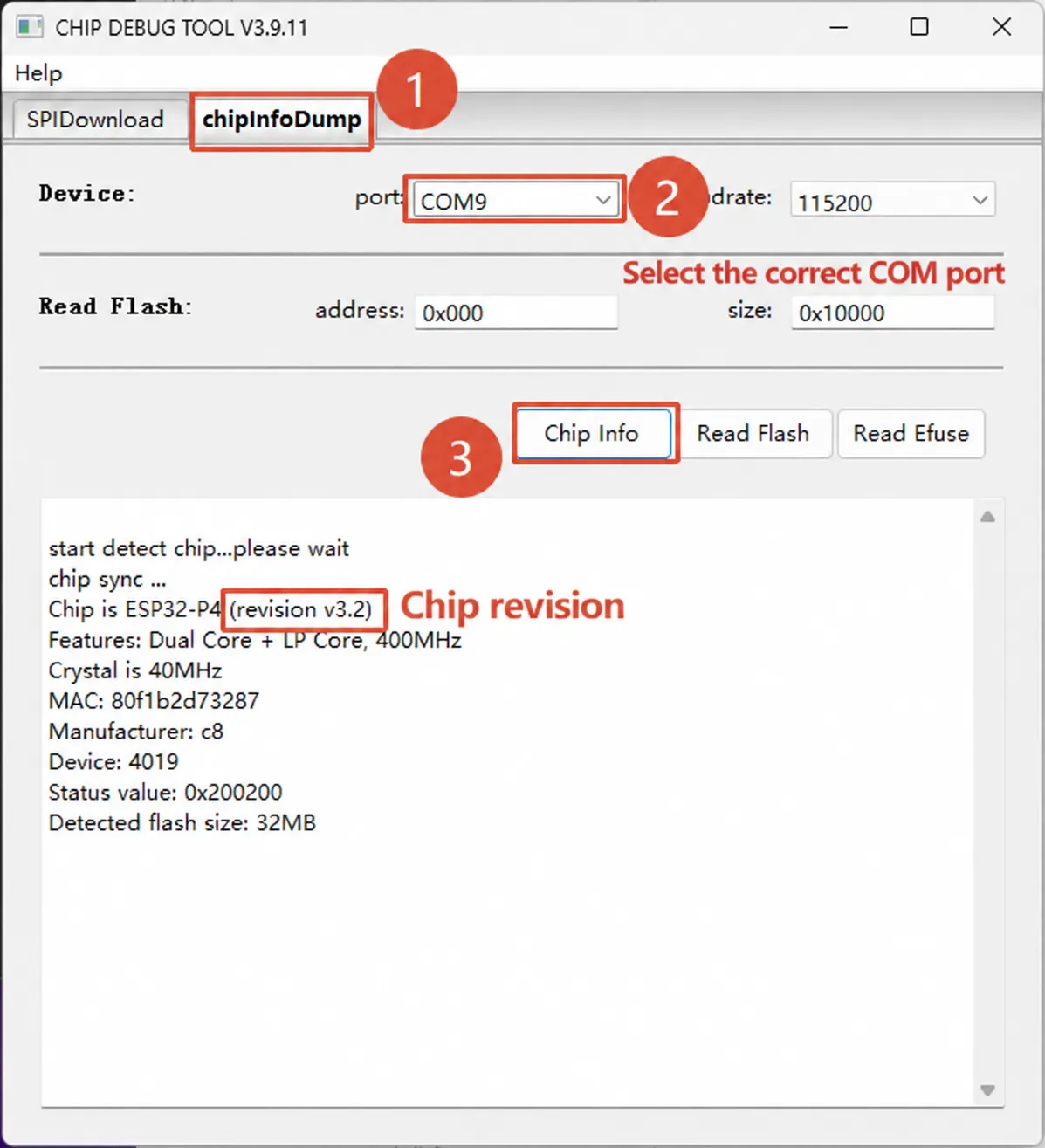
For tool operation instructions, see Espressif Flash Download Tool User Guide.
The ESP32-P4 Platform examples provide build configurations for chips rev v3.0 and later, rev v3.1 and later, and engineering samples of rev v0.x / v1.x. Confirm that the firmware configuration matches your actual chip version before flashing.
Q: Which ESP-IDF version is recommended for the ESP32-P4?
A: The ESP32-P4 Platform examples target ESP-IDF release/v5.4 and later. ESP-IDF v5.5.4 is recommended. Some advanced UI examples may retain compatibility notes for release/v5.3 — check the example directory README for specifics.
Q: I get a chip revision mismatch error when flashing. How do I fix it?
A: This message means the firmware's ESP32-P4 chip revision configuration doesn't match the chip on your board. Do not use --force to skip the check — rebuild with the correct chip revision instead.
The ESP32-P4 Platform repository provides shared configuration files:
- rev v3.1 or later:
config/esp32p4_rev_v3_1.defaults - rev v3.0 or later:
config/esp32p4_rev_v3_0.defaults - rev v0.x / v1.x engineering sample:
config/esp32p4_rev_pre_v3.defaults
Specify the matching config in the example directory via SDKCONFIG_DEFAULTS. See the detailed instructions under ESP-IDF examples.
Q: What is the maximum camera resolution supported by ESP32-P4?
A: 2 MP (200W). The ESP32-P4 integrates an ISP and an H.264 encoder. Raw data captured by the camera is processed by the ISP and then compressed into H.264 format by the hardware encoder. The H.264 encoder's maximum encoding capability is 1080p@30fps, so the ESP32-P4 supports cameras up to 2 MP.