FAQ
Q: How do I check my ESP32-P4 chip version?
A: You can use Espressif's official Flash Download Tool to read the ESP32-P4 chip version. On a Windows computer, connect the module through the baseboard's download interface, put the device into download mode, and close any serial monitor that is occupying the corresponding port.
-
Download and extract the Espressif Flash Download Tool.
-
Run the extracted
.exefile, and select "ESP32-P4" in "ChipType". Select the other options according to the actual download interface, and then click "OK".
-
Switch to the "chipInfoDump" tab, select the port number corresponding to the ESP32-P4 in the "port" field of the "Device" area, and set "baudrate" to
115200.COM9in the figure is only an example; please use the port actually recognized by your computer. -
Click "Chip Info" and check the log below for
Chip is ESP32-P4 (revision vX.X); the value afterrevisionis the chip version. The figure showsv3.2; the actual version is subject to the reading result of your device.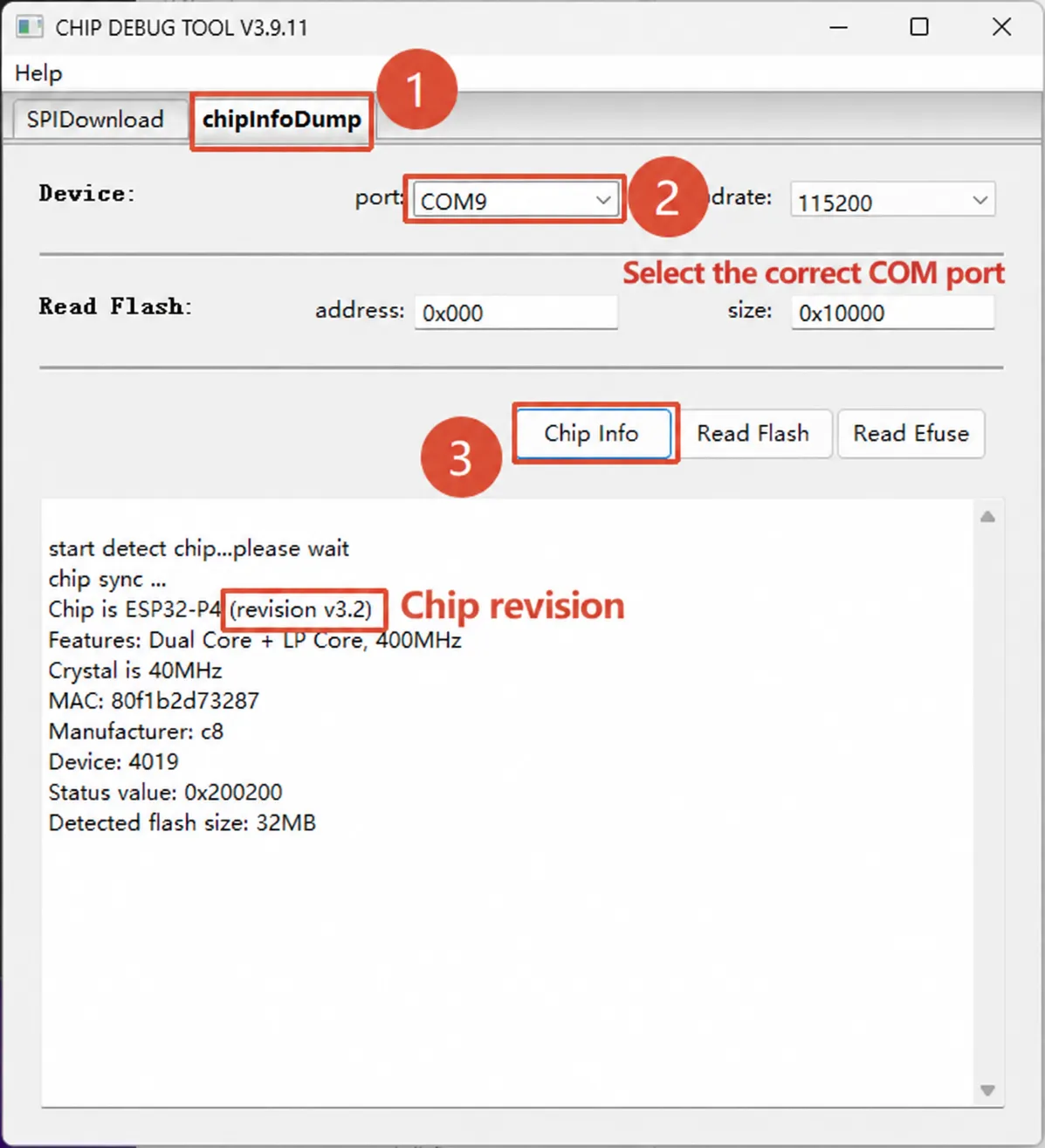
For tool operation instructions, see the Espressif Flash Download Tool User Guide.