FAQ
Q: How does the ESP32-P4-NANO-WIFI6-DB provide Wi-Fi and Bluetooth?
A: The board features an onboard ESP32-C5-MINI-1U wireless module, which provides 2.4 GHz / 5 GHz dual-band Wi-Fi 6 and Bluetooth 5 (LE) via an external antenna. The companion firmware and communication configuration between the ESP32-P4 and ESP32-C5 are subject to the official example documentation.
Q: Which kits include the PoE module?
A: Kits B, C, and D include the PoE module; the basic version and Kit A do not include it. Before using PoE power, please also prepare compatible PoE power sourcing equipment and verify that the power connection meets the requirements in the product documentation.
Q: Which kits include the 10.1inch DSI touchscreen?
A: Only Kit D includes the 10.1inch DSI touchscreen. The screen has a resolution of 800 × 1280 and uses a MIPI-DSI interface; other kits require a separately prepared compatible display.
Q: How to check the ESP32-P4 chip version?
A: You can use Espressif's official Flash Download Tool to read the ESP32-P4 chip version. On a Windows PC, connect the ESP32-P4 download interface following the product hardware wiring to put the ESP32-P4 into download mode, and close the serial monitor occupying the corresponding port.
- Download and extract Espressif Flash Download Tool.
- Run the extracted
.exefile. Select "ESP32-P4" for "ChipType". Choose the remaining options according to your actual download interface, then click "OK".
- Switch to the "chipInfoDump" tab. In the "Device" section, select the port number corresponding to the ESP32-P4 under "port", and set "baudrate" to
115200.COM9shown in the figure is only an example; use the port recognized by your PC. - Click "Chip Info". Check the log below for
Chip is ESP32-P4 (revision vX.X). The value afterrevisionis the chip version. The figure showsv3.2as the read result; your actual version depends on the device reading.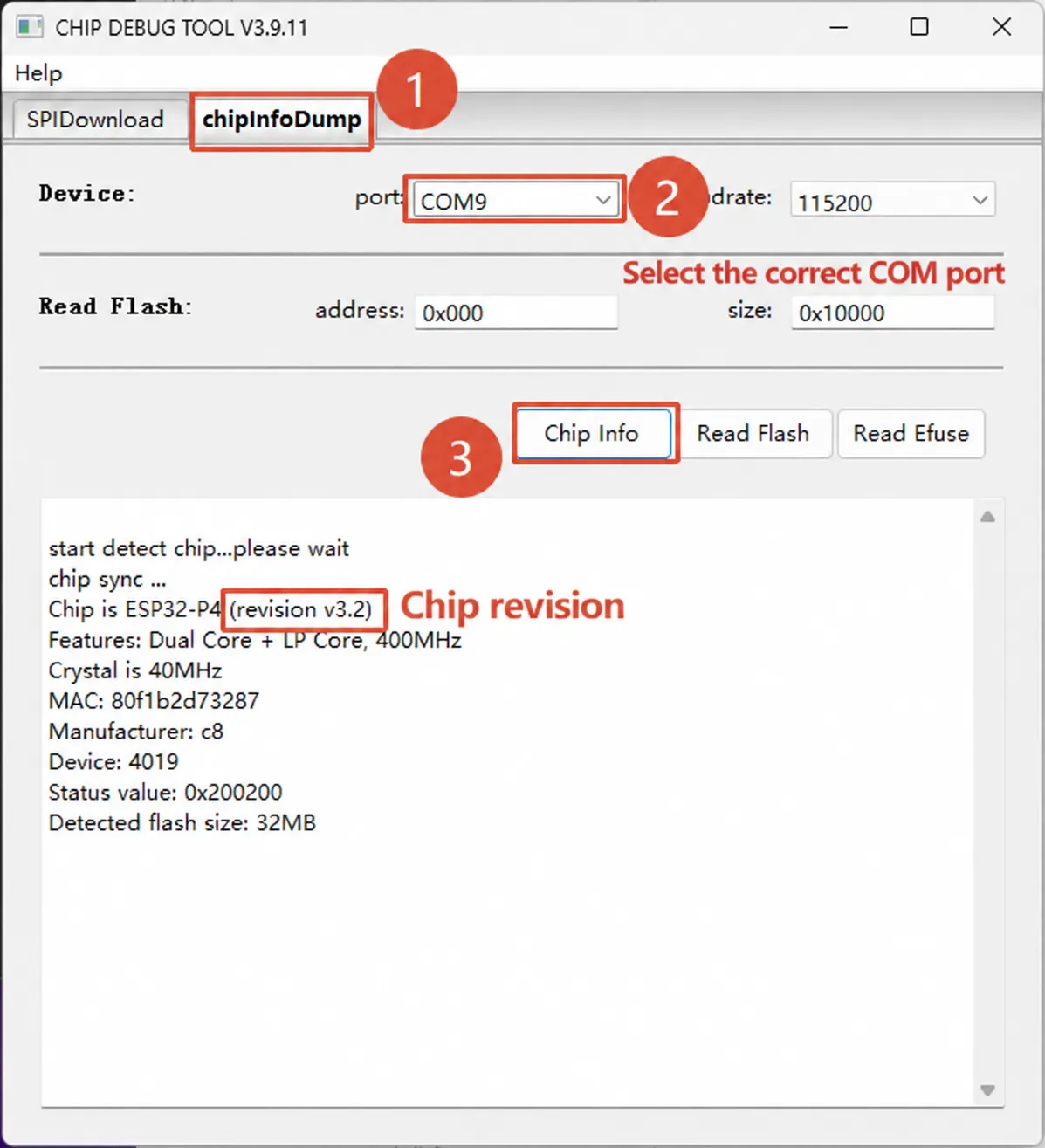
For tool operation instructions, see Espressif Flash Download Tool User Guide.
The ESP32-P4 Platform examples provide build configurations for chips rev v3.0 and later, rev v3.1 and later, and engineering samples of rev v0.x / v1.x. Confirm that the firmware configuration matches your actual chip version before flashing.
Q: How do I select the firmware corresponding to the ESP32-P4 chip version?
A: Refer to the onboard chip silkscreen and the serial boot log. Before flashing, confirm that the chip version configuration in the firmware matches the onboard ESP32-P4 version; do not use --force to skip the version check.