FAQ
Q: How does the ESP32-P4-WIFI6-DB provide Wi-Fi and Bluetooth?
A: The board features an onboard ESP32-C5 wireless module that communicates with the ESP32-P4 via SDIO, providing 2.4 GHz / 5 GHz dual-band Wi-Fi 6 and Bluetooth 5 (LE). The ESP32-C5 requires compatible ESP-Hosted slave firmware; flashing an ESP32-P4 example will not update the ESP32-C5.
Q: Which screens are supported by the development board?
A: The ESP-IDF BSP provides four panel configurations: 5inch HX8394, 7inch ILI9881C, 8inch JD9365, and 10.1inch JD9365. The first two are 720 × 1280, and the latter two are 800 × 1280. Before building, select the panel that is actually connected. For the options and default values, see Working with ESP-IDF.
For adaptation needs of other screens, please consult Technical Support.
Q: Which ESP-IDF version is recommended for the ESP32-P4-WIFI6-DB?
A: The component manifests for the ESP-IDF BSP and firmware/brookesia in the example repository require ESP-IDF >=5.5. This is the version constraint declared by the component manifests; dependent components may impose additional requirements, so please refer to the README in the example directory.
Q: How to check the ESP32-P4 chip version?
A: You can use Espressif's official Flash Download Tool to read the ESP32-P4 chip version. On a Windows PC, connect the ESP32-P4 download interface following the product hardware wiring to put the ESP32-P4 into download mode, and close the serial monitor occupying the corresponding port.
- Download and extract Espressif Flash Download Tool.
- Run the extracted
.exefile. Select "ESP32-P4" for "ChipType". Choose the remaining options according to your actual download interface, then click "OK".
- Switch to the "chipInfoDump" tab. In the "Device" section, select the port number corresponding to the ESP32-P4 under "port", and set "baudrate" to
115200.COM9shown in the figure is only an example; use the port recognized by your PC. - Click "Chip Info". Check the log below for
Chip is ESP32-P4 (revision vX.X). The value afterrevisionis the chip version. The figure showsv3.2as the read result; your actual version depends on the device reading.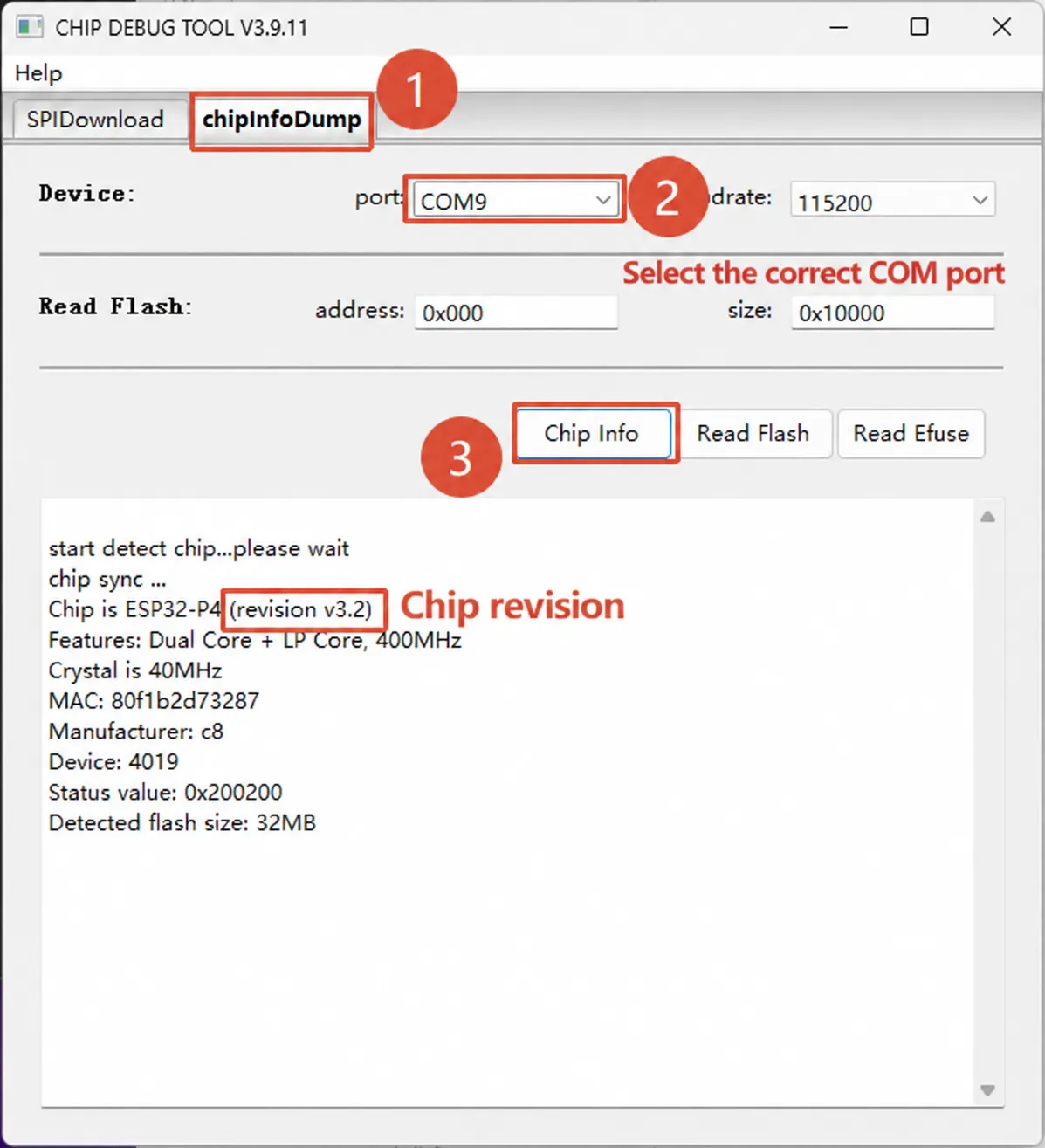
For tool operation instructions, see Espressif Flash Download Tool User Guide.
The ESP32-P4 Platform examples provide build configurations for chips rev v3.0 and later, rev v3.1 and later, and engineering samples of rev v0.x / v1.x. Confirm that the firmware configuration matches your actual chip version before flashing.
Q: How do I select the firmware corresponding to the ESP32-P4 chip version?
A: Refer to the onboard chip silkscreen and the serial boot log. Before flashing, confirm that the chip version configuration in the firmware matches the onboard ESP32-P4 version; do not use --force to skip the version check.
Q: What camera resolution does the ESP32-P4 support?
A: Kits A / B of this board come with the RPi Camera (B), which uses a 5-megapixel OV5647 and supports manual focus. The sensor pixel count, the capture resolution configured in the program, and the H.264 encoding resolution respectively describe the sensor specifications, the camera input, and the encoding output. The encoding resolution cannot be used to infer the pixel count of a camera that can be connected.
For example, the default OV5647 configuration listed in this board's ESP-IDF 05_mipi_csi example documentation is RAW8, 800 × 1280, 50 fps. This configuration does not represent the sensor's maximum resolution; other capture and processing modes are subject to the corresponding driver, example configuration, and processing flow. The H.264 encoding resolution and frame rate are limited by the encoder's capabilities and the program configuration. For the kit correspondence, see Models and Kits.
Q: Can I develop using PlatformIO or MicroPython?
A:
- PlatformIO: The repository for this model provides ESP-IDF projects and Arduino IDE board files, but does not provide a
platformio.inifor this model. When using PlatformIO, you need to confirm that the selected platform package's ESP32-P4, framework version, and board configuration are supported; the Arduino IDE board files cannot be regarded as already adapted for PlatformIO. For platform information, see the PlatformIO Espressif 32 documentation. - MicroPython: The official ESP32-P4 general-purpose firmware and version notes are available. You need to select the firmware according to the ESP32-P4 chip version and the wireless coprocessor. The existence of the general-purpose firmware does not mean that this board's display, touch, audio, and ESP32-C5 wireless connectivity have all been adapted; this board has only been verified with simple commands so far, and peripheral applications have not yet been adapted or fully verified.