FAQ
Q: Which screens are supported by the development board?
A: Please first check the component documentation to confirm compatible screen types: esp32_p4_platform
If you have requirements for adapting other screens or wish to inquire about support for specific screens, you can submit an issue via Waveshare's official after-sales support or the following address:
We will follow up and respond to your requests promptly.
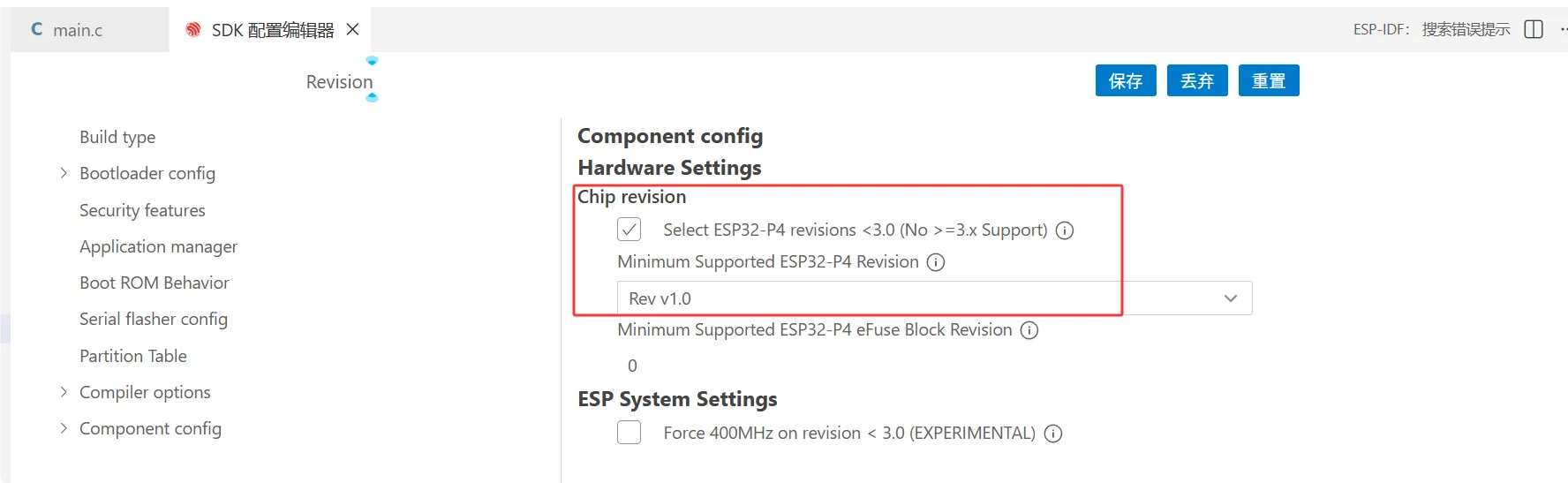
Q: How do I confirm the ESP32-P4 chip revision?
A: Refer to the onboard chip silkscreen and the serial boot log. The ESP32-P4 Platform examples provide build configurations for rev v3.0 and later chips, rev v3.1 and later chips, and rev v0.x / v1.x engineering samples. Before flashing, please ensure that the firmware configuration matches the actual chip revision.
Q: Which ESP-IDF version is recommended for ESP32-P4?
A: ESP-IDF v5.5.1 - v5.5.4 is recommended. The ESP32-P4 Platform examples are primarily maintained for ESP-IDF release/v5.4 and later versions. Some advanced UI examples may retain compatibility notes for release/v5.3; please refer to the README in the example directory for details.
Q: How to handle the chip revision mismatch error when flashing?
A: This message indicates that the ESP32-P4 chip revision configuration in the current firmware does not match the onboard chip. Do not use --force to skip the check; instead, rebuild according to the actual chip revision.
The ESP32-P4 Platform repository provides shared configuration files:
- rev v3.1 or later:
config/esp32p4_rev_v3_1.defaults - rev v3.0 or later:
config/esp32p4_rev_v3_0.defaults - rev v0.x / v1.x engineering samples:
config/esp32p4_rev_pre_v3.defaults
Specify the corresponding configuration via SDKCONFIG_DEFAULTS in the example directory. For detailed commands, see ESP-IDF Example Instructions.
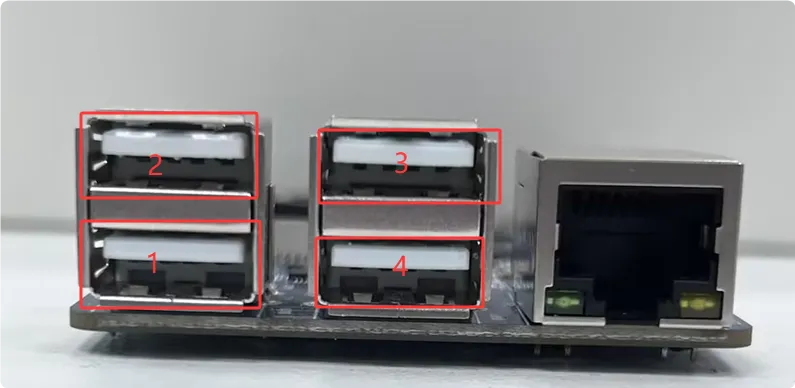
Q: How to use the Type-A ports on the development board?
A: Among the four Type-A ports, one is directly connected to the ESP32-P4, and the other three are connected to the CH334 HUB chip. You can use the jumper caps on the board to switch the ESP32-P4 between direct connection and connection to the CH334.
-
For board silkscreen Rev1.1 (ESP32-P4 chip revision v1.3):
- When the jumper is on the DEVICE side, USB port 1 is enabled.
- When the jumper is on the HOST side, USB ports 2-4 are enabled.
-
For board silkscreen Rev1.2 (ESP32-P4 chip revision v3.1):
- When the jumper is on the HOST side, USB port 1 is enabled.
- When the jumper is on the DEVICE side, USB ports 2-4 are enabled.
Q: How to flash firmware onto the ESP32-C6?
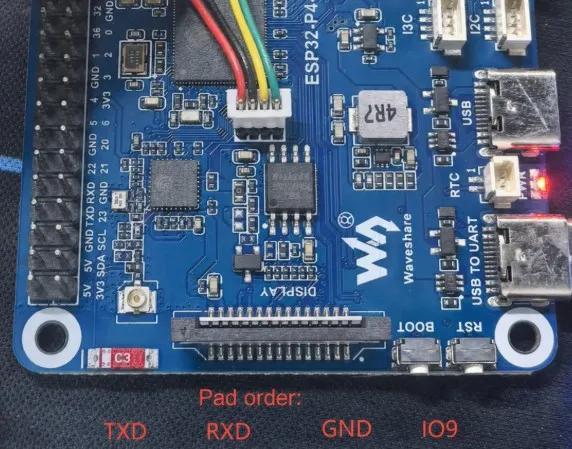
The ESP32-C6 comes with factory firmware by default. It is usually not necessary to flash it separately; if an upgrade is required, please confirm the firmware source, version, and recovery method first.
A: 1. Before power-on, short the C6 programming port IO9 to GND. 2. Connect a TTL to the C6 programming port: TX -> RXD (TTL), RX -> TXD (TTL). 3. Before powering on the whole system, press and hold the BOOT button to prevent the ESP32-P4 from controlling the C6 reset. 4. After performing the above steps, you can flash the C6 firmware normally.
Q: Are there example codes for other application scenarios?
A:
- During functionality testing, we have validated several features. Some applications, like using a Cat-4 module for network access or using P4's MIPI-DSI to expand the host screen, are progressing but not yet stable enough to release. Once these functionalities are refined, we will add examples to the wiki.
- If you have ideas or partially validated application scenarios, feel free to share them with us for feasibility assessment.
Q: Can I develop using PlatformIO or MicroPython?
A:
- Due to stability requirements, in order for PlatformIO to support ESP32-P4, it is also necessary for the PlatformIO community to support the Arduino-esp32 SDK V3.1x version
- During development, we tested MPY firmware for ESP32-P4, which can run some basic commands. However, this is just a preliminary verification; actual interface and peripheral applications are not yet adapted. Once fully adapted and stable, we will release ESP32-P4 usage examples in MicroPython.