Working with Arduino
This chapter contains the following sections. Please read as needed:
Arduino Getting Started
New to Arduino ESP32 development and looking for a quick start? We have prepared a comprehensive Getting Started Tutorial for you.
- Section 0: Getting to Know ESP32
- Section 1: Installing and Configuring Arduino IDE
- Section 2: Arduino Basics
- Section 3: Digital Output/Input
- Section 4: Analog Input
- Section 5: Pulse Width Modulation (PWM)
- Section 6: Serial Communication (UART)
- Section 7: I2C Communication
- Section 8: SPI Communication
- Section 9: Wi-Fi Basics
- Section 10: Web Server
- Section 11: Bluetooth
- Section 12: LVGL GUI Development
- Section 13: Comprehensive Project
Note: This tutorial uses the ESP32-S3-Zero as a reference example, and all hardware code is based on its pinout. Before you start, we recommend checking the pinout of your development board to ensure the pin configuration is correct.
Setting Up Development Environment
1. Installing and Configuring Arduino IDE
Please refer to the tutorial Installing and Configuring Arduino IDE to download and install the Arduino IDE and add ESP32 support.
2. Other Tips
-
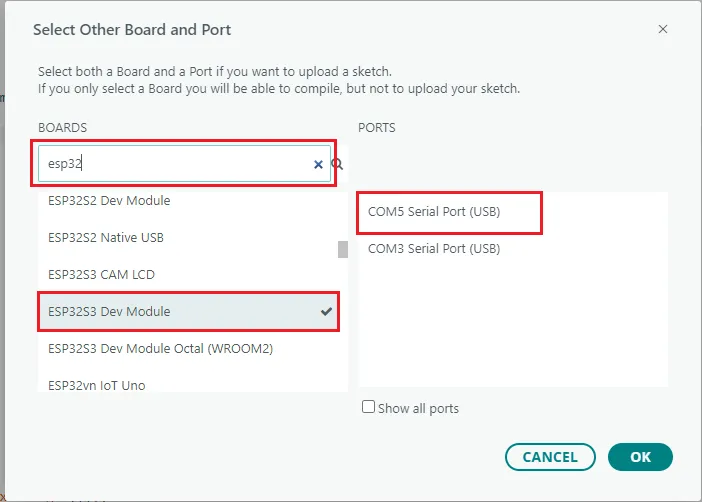
Click the board and port selector on the toolbar, then select Select other board and port. In the dialog box, search for and select "ESP32S3 Dev Module", and select the port corresponding to the board.
-
The ESP32-S3-DEV-KIT-N8R8 has an onboard CH334 USB hub. A single Type-C connection enumerates two independent USB devices, each with its own COM port:
ESP32-S3 Native USB CH343 USB-to-UART Connection ESP32-S3 built-in USB controller (GPIO20 = D+, GPIO19 = D-) CH343 converts ESP32-S3 UART0 (GPIO43 = TX, GPIO44 = RX) Main uses Flashing programs and USB device functions such as USB CDC, HID, and MSC Flashing programs and viewing Serial0 debug logs Name in Device Manager Contains Espressif or USB JTAG/serial debug unit Contains USB-Enhanced-SERIAL CH343 Behavior after pressing RESET in the board and port selector The port briefly disappears and then reappears The port remains unchanged infoThe RESET method for distinguishing the ports applies only to the board and port selector on the Arduino IDE toolbar. Pressing RESET while viewing Device Manager refreshes the entire device list, so you cannot use it to determine which port was re-enumerated. In that case, identify the ports by the device names shown in the table above.
To communicate over native USB, set Tools → USB CDC On Boot to Enabled in the Arduino IDE.
Serialthen refers to the native USB interface. Alternatively, use anHWCDCobject directly.