FAQ
Q: I want the program to have support for more libraries
You can subscribe to this repository and raise an issue to describe your requirements. The engineers will assess your request as soon as possible: ESP32-display-support
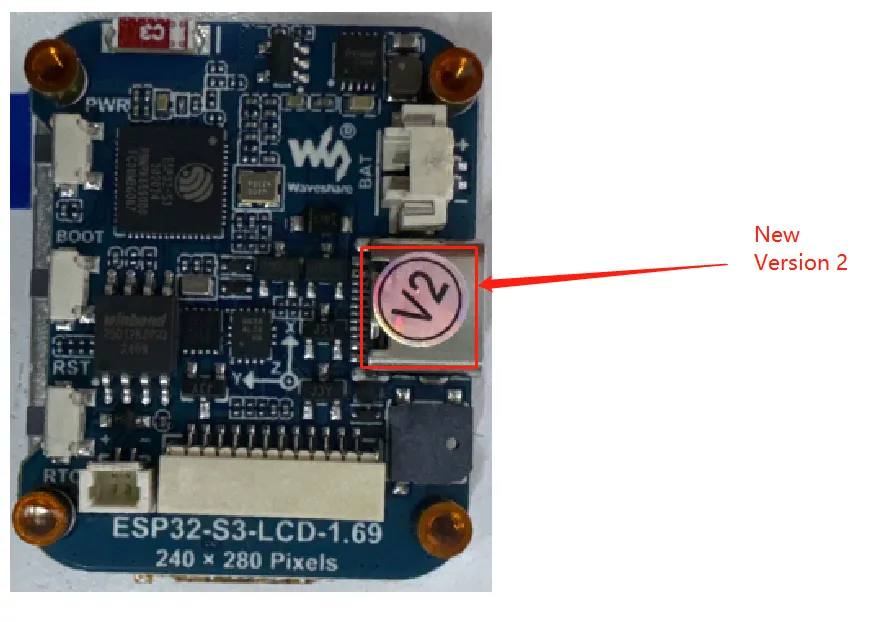
Q: Which version of the development board do I have?
After you receive the product, there is a QC label on the board. If there is a V2QC label, it is the new V2 version. This version has a slightly different pin definition.
Q: The board is too hot. What is the cause? How to solve it?
- If you find the board getting hot, first ensure the buzzer enable pin is pulled low. Otherwise, the passive buzzer will continuously consume power, putting a high current load on the LDO and causing it to overheat.
- If you are also using WiFi/Bluetooth features, overheating cannot be avoided. Enabling the wireless function on the ESP32-S3 will increase the power consumption, leading to overheating.
- In the Arduino IDE environment, enabling PSRAM, using external Flash, and pulling the buzzer enable pin low can still generate significant heat. It is recommended to use low-power solutions.
Q: Why does flashing fail?
- Flashing fails when the serial port is occupied. Close the serial monitor and flash again.
- When the ESP32 program crashes, flashing will fail. In this case, you need to completely power off the development module, hold down BOOT, then power on again to enter forced download mode before flashing. After flashing, the module will not automatically exit download mode, so you need to power cycle again.
Q: How do I check which COM port I am using?
Windows system:
① Check via Device Manager: Press Windows + R to open the "Run" dialog box; type devmgmt.msc and press Enter to open Device Manager; expand the "Ports (COM & LPT)" section, which lists all COM ports and their current status.
② Check using Command Prompt: Open Command Prompt (CMD); type the mode command, which will display status information for all COM ports.
③ Check hardware connections: If you have already connected an external device to the COM port, the device usually occupies a port number. You can determine which port is being used by checking the connected hardware.
Linux system:
① Check using the dmesg command: Open a terminal.
② Check using the ls command: Type ls /dev/ttyS* or ls /dev/ttyUSB* to list all serial devices.
③ Check using the setserial command: Type setserial -g /dev/ttyS* to view the configuration information of all serial devices.
Q: How do I port the provided lib library? Or how do I develop the LCD screen myself? How do I drive it?
The LCD screen display chip used in this product is ST7789V2, and the touch chip is CST816T (for touch version only). There are two chip drivers in the lib we provide. For display drivers, please refer to GFX enable. For touch drivers, please refer to Arduino_LVGL example
Q: Can you take a look at my code? Can you help me modify the code?
This product is positioned as a development board, not a finished product. The product ecosystem is based on the ESP32 core, which is very mature and the development environment is very friendly. We do not assist in modifying code. Please let the makers and geeks use their DIY skills. If you have questions, you can ask our engineers for answers.
If you find our product satisfactory and are interested in batch hardware customization, custom enclosures, or custom software, please contact our sales department
Q: Why is there no output after successful programming and running, even though the code is fine?
- Check the schematic. For different development boards' Type-C interfaces, the corresponding code handles output differently:
- For boards with direct USB output, the printf function is supported for printing. If you want to support the Serial function for printing, you need to enable the USB CDC On Boot feature or declare HWCDC.
- For boards with UART-to-USB, both the printf function and the Serial function are supported for printing, and there is no need to enable USB CDC On Boot.
Q: How do I design interfaces using SquareLine Studio?
- Please refer to: SquareLine Studio Tutorial.