Working with ESP-IDF
This chapter includes the following sections. Please read as needed:
ESP-IDF Getting Started
New to ESP32 ESP-IDF development and looking to get started quickly? We have prepared a general Getting Started Tutorial for you.
- Section 1: Environment Setup
- Section 2: Running Examples
- Section 3: Creating a Project
- Section 4: Using Components
- Section 5: Debugging
- Section 6: FreeRTOS
- Section 7: Peripherals
- Section 8: Wi-Fi Programming
- Section 9: BLE Programming
Please Note: This tutorial uses the ESP32-S3-Zero as a teaching example, and all hardware code is based on its pinout. Before you start, it is recommended that you check the pinout of your development board to ensure the pin configuration is correct.
Set Up the ESP-IDF Development Environment
Framework Version
ESP-IDF 5.5 stable is recommended, with the build target being esp32s3. ESP-IDF 6.2 is currently used for compatibility verification with a fixed development-version SDK and is not recommended as an official release.
Install ESP-IDF and VS Code
Install ESP-IDF and VS Code according to the following illustrated instructions, and select 5.5 stable for the SDK version.
The following guide uses Windows as an example, demonstrating development using VS Code + the ESP-IDF extension. macOS and Linux users should refer to the official documentation.
The screenshots in this section use ESP-IDF V5.5.2 as an example. When installing, please select the ESP-IDF version that matches your board's example.
Install the ESP-IDF Development Environment
-
Download the installation manager from the ESP-IDF Installation Manager page. This is Espressif's latest cross-platform installer. The following steps demonstrate how to use its offline installation feature.
Click the Offline Installer tab on the page, then select Windows as the operating system and the ESP-IDF version you need (the version shown in the screenshot is for reference only — choose the version that fits your actual needs).
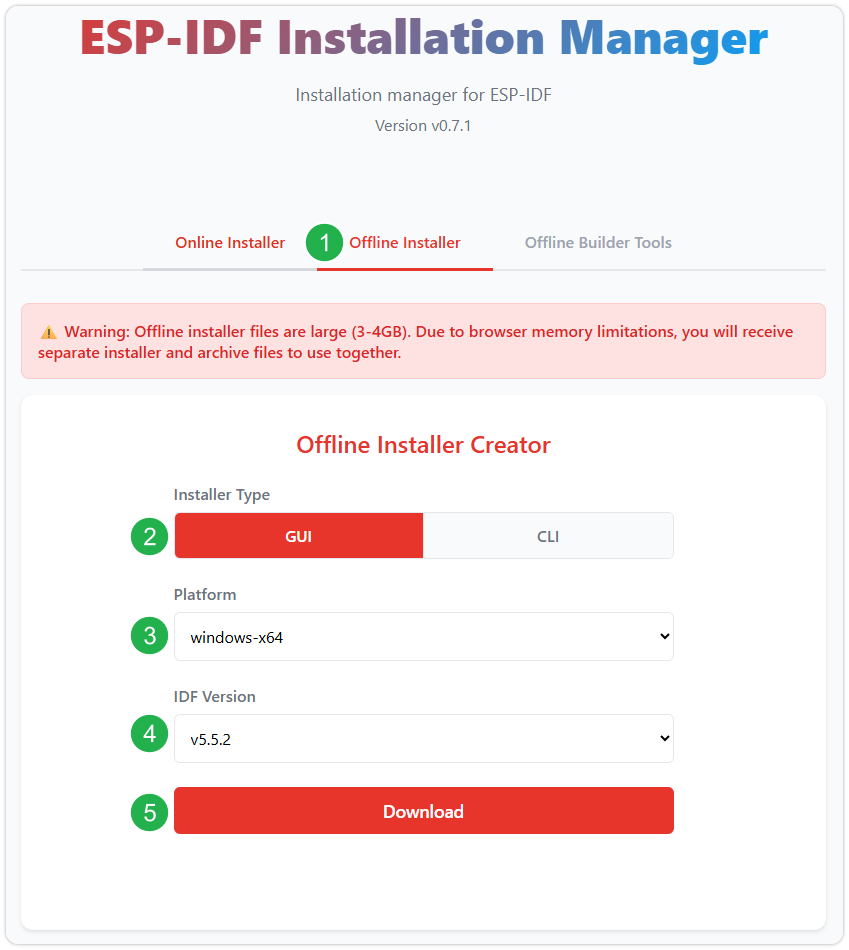
After confirming your selection, click the download button. The browser will automatically download two files: the ESP-IDF Offline Package (.zst) and the ESP-IDF Installer (.exe).
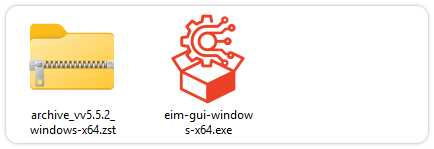
Please wait for both files to finish downloading.
-
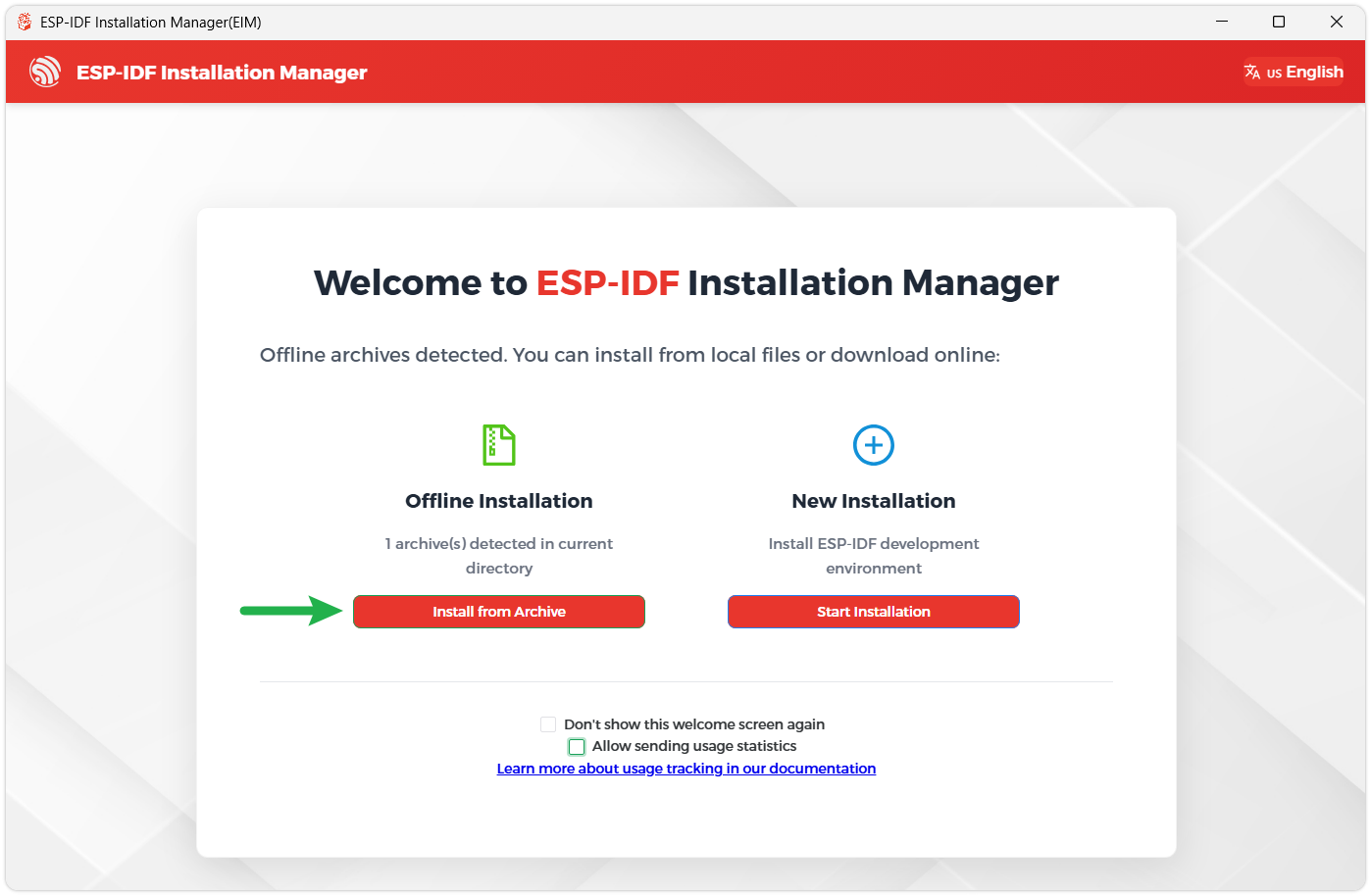
Once the download is complete, double-click to run the ESP-IDF Installer (eim-gui-windows-x64.exe).
The installer will automatically detect if the offline package exists in the same directory. Click Install from archive.
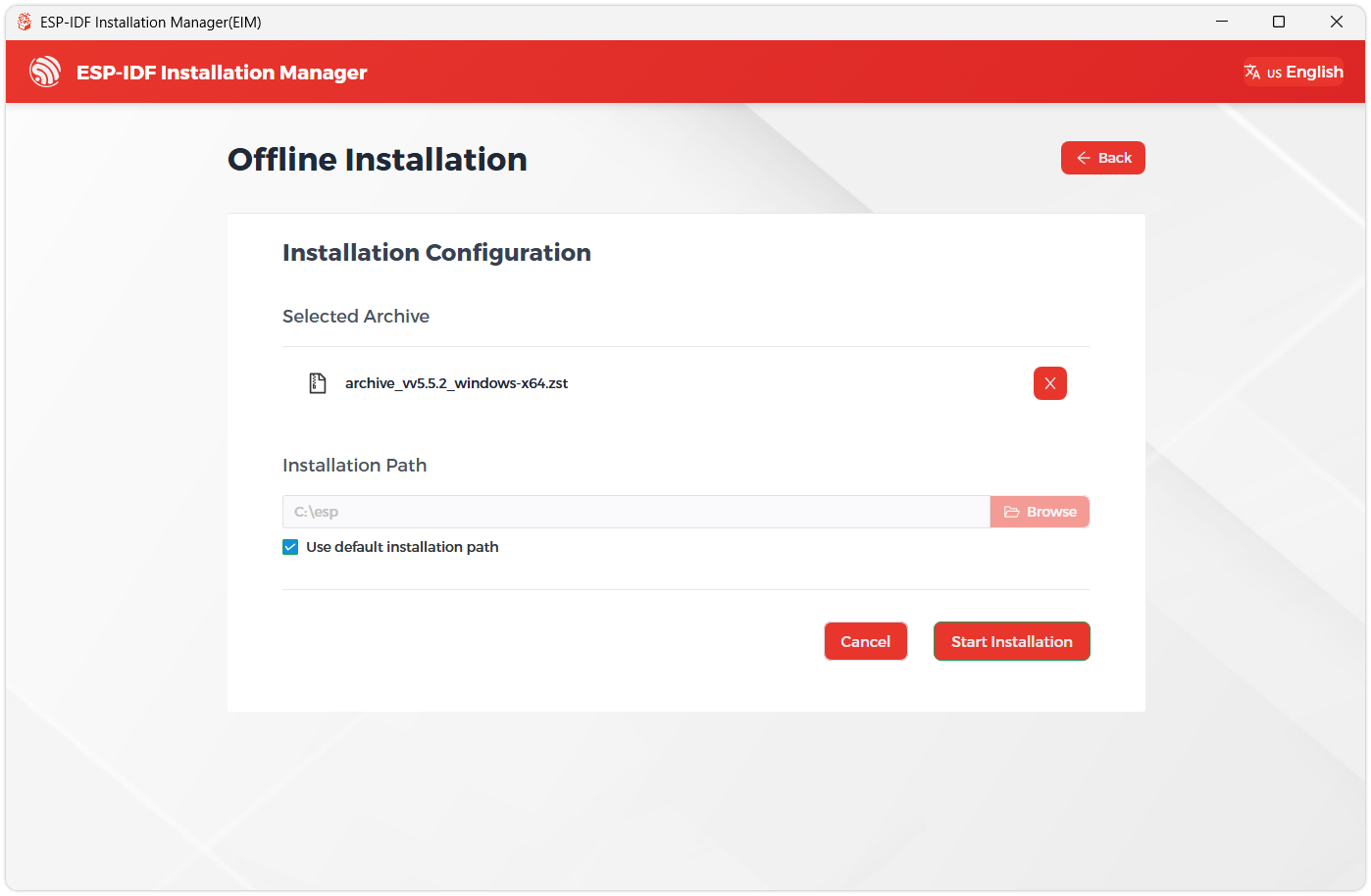
Next, select the installation path. We recommend using the default path. If you need to customize it, ensure the path does not contain Chinese characters or spaces. Click Start installation to proceed.
-
When you see the following screen, the ESP-IDF installation is successful.
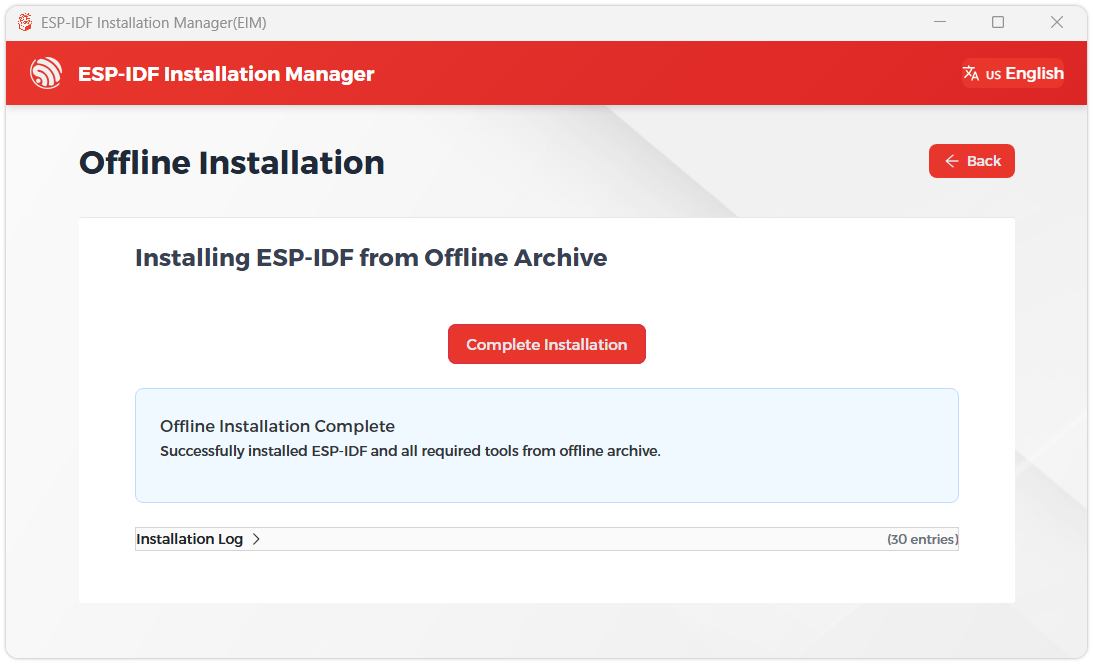
-
We recommend installing the drivers as well. Click Finish installation, then select Install driver.
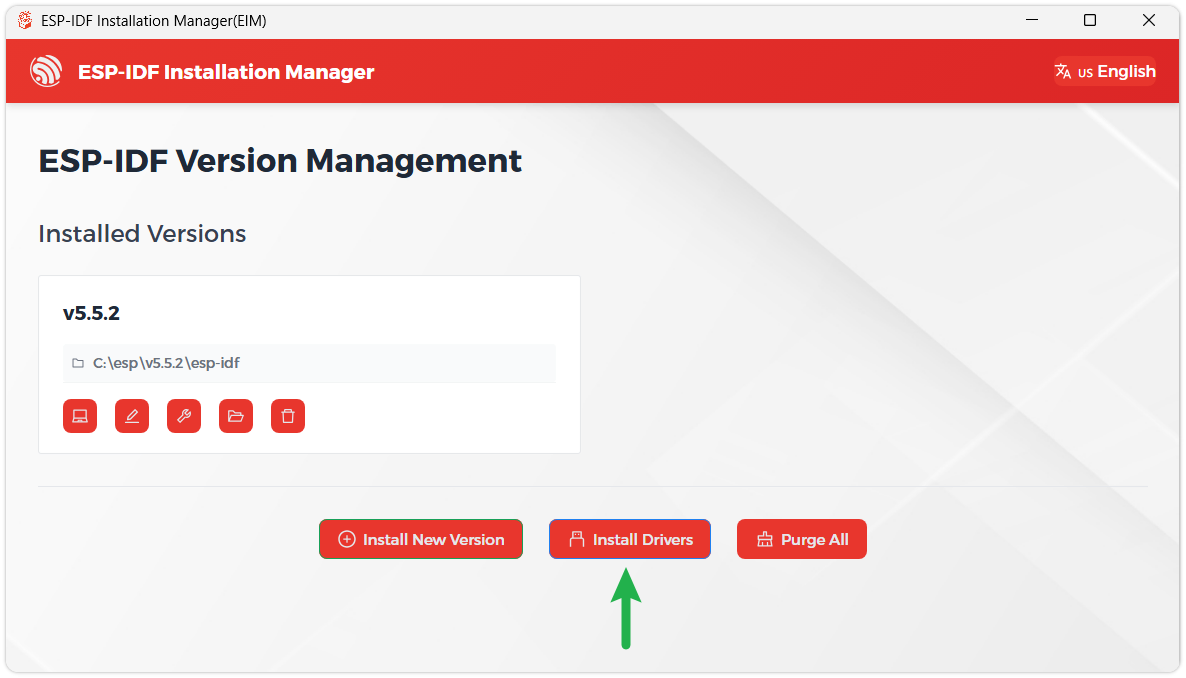
Install Visual Studio Code and the ESP-IDF Extension
-
Download and install Visual Studio Code.
-
During installation, it is recommended to check Add "Open with Code" action to Windows Explorer file context menu to facilitate opening project folders quickly.
-
In VS Code, click the Extensions icon
 in the Activity Bar on the side (or use the shortcut Ctrl + Shift + X) to open the Extensions view.
 -
Enter ESP-IDF in the search box, locate the ESP-IDF extension, and click Install.
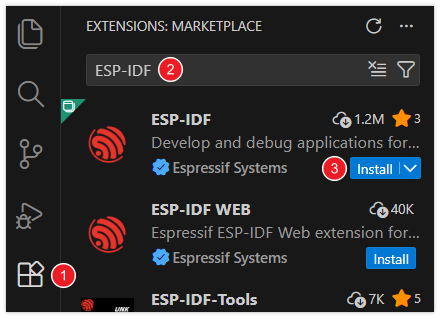
-
For ESP-IDF extension versions ≥ 2.0, the extension will automatically detect and recognize the ESP-IDF environment installed in the previous steps, requiring no manual configuration.
Build and Flash
Examples Using Board Manager
Obtain the project from ESP32-S3-LR1121-ePaper-2.9 Example Programs, and open the desired example directory in VS Code. The following commands are executed in the VS Code ESP-IDF terminal (Windows PowerShell), using example 03 as an example.
All 13 examples require generating board-level code through Board Manager. The board type is provided by the waveshare/waveshare_boards component. The example repository does not include a local boards directory, generated code, or build artifacts.
-
Install the generation assistant tool in the current SDK's Python environment:
python -m pip install esp-bmgr-assist==0.8.3 -
List the available board types:
idf.py bmgr -lConfirm that the list contains
esp32_s3_lr1121_epaper_2_9. If this board type is not present, prepare the corresponding definition according to the Board Type Missing Instructions before continuing. -
Select the board type for this product and generate the board-level code:
idf.py bmgr -b esp32_s3_lr1121_epaper_2_9Listing the board types does not generate code; you must run the selection command. The generator may replace
sdkconfig; back up any locally modified configurations before regenerating. -
Set the build target; if you need to modify the example options, run
idf.py menuconfigand build after saving:idf.py set-target esp32s3idf.py build -
Confirm that the build succeeds, connect the Type-C cable, and replace the actual port:
idf.py -p COM3 flash monitorIf automatic download fails, follow the Download Mode Instructions. Press
Ctrl+]to exit the serial monitor.
When switching to other examples, repeat the board type selection and build steps in the corresponding directory. For normal cleanup, use idf.py fullclean; retain or regenerate the board-level source code as needed.
For board type resources, see the Waveshare Board Manager Board Repository.
Example Programs
The following describes the operation steps and expected source code behavior for the 13 examples. The actual running results need to be verified against the corresponding logs and hardware behavior.
| Directory | Function | Additional Conditions |
|---|---|---|
| 01_ws2812_led | RGB LED single-color and breathing test | Observe the LED |
| 02_i2c_scan | Onboard I2C detection | Serial port |
| 03_epaper_2_9 | E-paper display and screen clearing | Confirm the screen configuration |
| 04_bat_axp2602 | Fuel gauge and interrupt | Battery and correct sampling configuration |
| 05_rtc_pcf85063 | RTC and 1 Hz interrupt | Set the time as needed |
| 06_lr1121_pingpong | LoRa PING/PONG | Antenna and peer with the same parameters |
| 07_sd_card | Storage card read/write verification and e-paper status display | FAT32 card |
| 08_deep_sleep | Timed wake-up, BOOT wake-up, and power shutdown | Observe the wake-up and measurement conditions |
| 09_comprehensive_demo | Startup self-test, wireless communication, and sleep recovery | Prepare matching antenna, LoRa peer, and FAT32 TF card as needed |
| 10_lr1121_lorawan | LoRaWAN Class A OTAA | Gateway, server, credentials |
| 11_LoRaWAN_ABP | LoRaWAN Class A ABP | Matching session and counters |
| 12_LoRaWAN_Class_C | Continuous reception after OTAA | Server Class C configuration |
| 13_LoRaWAN_Multicast | Static Class C multicast | Matching multicast parameters |
01_ws2812_led: RGB LED
Example Description
Board Manager enables GPIO38 power, obtains the single GRB LED on GPIO21, and uses the RMT driver. Red, green, and blue are each displayed for 1.2 seconds, followed by continuous color breathing, with the channel value limited to 48/255.
Operation Steps and Running Effect
After generating the board-level code, compiling, and downloading, verify that the single-color phase in the log matches the actual color, then observe the breathing effect. A successful log cannot replace the actual check of the LED color and power timing.
02_i2c_scan: I2C Scan
Example Description
Checks the idle levels of GPIO13/SDA and GPIO14/SCL, and scans 0x03-0x77; each round is spaced 3 seconds apart.
Operation Steps and Running Effect
Download and open the monitor, and check found 0x51 PCF85063A RTC, found 0x62 AXP2602 fuel gauge, and the device count. If the bus remains low, the program prompts you to check the power supply, pull-ups, and shared pins. This example does not refresh the screen.
03_epaper_2_9: E-Paper Display
Example Description
In the default functional mode, it displays the status and update count, updating every 30 seconds. The first frame is a full refresh, and a full refresh is inserted after a maximum of 10 successful full-screen fast refreshes.
Operation Steps
- Generate the board-level code and run
idf.py menuconfig. - Go to "03 e-Paper display" > "Display mode" and select the functional mode or clear screen mode in the table below.
- Save, recompile, and download, then check the behavior against the table below.
| Mode | Expected Behavior |
|---|---|
| Functional (customer default) | Periodically updates the functional interface |
| Clear screen (full white, then sleep) | Fully refreshes to pure white, then puts the screen controller to sleep, retaining the blank screen |
The success log for clearing the screen is screen cleared to white; panel sleeping; periodic refresh disabled. To restore normal use, reselect Functional and compile and download again; the mode is saved in sdkconfig, and a reset will not restore the default.
04_bat_axp2602: Fuel Gauge and IRQ
Example Description
This example reads the AXP2602 battery voltage, current, SOC, chip temperature, and remaining time, and uses GPIO48 to handle fuel gauge interrupts. The default sampling interval is 30 seconds and can be modified in "Component config" > "AXP2602 Battery Gauge Example".
Operation Steps and Running Effect
Connect the battery according to the Battery Instructions, then download. The example is already configured for the onboard 10 mΩ sampling resistor. Observe consecutive samples and the screen information; after an IRQ event occurs, the status should be recorded and cleared. Charger plug/unplug is not an independent AXP2602 IRQ source, so you cannot require GPIO48 to trigger on every plug/unplug.
The example does not write a new model adapted to the connected battery, and the SOC and remaining time are estimates. When reading individual fields fails, old values may be retained; judge based on consecutive samples. GPIO47 is an independent charging status signal.
05_rtc_pcf85063: RTC and Interrupt
Example Description
Reads the PCF85063A time, enables the 1 Hz timer interrupt, and records the interrupt count via GPIO7. When the time is invalid or the low-voltage flag is set, writes the default time 2026-01-01 12:00:00.
Operation Steps and Running Effect
Modify the initial time in main/main.c as needed, compile and download, and check the date, time, VL, INT level, and interrupt count. The screen updates according to the display period; you cannot require every serial log to synchronously refresh the screen.
An existing valid time is retained. The default time is not network time synchronization, nor is it the accurate time at the moment of flashing.
06_lr1121_pingpong: LoRa Point-to-Point
Example Description
Sends PING at random intervals and replies with PONG after receiving a peer's PING; displays the transmit/receive counts, RSSI, SNR, and the latest payload. The regular screen refresh is rate-limited to 30 seconds, and the serial port and screen do not need to update every packet synchronously.
Operation Steps
- Prepare two boards and matching antennas, and first check the Wireless Parameters and Regional Requirements.
- Check the default configuration and initialization parameters in
include/board_radio.hof the component supported by this example. The default is 868 MHz, 125 kHz, SF7, coding rate 4/5, 22 dBm. Both ends need to be consistent and comply with the actual usage restrictions. - Build and download them separately, and check PING/PONG and the incrementing TX/RX counts.
Result Judgment
Without a peer, a receive timeout cannot be judged as hardware damage on its own. A successful initialization alone also cannot be judged as the wireless link passing.
07_sd_card: TF Test
Example Description
Initializes the e-paper and shared power supply through Board Manager, mounts a FAT32 card using the native SDMMC/FATFS, lists up to 16 root directory entries, and then completes the write, sync, byte-by-byte read-back verification, cleanup, and unmount of /ws_sd/test.txt.
The e-paper displays the card capacity, mount, read/write, and unmount status, and the title is updated from SD TEST to SD PASS or SD FAIL. After unmounting is complete, refresh the final result, then let the screen sleep and turn off the shared power supply; the result screen is still retained.
The display and TF test use independent 16 KiB task stacks, with no need to manually increase the main task stack. If task creation fails, an error is reported, and the display is not switched to the main task.
Operation Steps and Running Effect
- Power off, insert a FAT32 card, and read the Test File Impact.
- Follow Build and Flash to generate the board-level code, compile, and download.
- Check the various statuses and
SD PASS/SD FAILon the screen, and verify thewrite/read verification passed,filesystem synchronized and unmounted, andFINALresults in the serial port.
The program does not format or overwrite existing test files. If the display fails, the TF test still continues; the serial port DISPLAY separately reports the display result, and FINAL indicates the TF test result; if a failure occurs, check the preceding error logs.
08_deep_sleep: Deep Sleep
Example Description
Displays a full-refresh sleep prompt once, and configures 600-second timed wake-up and BOOT/GPIO0 wake-up. Before sleeping, it sends a sleep command to the LR1121, puts the AXP2602 and e-paper to sleep, then isolates the wireless pins and turns off and holds off the GPIO38 shared power supply.
Operation Steps and Running Effect
After downloading, check LR1121 Sleep accepted before power off, the AXP2602 sleep status, and start deep sleep. Release BOOT, wait for the timed wake-up, or briefly press BOOT, and check the timed/button wake-up cause. To modify the period, adjust WAKEUP_TIME_SEC in main/main.cpp.
The USB monitor may disconnect during deep sleep. Power consumption needs to be measured at a clear measurement point and cannot be inferred from sleep API return values.
09_comprehensive_demo: Comprehensive Example
Example Description
After power-on or wake-up, it performs a single self-test of RAM/PSRAM, Flash, encryption, and peripherals, then runs Wi-Fi APSTA, BLE passive scanning, LoRa reception, battery monitoring, and button services. The full-capacity Flash check is read-only, and the TF check is read-only; no Flash erase/write or card file writing is performed.
After the self-test ends, the states proceed in sequence: ACTIVE_READY → LORA_RX. The RAM/PSRAM read/write verification is performed only during the startup self-test; no continuous dual-core stress test is performed during normal operation. The serial port retains the wireless status, LoRa transmit/receive counts, and free memory.
Operation Steps
- Configure the project according to Build and Flash, and generate the board-level code for this product.
- Modify the STA, SoftAP, and LoRa configurations in
main/app_config.h, and check the antenna and transmit parameters. If STA is not set, it does not affect SoftAP startup. - Build and download, and observe
SELF TEST,BOARD TEST, and the runtime page in sequence, confirming that the serial port status changes fromACTIVE_READYtoLORA_RX. - Each stable press of KEY/GPIO1 sends one frame; check the peer, TX/RX, and RSSI/SNR.
- Double-press BOOT/GPIO0, and check the orderly stop and
entering deep sleep; during deep sleep, single-press BOOT, and check the wake-up cause and the complete self-test rebuild.
Result Judgment
This example does not enable timed wake-up. PASS indicates that this item obtained a verifiable result, FAIL indicates a specific operation failed, and NOT_TESTED indicates that a card, peer, or other condition is missing. SLEEP_CANCELLED does not mean deep sleep has been entered, and a crash or USB reset cannot be regarded as a normal button wake-up.
In the RAM self-test log, requested is the target size, and actual and RAM=PASS bytes=... are the actual test range. If allocation fails, it retries with a smaller range; a single self-test cannot be regarded as verification of the entire RAM. If allocation is impossible, it displays RAM=NOT_TESTED bytes=0, and the system self-test is still judged as failed.
When the fuel gauge temperature is invalid or reading fails, it displays temp=UNAVAILABLE and does not substitute an old value or zero; a valid 0°C is still a normal reading. Chip temperature is not the same as ambient temperature.
The regular serial status period is 30 seconds, and the screen is 5 minutes; transmit/receive events can trigger an earlier refresh. Frequency offset displays NOT_AVAILABLE; this example has no network traffic generator, so Wi-Fi throughput still needs to be measured separately. After adding features, the application partition space needs to be rechecked.
10_lr1121_lorawan: Class A OTAA
Example Description
Default LoRaWAN 1.1, EU868 standard multi-channel, Class A. After completing OTAA or session restoration, it sends periodic uplinks and handles RX1/RX2 downlinks and status saving.
Operation Steps
- Copy
main/lorawan_secrets.h.exampleto a localmain/lorawan_secrets.h, and fill in the JoinEUI, DevEUI, AppKey, and NwkKey assigned by the server. - Modify the region, MAC version, power, and transmission policy in
main/lorawan_config.h, and use matching configurations on the server. - Compile and download, and check the activation result, FCntUp, receive windows, and server uplink/downlink records.
Result Judgment
The default application period is 60 seconds, FPort 1, unconfirmed uplink, with ADR disabled; actual transmission is also subject to protocol scheduling. The initialization showing 868.1 MHz does not mean all uplinks are fixed to that frequency; in multi-channel mode, RadioLib selects the valid channel. If the placeholder credentials are not replaced, no Join Request is transmitted.
11_LoRaWAN_ABP: Class A ABP
Example Description
Preconfigures the DevAddr and session keys, directly activates or restores a session, and does not perform OTAA. The current default is LoRaWAN 1.0.x, EU868 single-channel 868.1 MHz / DR3.
Operation Steps and Running Effect
Copy main/abp_credentials.h.example to main/abp_credentials.h, fill in the DevAddr, AppSKey, and NwkSKey, and verify the MAC version and channel in main/abp_config.h. After compiling and downloading, check session restoration, uplink, and RX1/RX2.
When selecting 1.1, use the independent network keys required by the configuration header and sync the server version. Single-channel testing requires a matching gateway; you cannot simply change the frequency and then consider it adapted to a standard multi-channel network. The frame counters need to be consistent between the device and the server.
12_LoRaWAN_Class_C: Continuous Reception
Example Description
Uses LoRaWAN 1.1 OTAA, entering Class C after activation or restoration. The default is EU868 multi-channel; after transmission and the necessary Class A receive windows end, it returns to the continuous reception state.
Operation Steps and Running Effect
Create a local main/lorawan_secrets.h, modify main/lorawan_config.h, and enable matching Class C and RX2/RXC parameters on the server. After downloading, check the activation and Class C status, then actually send downlinks, recording the downlink port, count, and payload.
Keep the power supply connected during operation, and do not perform deep sleep that stops reception. The current adaptation source uses a TCXO of 3.0 V; verify the actual module specifications before modifying.
13_LoRaWAN_Multicast: Static Class C Multicast
Example Description
Retains the device's own OTAA unicast session and adds a static Class C multicast slot. The default follows the EU868 single-channel test configuration. The multicast counter is persisted, and normal uplinks still go through the device's own unicast session.
Operation Steps and Running Effect
Create a local main/lorawan_secrets.h, and fill in the device identity as well as the multicast address and group keys; verify the frequency, DR, port, and period in main/multicast_config.h. Keep the same group parameters consistent on the server. After downloading, send unicast and multicast downlinks separately, and check the UNICAST / MULTICAST classification, group ID, and incrementing counters.
The current example only enables slot 0 and does not provide Class B, remote multicast configuration, clock synchronization, or full FUOTA. Multicast configuration errors cannot be fixed by repeatedly rejoining the network; verify the parameters and persisted state first.