ESP32-S3-RGB-Matrix User Guide
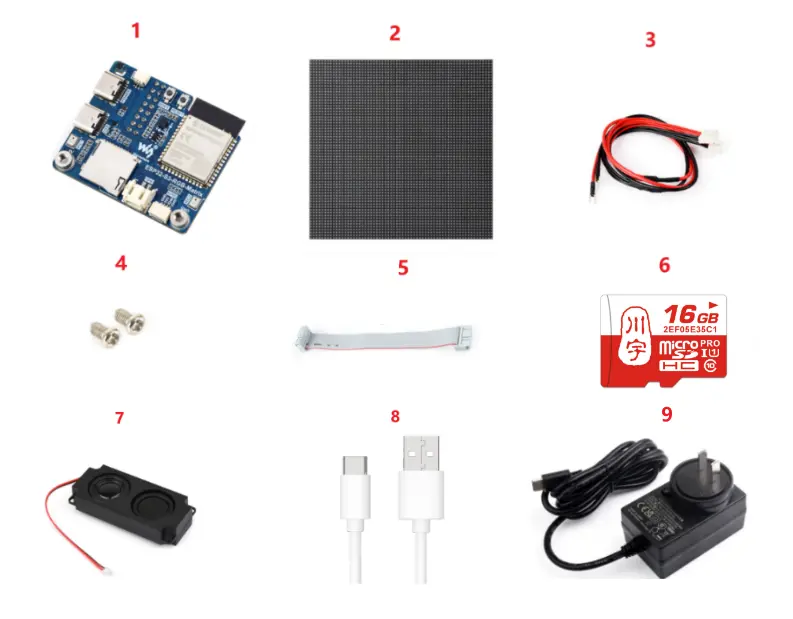
To help users quickly understand the features of the product, we provide a series of test examples that demonstrate how to use each interface. To run these examples, prepare the following components:
Component Preparation
- ESP32-S3-RGB-Matrix ×1
- Any model of LED screen x1 (you can prepare multiple if cascading is required)
- VH4 2PIN wire (approx. 500mm) ×1 (prepare multiple if cascading is required)
- Screw kit × 1
- 16PIN flat ribbon cable (approx. 200mm) ×1 (prepare multiple if cascading is required)
- TF card × 1
- 8Ω 5W speaker × 1
- USB cable Type-A male → Type-C male ×1
- PSU-27W-USB-C-EU-B x 1 USB Type-C charger
Precautions
-
To cascade multiple screens, prepare several screens and several flat ribbon cables. Connect each screen to one end of a ribbon cable. If the power supply is insufficient, you can use a dual-port USB Type-C charger.
-
The TF card only supports MMC communication.
⚠️ USB Download Precautions (Important)
If the port is not recognized, please enter Boot mode:
- Press and hold the BOOT button
- Connect the USB cable to the computer
- Release the BOOT button
After the download is complete, press the RESET button to run the program.
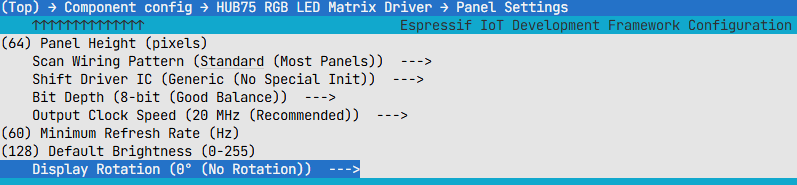
The following options must be configured in menuconfig before compilation:
-
Panel Height = 64
-
Panel Width = 64
-
Configure according to the specific pixel size. Incorrect settings will cause display misalignment.
-
Scan Wiring Pattern = Standard
-
Scan wiring modes and select the most common standard mode.
-
Shift Driver IC = Generic
-
Initialize the driver chip in generic mode, suitable for most common panels.
-
Bit Depth = 8-bit
-
Medium color depth, providing a good balance between effect and performance.
-
Output Clock Speed = 20MHz
-
Data output speed; 20MHz is typically stable and sufficient.
-
Minimum Refresh Rate = 60Hz
-
Set the minimum refresh rate to 60Hz to reduce visible flicker.
-
Default Brightness = 128
-
Half of the maximum brightness, a compromise between brightness and power consumption.
-
Display Rotation = 0°
-
No rotation, display in the default orientation.