FAQ
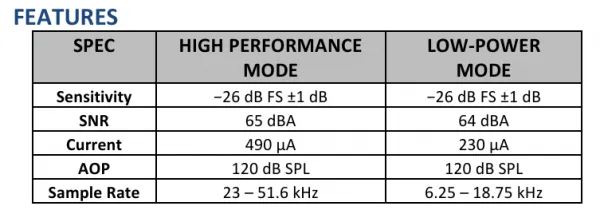
Q: What is the audio sampling frequency of the microphone?
- Refer to the table below for specific parameters:
Q: Do I need to keep pressing the PWR button when using battery power?
- No. The PWR button is designed for power control while also providing an additional user button. Its operating principle is as follows: Pressing PWR can enable battery power, at which point the system starts. The system should define SYS_EN to continuously output a high level to maintain the power-on state. At this point, releasing PWR will not cause a power failure. The function of PWR at this time is to lower SYS_OUT. The system detects actions such as pressing, double pressing, and long pressing on SYS_OUT, enabling customizable power-off control operations. For instance, in a long press mode, setting SYS_EN to a low level to disconnect the battery power completes the use of the multi-purpose buttons.
Q: The ESP-IDF program keeps resetting after being flashed?
- Downgrade ESP-IDF to v5.3.2.
Q: After programming the module, sometimes I cannot connect to the serial port or the upload fails on a subsequent attempt?
- Press and hold the Reset button for more than 1 second, wait for the PC to re-recognize the device, then download again
- Press and hold the BOOT button, press RESET, release RESET, then release BOOT. The module will enter download mode, which solves most download issues.
- Press and hold the BOOT button, reconnect the USB cable, and after the USB cable is connected, release the BOOT button. The module will enter download mode, which solves most download issues.
Q: The module keeps resetting continuously, and when checking in Device Manager, the recognition status flashes?
- This situation may be caused by an unstable USB port due to a blank Flash. You can press and hold the
BOOTbutton, simultaneously pressRESET, then releaseRESET, and finally release theBOOTbutton. At this point, the module will enter download mode to flash the firmware (program), which should resolve the issue.
Q: The first compilation of the program is extremely slow. What should I do?
- The first compilation being slow is normal; just wait patiently
Q: Can't find the AppData folder. How to handle this?
- Some AppData folders are hidden by default. You can set your system to show them.
- File Explorer -> View -> Check "Hidden items"
Q: How to check which COM port I am using?
-
Windows System:
- ①Check via Device Manager: Press Windows + R to open the "Run" dialog box. Type
devmgmt.mscand press Enter to open Device Manager. Expand the "Ports (COM & LPT)" section. All COM ports and their current status will be listed here. - ②Check using Command Prompt: Open the Command Prompt (CMD), type the
modecommand, which will display status information for all COM ports. - ③Check Hardware Connection: If an external device is already connected to a COM port, the device typically occupies a port number. You can determine which port is being used by checking the connected hardware.
- ①Check via Device Manager: Press Windows + R to open the "Run" dialog box. Type
-
Linux System:
- ①Check using the
dmesgcommand: Open the terminal. - ②Check using the
lscommand: Typels /dev/ttyS*orls /dev/ttyUSB*to list all serial devices. - ③Check using the
setserialcommand: Typesetserial -g /dev/ttyS*to view configuration information for all serial devices.
- ①Check using the
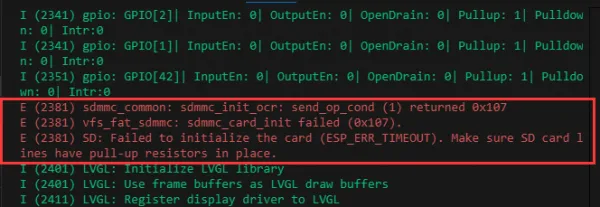
Q: Why does ESP-IDF report this error?
- This occurs when no TF card is inserted or the TF card cannot be recognized. If this happens, wait for a moment and then reset the device. If the issue persists, format the TF card to FAT32. If it still fails, try using a different TF card
Q: Program flashing fails when using a Mac device?
- Install the MAC driver and then flash again.
Q: What is the screen refresh rate (frame rate)?
- It depends on the running example; different programs have different refresh rates.
Q: When I run a program that uses the serial port (Serial.println()), the serial monitor in Arduino IDE does not show any data?
- Are you using a USB to UART tool to connect to the UART pins, or have you enabled USB CDC in Tools?
Q: Can Wi-Fi and Bluetooth be used simultaneously?
- Yes, they can be used simultaneously. However, because audio consumes a significant amount of memory, they cannot be used together when audio functions are active
Q: Which battery can be used?
- MX1.25 interface 3.7V lithium battery
Q: What capacity Li‑battery is recommended?
- Using one with the corresponding interface and output voltage is acceptable; capacity depends on customer needs
Q: Why is there no output after successful programming and running, even though the code is fine?
- Check the schematic. Depending on the Type‑C interface of different boards, the code handles output differently:
For boards with a direct USB connection, the
printffunction works for output. To useSerialfor output, you need to enable theUSB CDC On Bootoption or declare an HWCDC object. For boards with UART‑to‑USB, bothprintfandSerialwork without enablingUSB CDC On Boot.
Q: How do I design interfaces using SquareLine Studio?
- Please refer to the SquareLine Studio tutorial.
Q: Product thickness
- Manually measured, there may be errors.
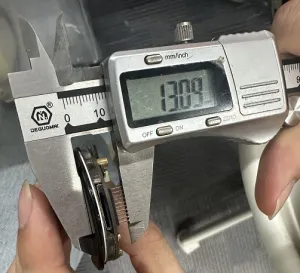
Q: Cover glass thickness
- Approximately 1.7 mm.

Q: How do I restore factory mode?
- Flash the factory bin file. Refer to the Flash Firmware Flashing and Erasing Tutorial.
Q: Can I use the product without a TF card?
- Yes, it can. Only the functions related to the TF card will be unavailable; other functions are unaffected
Q: Screen issues
- The screen and backplate of this type of product are designed with an integrated adhesive bonding. To ensure normal use, it is recommended to avoid disassembling or prying open the adhesive layer. If the screen is damaged due to disassembly, repairs cannot be performed.