FAQ
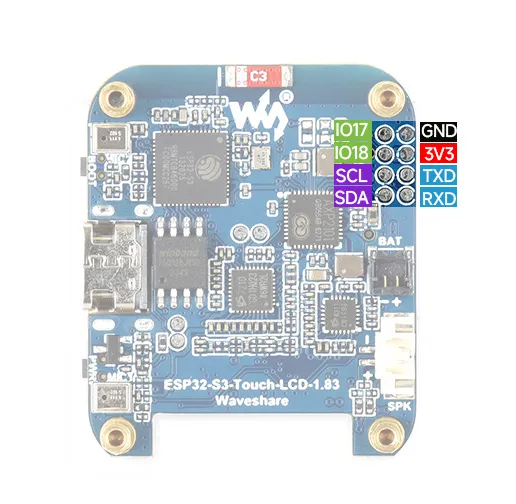
Q: What are the GPIOs corresponding to the reserved GPIO pads on the ESP32-S3-Touch-LCD-1.83 development board?
A:
Q: How to check which COM port I am using?
-
Windows System:
- ①Check via Device Manager: Press Windows + R to open the "Run" dialog box. Type
devmgmt.mscand press Enter to open Device Manager. Expand the "Ports (COM & LPT)" section. All COM ports and their current status will be listed here. - ②Check using Command Prompt: Open the Command Prompt (CMD), type the
modecommand, which will display status information for all COM ports. - ③Check Hardware Connection: If an external device is already connected to a COM port, the device typically occupies a port number. You can determine which port is being used by checking the connected hardware.
- ①Check via Device Manager: Press Windows + R to open the "Run" dialog box. Type
-
Linux System:
- ①Check using the
dmesgcommand: Open the terminal. - ②Check using the
lscommand: Typels /dev/ttyS*orls /dev/ttyUSB*to list all serial devices. - ③Check using the
setserialcommand: Typesetserial -g /dev/ttyS*to view configuration information for all serial devices.
- ①Check using the
Q: How do I design interfaces using SquareLine Studio?
- Refer to the SquareLine Studio Tutorial.