Working with Arduino
This chapter includes the following sections. Please read as needed:
Setting Up the Development Environment
1. Install and Configure the Arduino IDE
- Please refer to the Arduino IDE Installation and Configuration Tutorial to download and install the Arduino IDE and add ESP32 board support.
- Installation instructions and version requirements for the ESP32-S3-Touch-LCD-7 development board:
| Board Name | Installation Requirement | Version Requirement |
|---|---|---|
| Waveshare ESP32-S3-Touch-LCD-7 | Offline installation / Online installation | 3.0.7 |
2. Installing Libraries
To successfully run programs on the Arduino IDE, you also need to install the required libraries. The library files for the ESP32-S3-Touch-LCD-7 are located in the examples/Arduino/libraries folder of the example package. Click this link to download the example programs.
| Library Name | Description | Version | Library Installation Requirement |
|---|---|---|---|
| ESP32_Display_Panel | Display panel control library for ESP32 microcontrollers | v0.1.4 or higher | "Online Installation" or "Offline Installation" |
| ESP32_IO_Expander | I/O expander library for ESP32 | v0.0.4 or higher | "Online Installation" or "Offline Installation" |
| lvgl | LVGL graphics library | v8.4.0 | "Offline Installation" |
| lv_conf.h | LVGL v8 configuration file | — | "Offline Installation" |
09_lvgl_v8_demo uses LVGL v8.4.0, and 10_lvgl_v9_demo uses LVGL v9.5.0. The two examples depend on different versions. Please install the corresponding LVGL_v8.4.0.7z or LVGL_v9.5.0.7z archive from the example repository based on the example you choose.
Installation Steps:
-
Download or clone the example.
-
Copy all folders (ESP32_Display_Panel, ESP32_IO_Expander, etc.) from its
examples/Arduino/librariesdirectory to your Arduino libraries folder.infoThe path to the Arduino libraries folder is typically:
c:/Users/<username>/Documents/Arduino/libraries.You can also locate it in the Arduino IDE by going to File > Preferences and checking the "Sketchbook location". The libraries folder is the
librariessubfolder within this path. -
For other installation methods, please refer to: Arduino Library Management Tutorial.
3. Arduino Project Settings
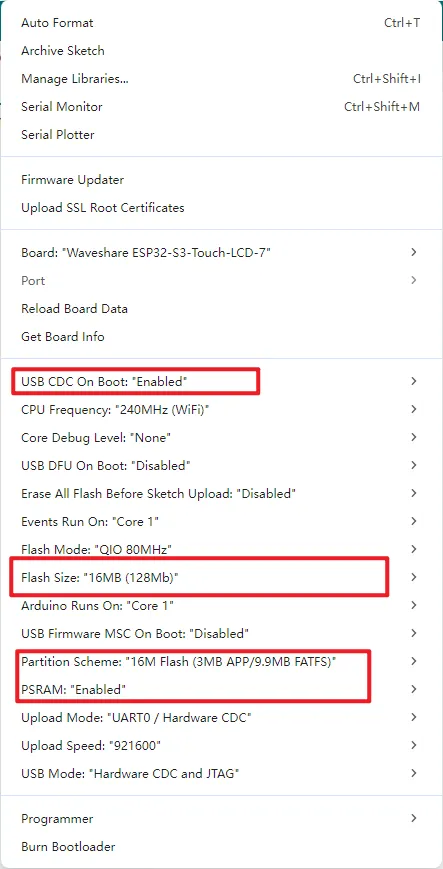
Example
Want to quickly learn how to drive each interface? We have prepared a series of examples and related tutorials based on the Arduino IDE to help you quickly understand the use of each interface.