ESP32-S3-Touch-LCD-7 FAQ
Q: What connectors and cables should be used for the UART, sensor, CAN, I2C, and RS485 interfaces?
A: All of the above interfaces use HY2.0 connectors. Please select the matching cables based on the pin count of the interface:
- UART interface: HY2.0 4P to Dupont male 4P 10 cm cable
- Sensor interface: HY2.0 3P to Dupont male 3P 10 cm cable
- CAN interface: HY2.0 2P to Dupont male 2P 10 cm cable
- I2C interface: HY2.0 4P to Dupont male 4P 10 cm cable
- RS485 interface: HY2.0 2P to Dupont male 2P 10 cm cable
It is recommended to use the cables included with the product first.
Q: What connector is used for the battery interface?
A: The battery interface is a PH2.0 2P connector and only supports a single-cell 3.7V lithium battery. Do not confuse the PH2.0 battery cable with other HY2.0 peripheral interface cables.
Q: When connected to a USB port, the computer does not detect the COM port.
A: The USB interface and CAN interface on this device are shared and are switched via the extended IO pin EXIO5:
By default, this pin is pulled high to operate in CAN mode, so the computer cannot detect the USB COM port.
Pulling the EXIO5 pin low switches to USB mode, allowing the computer to detect the COM port normally (refer to the CAN-related example code for level control).
When flashing the program, first press and hold the BOOT button (do not release it), then reconnect the Type-C power cable to the USB port. After powering on, release the BOOT button.
Q: Can I flash meshtastic directly?
A: Meshtastic is typically used with LoRa, and this product does not come with LoRa functionality by default.
Q: What is the difference between the UART1 and UART2 interfaces on the board, and how should they be used?
A:
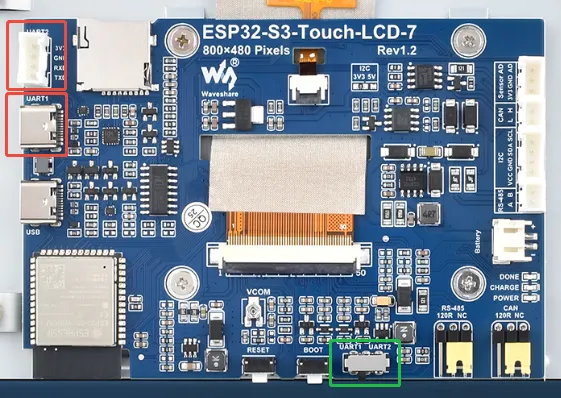
Both the UART1 and UART2 interfaces use UART0 (IO43, IO44) of the ESP32-S3, but there are differences as follows (refer to the schematic diagram):
- UART2 is directly connected to UART0 and is routed to a header for easy connection to other modules using wires.
- UART1 is routed via CH343 to provide USB-to-TTL functionality and is brought out to a Type-C connector.
- A DIP switch (green area in the image above) can be used to switch between these two interfaces.
Q: ESP32-S3-Touch-LCD-7 CAN reception fails?
A:
- Restart the COM port in UCANV2.0.exe and press the Reset button on the ESP32-S3-Touch-LCD-7 a few times.
- Uncheck the "DTR" checkbox in the serial debugging assistant.
Q: ESP32-S3-Touch-LCD-7 has no response after programming an Arduino program for RGB display?
A: If the screen does not respond after programming, check whether the following are correctly configured in Arduino IDE -> Tools: select the corresponding Flash (16 MB) and enable PSRAM (8 MB OPI).
Q: Compilation fails or shows errors when flashing the Arduino RGB screen program on the ESP32-S3-Touch-LCD-7?
A: Check if the required libraries are installed. Please refer to the Library Installation Steps.
Q: Why does the lvgl program report an error that lv_conf.h is missing even though all libraries are installed?
A: The library installation path contains Chinese characters, causing the library files not to be found.
Q: Why is there no display on the screen after successful Arduino flashing?
A: You can refer to the following steps to run the example for comparison:
- Before running the program, install the required libraries.
- Install libraries video reference.
- Run and flash the example.
Q: When compiling an example using Arduino IDE, I get fatal error: esp_memory_utils.h: No such file or directory
A: Please install Arduino esp32 ≥v3.0.2 to resolve this issue.
Q: Can the CAN communication debugging tool send continuous frames?
A: Yes, you can also customize the frequency of consecutive frames. When the frequency is too high and the computer freezes, it may cause bus errors.
Q: What if ESP-IDF programming fails?
A:
- Set the development board to download mode. Power off completely, press and hold the Boot button, then power on again and release the button to enter download mode. Re-flash the program, then reset to run.
- Try pressing the fullclean button in the status bar and recompile and flash. This function cleans all compiled content when compilation errors occur or the build is polluted by other operations.
Q: How to handle the situation when the AppData folder cannot be found?
A: The AppData folder is hidden by default on some systems. You can set it to show:
- File Explorer -> View -> Check "Hidden items"
Q: How to view the COM port?
A: Press Windows + R to open the "Run" dialog, type devmgmt.msc and press Enter to open Device Manager. Expand the "Ports (COM & LPT)" section; all COM ports and their current status will be listed.
Q: What if the program takes extremely long to compile for the first time?
A: It is normal for the first compilation to be slow. Please wait patiently.
Q: The program flashes successfully, but nothing is shown on the screen. How to solve this?
A: If the development board has a reset button, press it; if not, power cycle the board.
Q: Program fails to flash when using a MAC device?
A: Install the MAC driver and re-flash.
Q: How to design a user interface with SquareLine Studio?
A: Refer to the SquareLine Studio Tutorial.
Q: How to port the provided lib libraries? Or how to develop my own LCD screen? How to drive it?
A: The LCD display chip used in this product is ST7262, and the touch chip is GT911. We recommend directly referring to the Arduino or ESP-IDF example programs.
Q: Wi-Fi reconnection drifts?
A: Click this link to view the solution: LCD FAQ
Q: When using the Arduino driver, characters appear reddish. What should I do?
A: In the esp_panel_board_custom_conf.h header file, modify ESP_PANEL_BOARD_LCD_RGB_PCLK_ACTIVE_NEG to 1.