ESP32-S3-ePaper-13.3E6
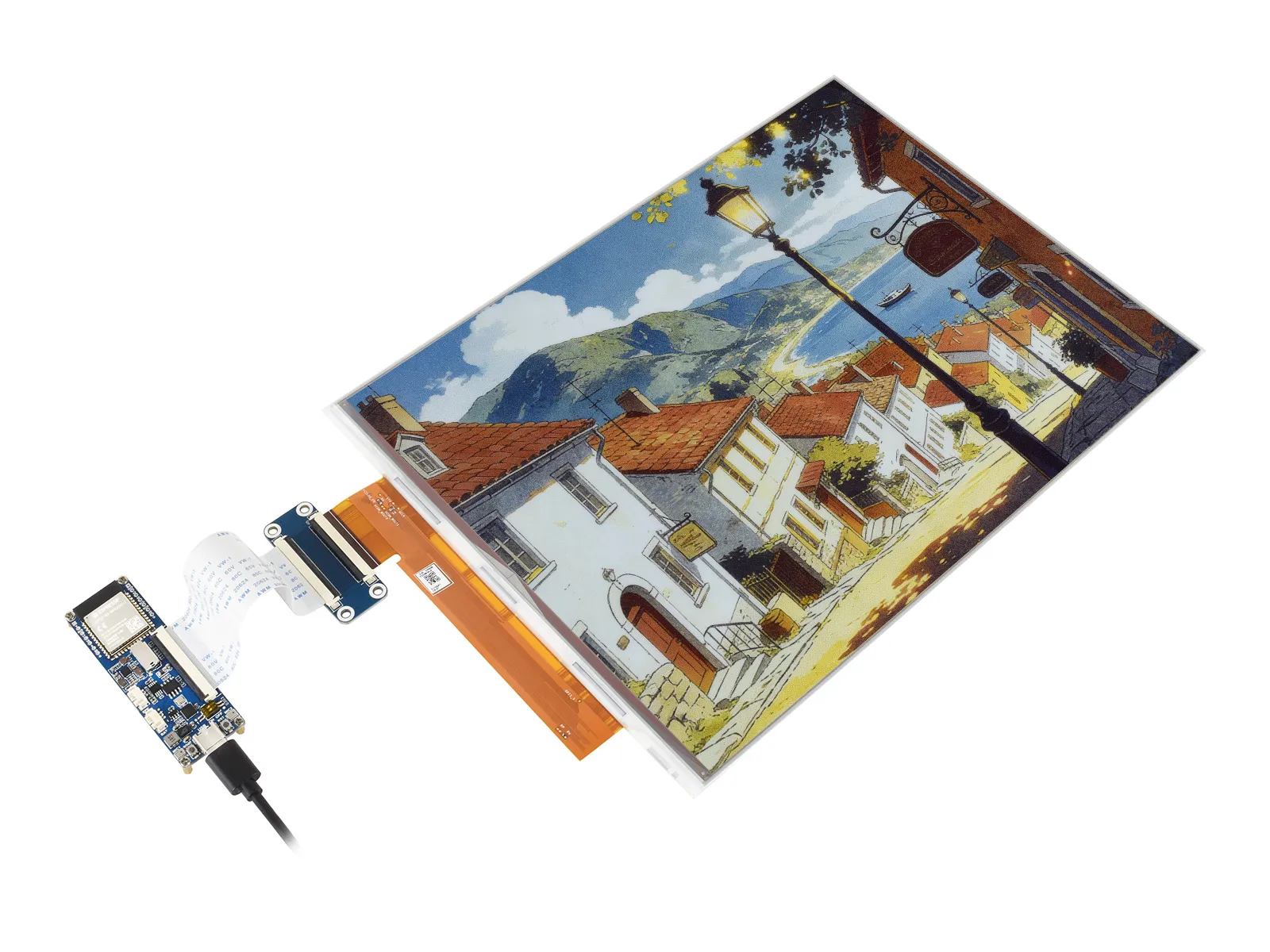
The ESP32-S3-ePaper-13.3E6 driver board is a compact microcontroller development board featuring a 60PIN e‑Paper interface. It uses the ESP32-S3-WROOM-2-N32R16V module, which integrates an Xtensa 32‑bit LX7 dual‑core processor running at up to 240 MHz, 512 KB SRAM (TCM), 16 MB PSRAM, and 32 MB Flash. It supports Wi‑Fi and BLE dual‑mode communication, and includes a TF card slot, a low‑power audio codec circuit, an efficient charge/discharge management chip (ETA6098), and an MX1.25 lithium battery connector. Onboard CH343 serial and CH334 USB HUB chips allow simultaneous USB and UART development through a single Type‑C port. Multiple pin headers are brought out for easy expansion and peripheral connection.
| SKU | Product |
|---|---|
| 34349 | ESP32-S3-ePaper-13.3E6 |
Features
Driver Board Features
- Powered by the ESP32-S3-WROOM-2-N32R16V module, featuring an Xtensa 32-bit LX7 dual-core processor with a main frequency of up to 240MHz
- Integrated 512 KB SRAM, 384 KB ROM, 16 MB PSRAM, and 32 MB Flash
- Integrated 2.4GHz Wi-Fi and Bluetooth LE dual-mode wireless communication with excellent RF performance
- USB Type-C interface, eliminating concerns about plug orientation
- Onboard CH343 and CH334 chips, enabling both USB and UART development via a single Type‑C port
- Onboard 13.3E6 e‑Paper interface, supporting direct connection to the 13.3E6 full‑color e‑Paper screen
- Onboard audio codec chip supports voice capture and playback, facilitating AI voice interaction applications
- Onboard efficient charge/discharge management chip ETA6098 and MX1.25 lithium battery connector
- Built-in TF card slot, supports external storage of images or files
e‑Paper Features
- E Ink Spectra 6 (E6) technology, delivering high‑contrast, high‑saturation color display
- No backlight required; can retain the last displayed content for a long time after power-off
- Very low power consumption, mainly only consumes power during refresh
Onboard Resources
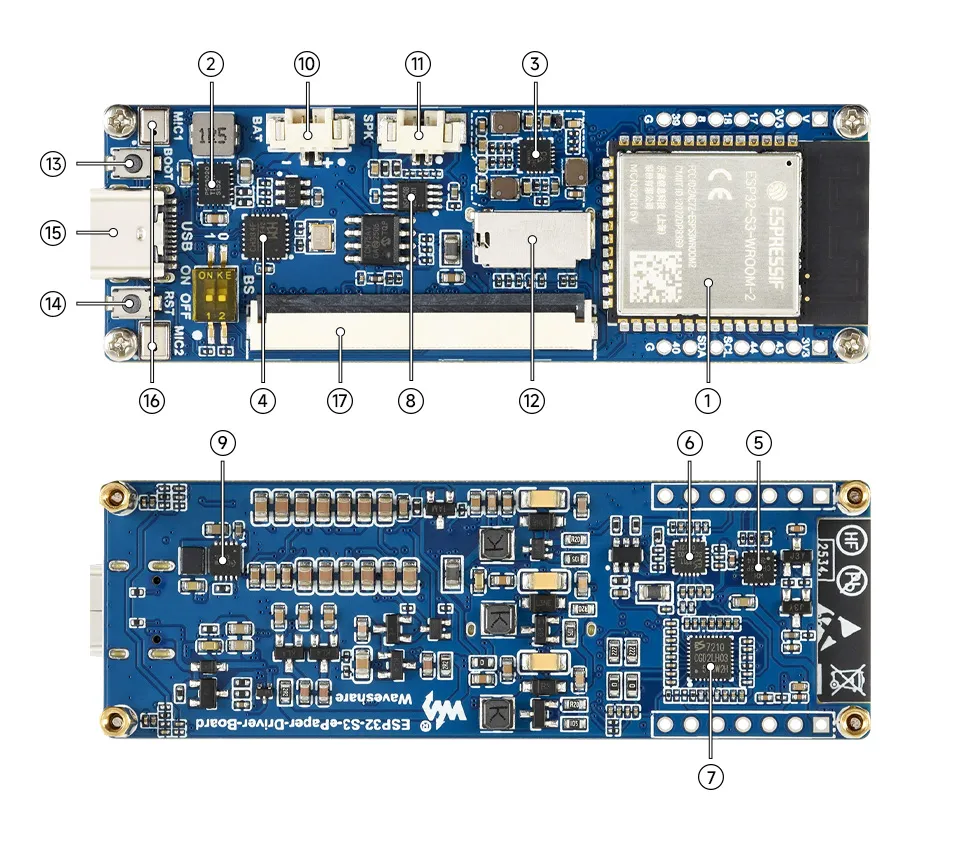
- ESP32-S3-WROOM-1-N16R8 Wi-Fi and Bluetooth SoC, up to 240MHz operating frequency, stacked with 16MB Flash and 8MB PSRAM
- TPS63020DSJR DC/DC boost converter
- EA3036CQBR Power management IC
- USB HUB Chip
- USB‑to‑UART Chip
- ES8311 DAC Audio Codec High-performance, low-power audio digital-to-analog converter
- ES7210 ADC Audio Codec High-performance, low-power audio analog-to-digital converter, supports multi-microphone input
- NS4150B Audio power amplifier chip
- ETA6098 Battery charge/discharge management chip
- MX1.25 2PIN Lithium Battery Header For connecting a lithium battery
- MX1.25 2PIN Speaker Header Audio signal output, for connecting external speaker
- TF Card Slot TF card must be formatted as FAT32 for use
- BOOT Button Press and hold the BOOT button to power on again to enter download mode
- Reset Button
- Type-C Interface ESP32-S3 USB interface for program flashing and serial logging
- Microphone For audio capture
- e‑Paper Driver Interface
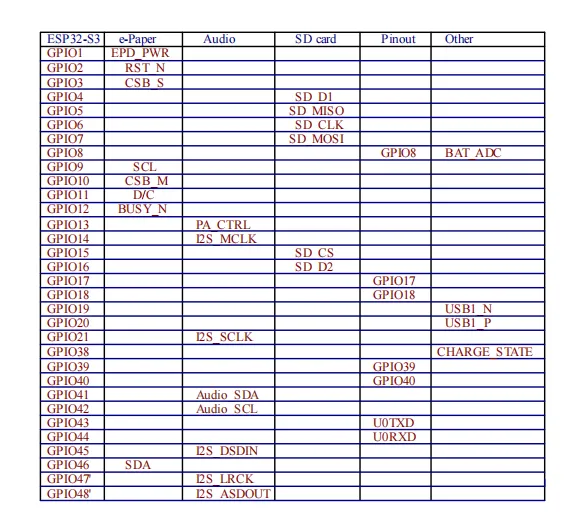
Interface Introduction
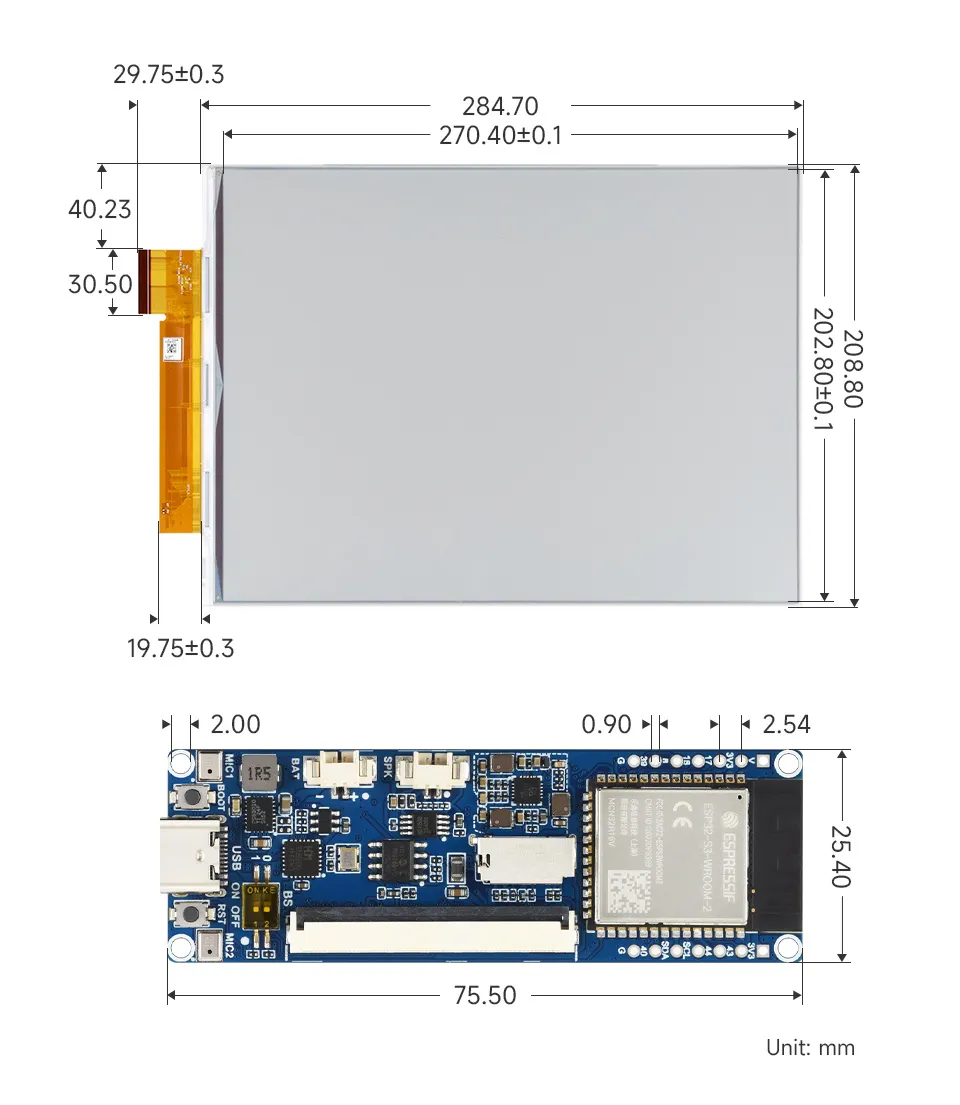
Dimensions
Development Methods
The ESP32-S3-ePaper-Driver-Board supports two development frameworks: Arduino IDE and ESP-IDF, offering flexibility for developers. You can choose the appropriate development tool based on project requirements and personal preference.
Both development methods have their own advantages. Developers can choose based on their needs and skill levels. Arduino is simple to learn and quick to start, suitable for beginners and non-professionals. ESP-IDF provides more advanced development tools and stronger control capabilities, suitable for developers with professional backgrounds or higher performance requirements, and is more appropriate for complex project development.
-
Arduino IDE is a convenient, flexible, and easy-to-use open-source electronics prototyping platform. It requires minimal foundational knowledge, allowing for rapid development after a short learning period. Arduino has a huge global user community, providing a vast amount of open-source code, project examples, and tutorials, as well as a rich library ecosystem that encapsulates complex functions, enabling developers to implement various features rapidly. You can refer to the Working with Arduino to complete the initial setup, and the tutorial also provides related demos for reference.
-
ESP-IDF, short for Espressif IoT Development Framework, is a professional development framework launched by Espressif Systems for its ESP series of chips. It is based on C language development and includes compilers, debuggers, flashing tools, etc. It supports development via command line or integrated development environments (such as Visual Studio Code with the Espressif IDF plugin), which provides features like code navigation, project management, and debugging. We recommend using VS Code for development. For the specific configuration process, please refer to the Working with ESP-IDF. The tutorial also provides relevant demos for reference.