Environment X6 Sensor
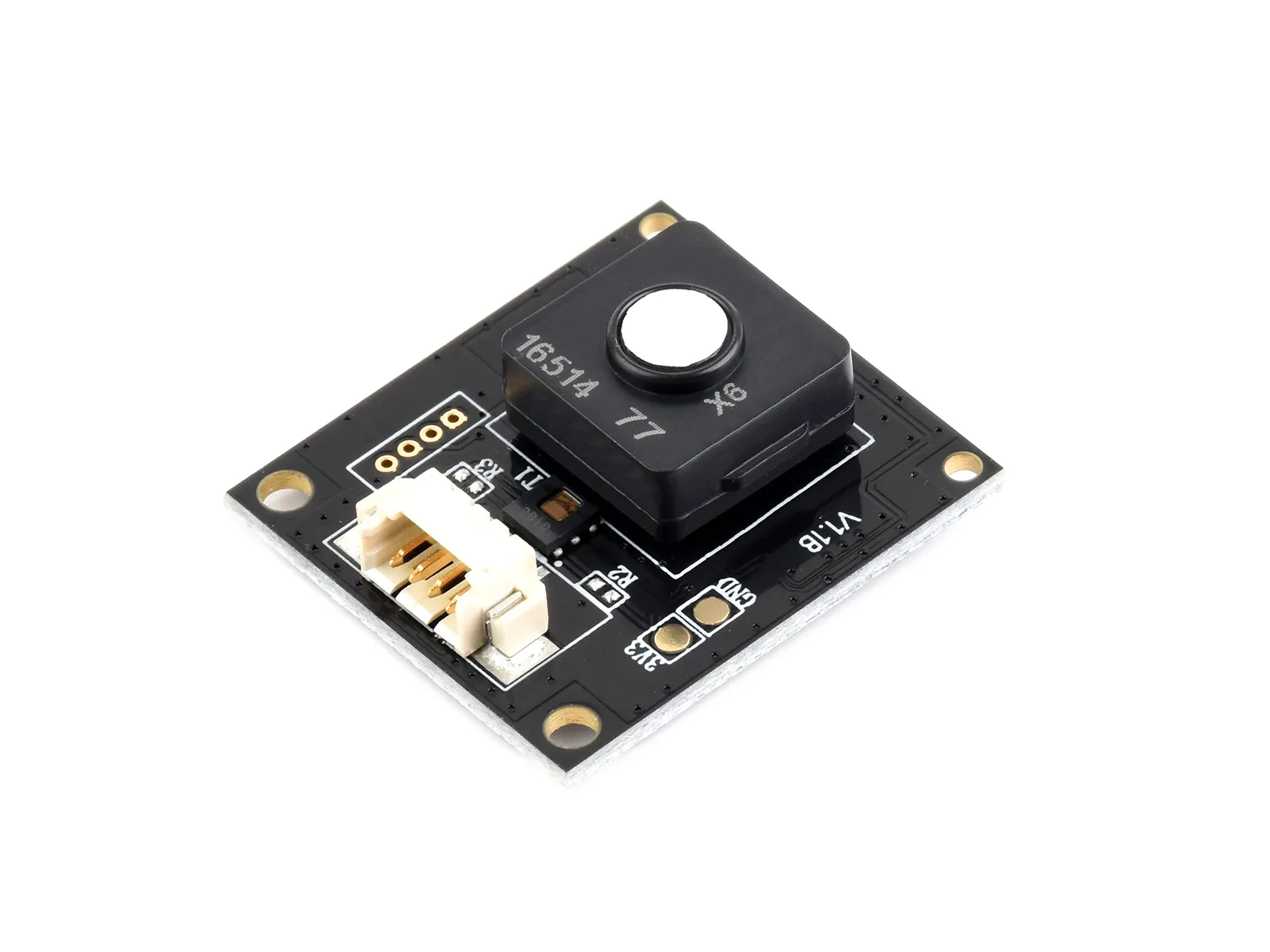
| SKU | Product |
|---|---|
| 34169 | Environment X6 Sensor |
Features
The Environment X6 Sensor is built on EC Sense's (Germany) solid-state polymer electrochemical technology. It uses a multi-electrode integrated structure with a solid-state electrolyte system, generating current signals through electrochemical reactions of gases on the working electrode surface to achieve high-sensitivity detection of target gas concentrations. Compared to conventional gas sensors, the solid-state polymer design offers advantages such as no electrolyte leakage, no poisoning, virtually zero drift, and extended service life.
Application Scenarios
- Smart home
- Ambient air quality monitoring
- In-vehicle air purifiers
- Handheld air quality detectors
- Factory ventilation systems
Working Principle
The solid-state polymer electrochemical sensor uses a classic three-electrode system (Working Electrode WE, Reference Electrode RE, Counter Electrode CE) with multi-layer printing technology. Through a single-electrode multi-layer catalytic active site design, diffusion control layer structure, and intelligent signal decoupling algorithms, it enables parallel detection and identification of multiple gases.
Specifications
| Environment X6 Sensor | |||
|---|---|---|---|
| Supply Voltage | 5V | Logic Voltage | 3.3V |
| Communication Interface | UART | Baud Rate | 9600 bps |
| Measurement Range |
| Resolution |
|
| Accuracy |
| Response Time |
|
| Dimensions | 23 × 25.5 × 9.5 mm | Mounting Hole Diameter | 2.0 mm |
| Operating Current | 6.5 mA | Operating Temperature | -40 ℃ ~ +55 ℃ |
| Operating Humidity | >15%RH | Service Life | 10 years |
The sensor operates at 3.3V logic levels. If using 5V logic, a level shifter is required; otherwise the sensor may be damaged.
Pin Description
| Pin | Label | Description |
|---|---|---|
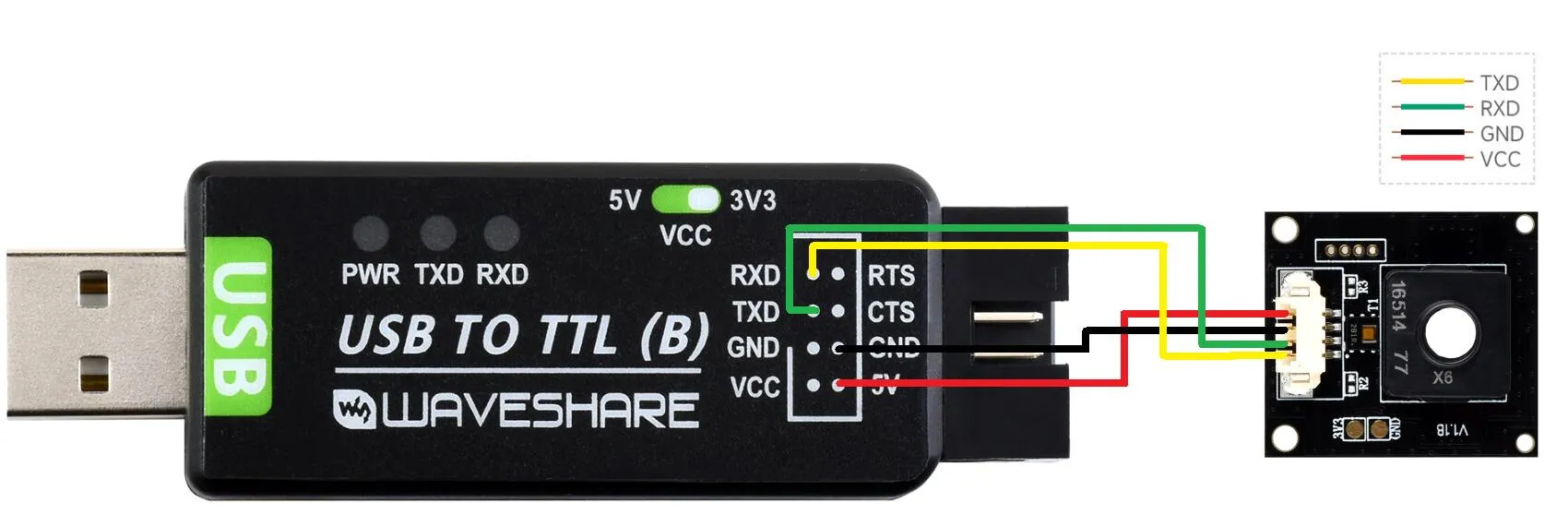
| 1 | VCC | 5V Power Supply |
| 2 | GND | Ground |
| 3 | RXD | UART Input |
| 4 | TXD | UART Output |
Protocol Details
Click to expand
UART Communication Flow
- Default serial configuration: 8 data bits, 1 stop bit, no parity, no flow control, default baud rate 9600
- The protocol consists of a command header, data field, and 0-add8 checksum
- Note: Protocol packets follow big-endian byte order (most significant byte first)
Command Reference
General Notes
- Checksum algorithm: 0-add8 (sum all bytes in the packet, take the lower 8 bits, bitwise invert, then add 1)
- Byte order: Big-endian (most significant byte first)
Reference Information
Gas Concentration Unit Table
| Code | Unit | Description |
|---|---|---|
| 0x00 | IAQ | Indoor Air Quality Index |
| 0x02 | ppm | Parts per million |
IAQ Level Descriptions (based on EPA standards):
| Range | Level |
|---|---|
| 0–50 | Good |
| 51–100 | Moderate |
| 101–150 | Unhealthy for Sensitive Groups |
| 151–200 | Unhealthy |
| 201–300 | Very Unhealthy |
| 301–500 | Hazardous |
Sensor Type Code Table
| Gas Type | Code |
|---|---|
| IAQ | 0x33 |
| TVOC | 0x18 |
| HCHO | 0x17 |
| CO | 0x19 |
Query Current Concentration (0x70)
Reads the real-time concentration of all gases, along with temperature and humidity.
Send (Tx)
| Header | Checksum |
|---|---|
| Byte0 | Byte1 |
| 70 | 0-add8 |
Response (Rx)
| Header | IAQ Data | TVOC Data | HCHO Data | CO Data | Temperature Data | Humidity Data | Checksum |
|---|---|---|---|---|---|---|---|
| Byte0 | Byte1-Byte4 | Byte5-Byte8 | Byte9-Byte12 | Byte13-Byte16 | Byte17-Byte18 | Byte19-Byte20 | Byte21 |
| 70 | 42 30 00 00 | 3D 35 64 F0 | 3D 53 D2 5B | 3D 08 19 55 | 0A C8 | 27 0F | E0 |
Example Breakdown
Send: 0x70 0x90
      │     └── Checksum
      └── Header

Response: 0x70 0x42300000 0x3D3564F0 0x3D53D25B 0x3D081955 0x0AC8 0x270F 0xE0
          │     │          │          │          │          │      │      └── Checksum
          │     │          │          │          │          │      └── Humidity: 0x270F = 9999 → 99.99% RH (2 decimal places)
          │     │          │          │          │          └── Temperature: 0x0AC8 = 2760 → 27.60 ℃ (2 decimal places)
          │     │          │          │          └── CO:   IEEE 754 float → 0.033 ppm
          │     │          │          └── HCHO: IEEE 754 float → 0.052 ppm
          │     │          └── TVOC: IEEE 754 float → 0.044 ppm
          │     └── IAQ:  IEEE 754 float → 44.000
          └── Header
Read Sensor Parameters (0x72)
Queries the detection range and concentration unit of a specified gas channel.
Send (Tx)
| Header | Gas Index | Checksum |
|---|---|---|
| Byte0 | Byte1 | Byte2 |
| 72 | 00 | 0-add8 |
Gas index mapping: 0x00 = IAQ, 0x01 = TVOC, 0x02 = HCHO, 0x03 = CO
Response (Rx)
| Header | Gas Index | Gas Name | Range | Unit | Checksum |
|---|---|---|---|---|---|
| Byte0 | Byte1 | Byte2 | Byte3-Byte4 | Byte5 | Byte6 |
| 72 | 00 | 19 | 03 E8 | 02 | 87 |
Example Breakdown
Send: 0x72 0x00 0x8D
      │     │    └── Checksum
      │     └── Gas index: IAQ
      └── Header

Response: 0x72 0x00 0x19 0x03E8 0x02 0x87
          │     │    │    │      │    └── Checksum
          │     │    │    │      └── Concentration unit: 0x02 = ppm (see Gas Concentration Unit Table)
          │     │    │    └── Range: 0x03E8 = 500
          │     │    └── Gas name: 0x19 = CO (see Sensor Type Code Table)
          │     └── Gas index: IAQ
          └── Header
Read LED Status (0x74)
Queries the current state of the status indicator LED.
Send (Tx)
| Header | Checksum |
|---|---|
| Byte0 | Byte1 |
| 74 | 0-add8 |
Response (Rx)
| Header | LED Status | Checksum |
|---|---|---|
| Byte0 | Byte1 | Byte2 |
| 74 | 01 | 8B |
Example Breakdown
Send: 0x74 0x8C
      │     └── Checksum
      └── Header

Response: 0x74 0x01 0x8B
          │     │    └── Checksum
          │     └── LED status: 0x01 = Blinking (0x00 = Off, any other value = Blinking)
          └── Header
Set LED Status (0x56)
Controls the on/off state of the status indicator LED.
Send (Tx)
| Header | LED Control | Checksum |
|---|---|---|
| Byte0 | Byte1 | Byte2 |
| 56 | 00 | 0-add8 |
LED control values: 0x00 = Off, 0x01 = On
Response (Rx)
| Header | Reserved | Return Value | Checksum |
|---|---|---|---|
| Byte0 | Byte1 | Byte2-Byte3 | Byte4 |
| 56 | 00 | 4F 4B | 10 |
Example Breakdown
Send: 0x56 0x00 0xAA
      │     │    └── Checksum
      │     └── LED control: Turn off the LED
      └── Header

Response: 0x56 0x00 0x4F4B 0x10
          │     │    │      └── Checksum
          │     │    └── Return value: "OK" (setting successful)
          │     └── Reserved
          └── Header
Enter Sleep Mode (0x54)
Puts the sensor into low-power sleep mode.
Send (Tx)
| Header | Sleep Command | Checksum |
|---|---|---|
| Byte0 | Byte1-Byte5 | Byte6 |
| 54 | 73 6C 65 65 70 (ASCII: sleep) | 0-add8 |
Response (Rx)
| Header | Reserved | Return Value | Checksum |
|---|---|---|---|
| Byte0 | Byte1 | Byte2-Byte3 | Byte4 |
| 54 | 00 | 4F 4B | 12 |
Example Breakdown
Send: 0x54 0x73 0x6C 0x65 0x65 0x70 0x93
      │     │                        └── Checksum
      │     └── ASCII: "sleep"
      └── Header

Response: 0x54 0x00 0x4F4B 0x12
          │     │    │      └── Checksum
          │     │    └── Return value: "OK" (command executed successfully)
          │     └── Reserved
          └── Header
Exit Sleep Mode (0x55)
Wakes the sensor and resumes normal operation.
Send (Tx)
| Header | Wake Command | Checksum |
|---|---|---|
| Byte0 | Byte1-Byte5 | Byte6 |
| 55 | 61 77 61 6B 65 (ASCII: awake) | 0-add8 |
Response (Rx)
| Header | Reserved | Return Value | Checksum |
|---|---|---|---|
| Byte0 | Byte1 | Byte2-Byte3 | Byte4 |
| 55 | 00 | 4F 4B | 11 |
Example Breakdown
Send: 0x55 0x61 0x77 0x61 0x6B 0x65 0xA2
      │     │                        └── Checksum
      │     └── ASCII: "awake"
      └── Header

Response: 0x55 0x00 0x4F4B 0x11
          │     │    │      └── Checksum
          │     │    └── Return value: "OK" (command executed successfully)
          │     └── Reserved
          └── Header
Get Sensor Serial Number (0x71)
Reads the sensor's 6-byte unique serial number.
Send (Tx)
| Header | Checksum |
|---|---|
| Byte0 | Byte1 |
| 71 | 0-add8 |
Response (Rx)
| Header | Sensor SN | Checksum |
|---|---|---|
| Byte0 | Byte1-Byte6 | Byte7 |
| 71 | 12 34 56 78 91 23 | C7 |
Example Breakdown
Send: 0x71 0x8F
      │     └── Checksum
      └── Header

Response: 0x71 0x12 0x34 0x56 0x78 0x91 0x23 0xC7
          │     │                              └── Checksum
          │     └── Sensor serial number: 123456789123
          └── Header
Get Firmware Version (0x73)
Reads the sensor's firmware version information.
Send (Tx)
| Header | Checksum |
|---|---|
| Byte0 | Byte1 |
| 73 | 0-add8 |
Response (Rx)
| Header | Firmware Version | Checksum |
|---|---|---|
| Byte0 | Byte1-Byte19 | Byte20 |
| 73 | 69 4E 6F 73 65 58 36 32 30 32 35 31 31 31 32 31 34 33 39 | A2 |
Example Breakdown
Send: 0x73 0x8D
      │     └── Checksum
      └── Header

Response: 0x73 0x694E6F736558363230323531313132313433390 0xA2
          │     │                                         └── Checksum
          │     └── ASCII: "iNoseX6202511121439" (firmware version)
          └── Header
API Overview
Click to expand
environment_x6_init(): Initializes the Environment X6 Sensorenvironment_x6_get_concentration(): Retrieves real-time concentration valuesenvironment_x6_get_sensor_param(): Retrieves sensor parameters, including detection range and unitsenvironment_x6_get_led(): Gets the current LED status (on or off)environment_x6_set_led(): Sets the LED statusenvironment_x6_sleep(): Puts the sensor into sleep modeenvironment_x6_wakeup(): Wakes the sensor from sleep modeenvironment_x6_get_serial(): Retrieves the serial numberenvironment_x6_get_version(): Retrieves the firmware version
Quick Test
-
Testing software: Serial Debugging Assistant paired with a USB-to-TTL adapter for quick verification
-
Test preparation
- Windows PC
- USB TO TTL (B) × 1
- Environment X6 Sensor × 1
- Connection cables
-
Hardware connection
-
Connect the components as shown below
-
-
Testing procedure
- Connect the USB-to-TTL adapter to a USB port on your PC
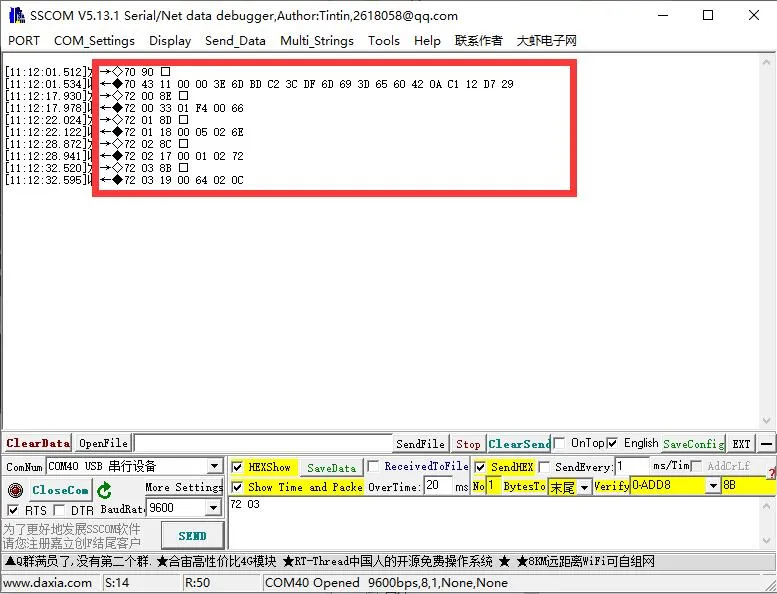
- Open the Serial Debugging Assistant (SSCOM), select the correct COM port, set the baud rate to 9600, open the port, and set the checksum mode to 0-add8
- Send the command in hexadecimal: 70, and the sensor data will be returned:
- Connect the USB-to-TTL adapter to a USB port on your PC
-
① Send the query command
-
② Receive real-time data