Working with Raspberry Pi
This chapter contains the following sections. Please read as needed:
Setting Up Development Environment
1. Installation and Configuration
- For Raspberry Pi system installation and usage, please refer to this link
- After successful booting, configure the Raspberry Pi environment
2. Download Demo
sudo apt install gpiod libgpiod-dev
cd ~
git clone https://github.com/waveshareteam/Environment-X6-Sensor
cd Environment-X6-Sensor/examples/raspberrypi
3. Enable Raspberry Pi UART
-
Enter the command in the Raspberry Pi terminal:
sudo raspi-config nonint do_serial 2 -
Select NO in the first pop-up window, YES in the second one, and OK in the final one.


Example
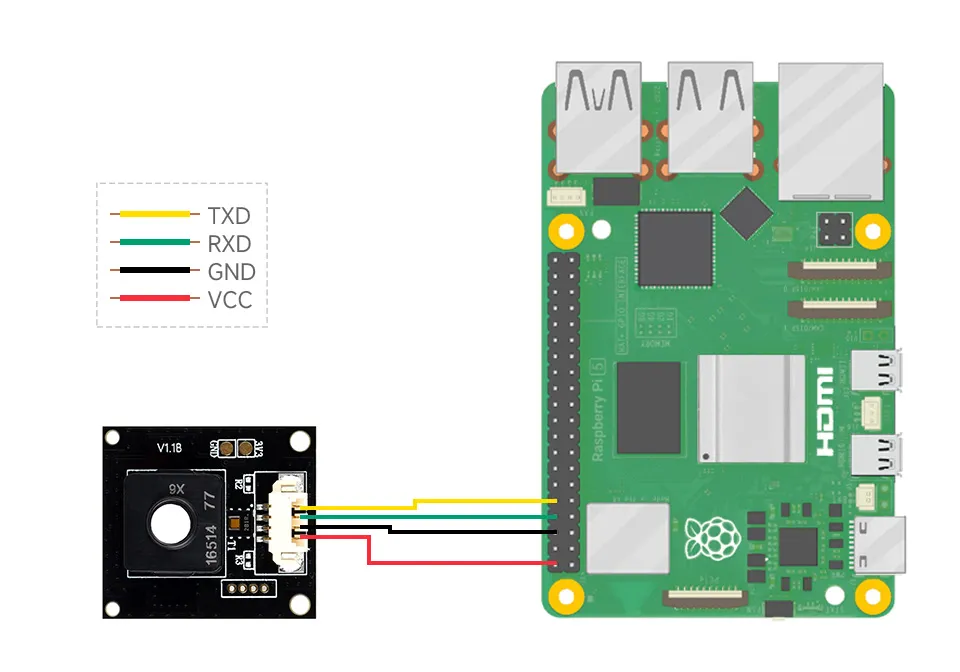
Hardware Connection
Refer to the following diagrams for connection
Run C Demo
cd ~/environment-x6-sensor/examples/raspberrypi/c/
make
./main
Run Python Demo
cd ~/environment-x6-sensor/examples/raspberrypi/python/example
python main.py