Working with Jetson
Hardware Connection

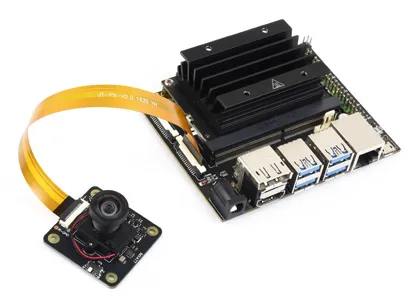
- The images above are for demonstration purposes only. This product does not include the above mainboards or kits.
- Requires the official carrier board or a compatible third-party carrier board.
- Connect the camera ribbon cable to the CSI interface on the Jetson board, paying attention to the orientation of the metal contacts.
Software Configuration
JetPack 4.6 and Above (Recommended)
Jetson boards use the jetson-io tool to configure camera drivers. The IMX477 sensor is natively supported.
-
Open a terminal and run the jetson-io tool:
sudo /opt/nvidia/jetson-io/jetson-io.py -
Select
Configure Jetson CSI Connector. -
Select
Configure for compatible hardware. -
Choose the appropriate configuration based on the number of cameras connected:
Camera IMX477 Dual— Both camera interfaces are set to IMX477Camera IMX477-A and IMX219-B— One interface is IMX477, the other is IMX219
-
Save the configuration and reboot the system.
JetPack Versions Below 4.6
For JetPack versions below 4.6, additional installation of the IMX477 driver is required. Installing the driver may affect the use of the original IMX219 camera. It is recommended to back up the system before installation.
Refer to RidgeRun's IMX477 driver tutorial:
https://github.com/RidgeRun/NVIDIA-Jetson-IMX477-RPIV3
Testing the Camera
Check if the Camera is Detected
sudo dmesg | grep imx477
If the camera is recognized successfully, you will see information related to the IMX477 sensor.
Preview with GStreamer
After connecting an HDMI or DP display, run the following command to preview the camera feed:
DISPLAY=:0.0 gst-launch-1.0 nvarguscamerasrc ! 'video/x-raw(memory:NVMM), width=1920, height=1080, format=(string)NV12, framerate=(fraction)20/1' ! nvoverlaysink -e
Dual Camera Test
To test dual cameras, add the sensor-id parameter to select the camera:
# Test video0
DISPLAY=:0.0 gst-launch-1.0 nvarguscamerasrc sensor-id=0 ! 'video/x-raw(memory:NVMM), width=1920, height=1080, format=(string)NV12, framerate=(fraction)20/1' ! nvoverlaysink -e

# Test video1
DISPLAY=:0.0 gst-launch-1.0 nvarguscamerasrc sensor-id=1 ! 'video/x-raw(memory:NVMM), width=1920, height=1080, format=(string)NV12, framerate=(fraction)20/1' ! nvoverlaysink -e
- In NV12, the "12" is a number, not a letter.
- The test output is displayed on the HDMI or DP monitor; ensure the display is properly connected.
- Jetson series boards require the corresponding driver configuration to use the IMX477 camera. Please refer to the official Jetson documentation for details.