FAQ
Q: What is the correct way to shut down the device?
A: First shut down the system via software (or short-press the Pi 5 side silicone power button to trigger shutdown). After the device is fully powered off, if needed, double-press the top power button to disconnect the device power supply.
Q: Raspberry Pi 5 reports insufficient current?
A: When the Raspberry Pi 5 boots up, it detects the PD protocol on the Type-C port. If no PD protocol is detected, the system will display the following prompt and limit the output current to 3A.

Solution: Modify the EEPROM configuration to remove the current limit and allow up to 5A.
-
Open the EEPROM configuration editor:
sudo rpi-eeprom-config --edit -
Add the following line at the end of the configuration file, save and exit:
PSU_MAX_CURRENT=5000 -
Reboot the Raspberry Pi. The prompt should disappear, indicating the setting has taken effect.

Q: How to completely turn on or off the screen on Raspberry Pi Trixie / Bookworm?
A: In a Wayland environment (Raspberry Pi OS Trixie or Bookworm), use the wlr-randr command to control the screen power state.
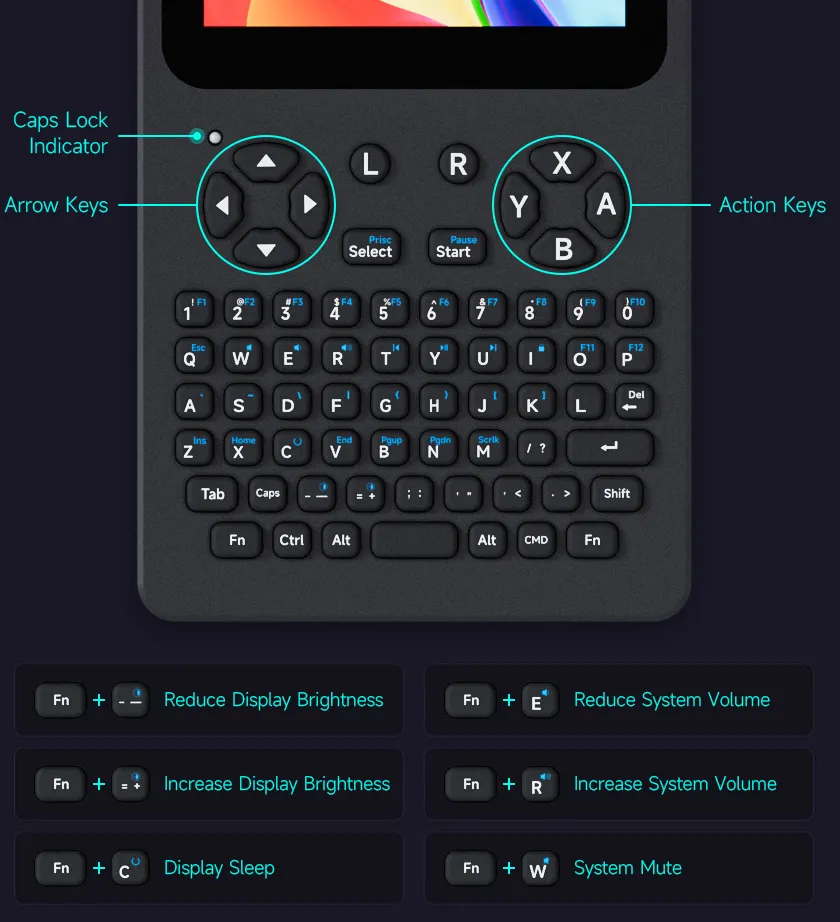
We recommend using the shortcut Fn + C to quickly turn the screen off/on without entering any commands.
wlr-randr --output HDMI-A-1 --off
wlr-randr --output HDMI-A-1 --on
Q: The screen displays correctly, but touch does not respond. What should I do?
A: First, verify that the system configuration is correct.
If you are using the pre-installed PocketTerm35 image, touch-related settings are already pre-configured, and no additional driver installation is required.
If you are using a self-flashed Raspberry Pi OS, please refer to the software configuration section to complete the relevant setup: add the corresponding configuration to config.txt and copy the provided .dtbo file to the system's overlays directory.
The touch interface of the PocketTerm35 is implemented via I2C. Refer to the diagram below:
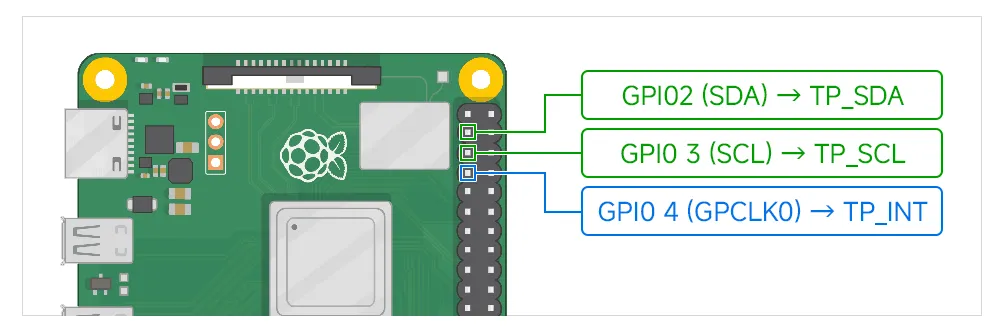
If the software configuration is verified correct but touch still does not respond, check whether any other device tree configurations, I2C peripherals, or custom GPIO settings are occupying GPIO2 / GPIO3 / GPIO4, which may cause resource conflicts with the touch interface.
Also, ensure that the Raspberry Pi GPIO pins are making reliable contact with the spring-loaded pogo pins on the baseboard. If necessary, clean any dirt or oxidation from the GPIO contact surfaces. If you have the tools, you can also use a multimeter to check continuity on the relevant contacts.
Q: The keyboard does not respond. What should I do?
A: The PocketTerm35 keyboard works through the Raspberry Pi's USB OTG interface and requires the system to enable USB Host mode. Check that the following configuration is present in config.txt:
dtoverlay=dwc2,dr_mode=host
If the configuration is correct but the keyboard still does not respond, power off the device completely and check that the internal Type-C adapter cable and the 1.27H 4PIN cable are properly connected.
Q: What should I do if there is no sound from the speaker?
A: Right-click the speaker icon in the top-right corner of the Raspberry Pi desktop (or long-press on the touch screen) and confirm that the audio output is switched to HDMI, and that the system is not muted and the volume is turned up.
If there is still no sound, power off the device and check that the speaker is connected to the 4PIN PH1.25 audio interface and that the connection is secure.
Q: When powering on the Raspberry Pi 5, a configuration screen appears and causes screen corruption. What should I do?
A: Some Raspberry Pi 5 units may enter the EEPROM Bootloader's Network Install configuration interface during the boot process.
This interface is part of the Raspberry Pi 5 EEPROM Bootloader's network installation feature. When switching from this interface to the system desktop during boot, the display output mode may change, and in some cases screen glitches or display abnormalities may occur.
You can prevent this interface from automatically appearing at boot by disabling the Network Install auto-start function in the EEPROM.
After entering the system, run:
sudo -E rpi-eeprom-config --edit
In the EEPROM configuration, locate the following entry:
NET_INSTALL_AT_POWER_ON=1
Change it to:
NET_INSTALL_AT_POWER_ON=0
If this entry does not exist in the configuration file, you can manually add it at the end of the file:
NET_INSTALL_AT_POWER_ON=0
After saving, reboot the device:
sudo reboot
After this change, the Raspberry Pi 5 will no longer automatically enter the Network Install configuration screen at boot, reducing the likelihood of screen glitches or display abnormalities caused by display mode switching during the startup phase.
This setting does not affect normal booting from TF card, USB, or NVMe; it only disables the automatic entry into the network installation interface at power-on.
Note: This issue is not related to the PocketTerm35 screen hardware; it is typically caused by the Raspberry Pi 5 EEPROM Bootloader boot configuration.
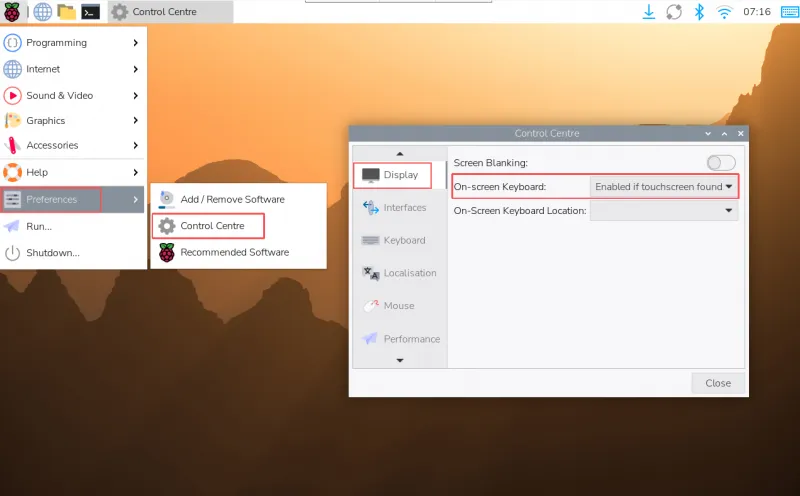
Q: How do I enable or disable the touchscreen virtual keyboard (Squeekboard)?
A: In Raspberry Pi OS Bookworm, the on-screen keyboard (Squeekboard) is integrated by default.
-
It automatically appears when text input is possible and hides when not.
-
You can manually show or hide it using the keyboard icon in the top-right corner of the taskbar.

To manually control or disable the virtual keyboard, you can:
-
Open the top-left menu → Preferences → Control Centre → Display
-
Set the on-screen keyboard to show or hide in the relevant options
Q: Is it normal for the device to get hot? What should I do if it feels too warm?
A: Some heat generation during normal operation is normal. The temperature generally does not exceed 60°C.
If the device feels too warm, you can reduce the screen brightness to improve the situation.
Screen brightness adjustment: Press Fn + - to lower brightness.