Working with Arduino
This chapter contains the following sections. Please read as needed:
Arduino Getting Started
New to Arduino ESP32 development and looking for a quick start? We have prepared a comprehensive Getting Started Tutorial for you.
- Section 0: Getting to Know ESP32
- Section 1: Installing and Configuring Arduino IDE
- Section 2: Arduino Basics
- Section 3: Digital Output/Input
- Section 4: Analog Input
- Section 5: Pulse Width Modulation (PWM)
- Section 6: Serial Communication (UART)
- Section 7: I2C Communication
- Section 8: SPI Communication
- Section 9: Wi-Fi Basics
- Section 10: Web Server
- Section 11: Bluetooth
- Section 12: LVGL GUI Development
- Section 13: Comprehensive Project
Note: This tutorial uses the ESP32-S3-Zero as a reference example, and all hardware code is based on its pinout. Before you start, we recommend checking the pinout of your development board to ensure the pin configuration is correct.
Setting Up the Development Environment
1. Installing and Configuring the Arduino IDE
Please refer to the tutorial Installing and Configuring Arduino IDE to download and install the Arduino IDE and add ESP32 support.
2. Installing Libraries
Install the Adafruit GFX Library before opening the example. The ESP32-HUB75-MatrixPanel-I2S-DMA driver files are included in the example directory and do not require separate installation.
Download the complete 01_SimpleTestShapes directory, preserve its original file structure, and open 01_SimpleTestShapes.ino in Arduino IDE. The complete sketch is provided below.
| Library/File Name | Description | Version | Installation Method |
|---|---|---|---|
| Adafruit GFX Library | GFX Library graphics library | v1.12.5 | Install via Library Manager or manually |
Board Installation Instructions
| Board Name | Installation Requirement | Version Requirement |
|---|---|---|
| ESP32 by Espressif Systems | "Install Offline" / "Install Online" | 3.3.7 |
Installation Steps:
- For installation methods, refer to: Arduino Library Management Tutorial.
Example
3. Arduino Project Parameter Settings
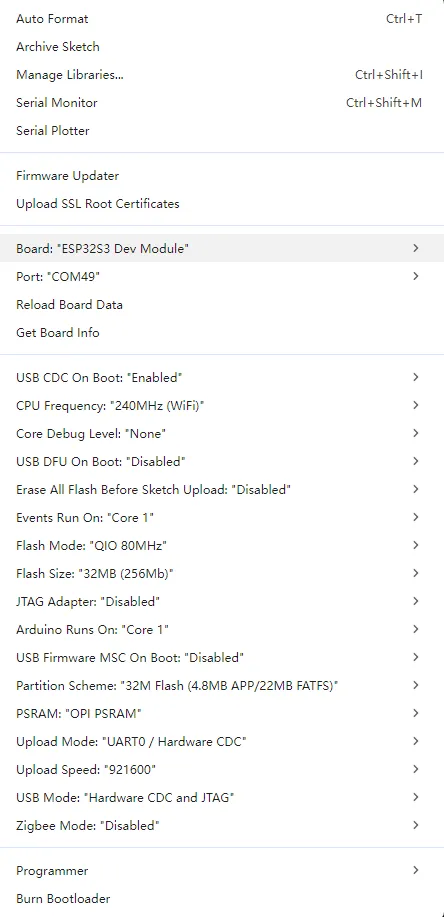
Complete Example Code
Configured for one 64×32 panel (PANEL_CHAIN set to 1), the sketch initializes the HUB75 panel, draws test shapes and text, and cycles through solid colors.
01_SimpleTestShapes.ino
#include <ESP32-HUB75-MatrixPanel-I2S-DMA.h>
#include <string.h>

#define PANEL_RES_X 64
#define PANEL_RES_Y 32
#define PANEL_CHAIN 1

MatrixPanel_I2S_DMA *dma_display = nullptr;

uint16_t myBLACK;
uint16_t myWHITE;
uint16_t myRED;
uint16_t myGREEN;
uint16_t myBLUE;

uint16_t colorWheel(uint8_t pos) {
  if (pos < 85) {
    return dma_display->color565(pos * 3, 255 - pos * 3, 0);
  }

  if (pos < 170) {
    pos -= 85;
    return dma_display->color565(255 - pos * 3, 0, pos * 3);
  }

  pos -= 170;
  return dma_display->color565(0, pos * 3, 255 - pos * 3);
}

void drawText(uint8_t colorWheelOffset) {
  const char *line1 = "ESP32 DMA";
  const char *line2 = "*********";
  const char *line3 = "LED MATRIX";
  const char *line4 = "64x32 RGB";

  const int16_t display_w = dma_display->width();
  const int16_t display_h = dma_display->height();

  dma_display->setTextWrap(false);

  int8_t text_size = 1;
  for (int8_t candidate_size = 1; candidate_size <= 4; candidate_size++) {
    dma_display->setTextSize(candidate_size);

    int16_t x1 = 0;
    int16_t y1 = 0;
    uint16_t w1 = 0;
    uint16_t h1 = 0;

    dma_display->getTextBounds(line1, 0, 0, &x1, &y1, &w1, &h1);
    const bool fits_1 = static_cast<int16_t>(w1) <= display_w;

    dma_display->getTextBounds(line2, 0, 0, &x1, &y1, &w1, &h1);
    const bool fits_2 = static_cast<int16_t>(w1) <= display_w;

    dma_display->getTextBounds(line3, 0, 0, &x1, &y1, &w1, &h1);
    const bool fits_3 = static_cast<int16_t>(w1) <= display_w;

    dma_display->getTextBounds(line4, 0, 0, &x1, &y1, &w1, &h1);
    const bool fits_4 = static_cast<int16_t>(w1) <= display_w;

    const int16_t line_h = 8 * candidate_size;
    const bool fits_v = (4 * line_h) <= display_h;

    if (fits_1 && fits_2 && fits_3 && fits_4 && fits_v) {
      text_size = candidate_size;
    }
  }

  dma_display->setTextSize(text_size);

  const int16_t line_h = 8 * text_size;
  int16_t remaining_h = display_h - (4 * line_h);
  if (remaining_h < 0) {
    remaining_h = 0;
  }
  const int16_t gap_h = remaining_h / 5;

  int16_t x1 = 0;
  int16_t y1 = 0;
  uint16_t tw = 0;
  uint16_t th = 0;

  dma_display->getTextBounds(line1, 0, 0, &x1, &y1, &tw, &th);
  int16_t x_line1 = (display_w - static_cast<int16_t>(tw)) / 2;
  if (x_line1 < 0) {
    x_line1 = 0;
  }
  dma_display->setCursor(x_line1, gap_h);
  for (uint16_t i = 0; i < strlen(line1); i++) {
    dma_display->setTextColor(colorWheel((i * 32) + colorWheelOffset));
    dma_display->print(line1[i]);
  }

  dma_display->getTextBounds(line2, 0, 0, &x1, &y1, &tw, &th);
  int16_t x_line2 = (display_w - static_cast<int16_t>(tw)) / 2;
  if (x_line2 < 0) {
    x_line2 = 0;
  }
  dma_display->setCursor(x_line2, gap_h + (line_h + gap_h));
  for (uint16_t i = 0; i < strlen(line2); i++) {
    dma_display->setTextColor(colorWheel(((i + 9) * 32) + colorWheelOffset));
    dma_display->print(line2[i]);
  }

  dma_display->getTextBounds(line3, 0, 0, &x1, &y1, &tw, &th);
  int16_t x_line3 = (display_w - static_cast<int16_t>(tw)) / 2;
  if (x_line3 < 0) {
    x_line3 = 0;
  }
  dma_display->setCursor(x_line3, gap_h + (2 * (line_h + gap_h)));
  dma_display->setTextColor(dma_display->color444(15, 15, 15));
  dma_display->print(line3);

  dma_display->getTextBounds(line4, 0, 0, &x1, &y1, &tw, &th);
  int16_t x_line4 = (display_w - static_cast<int16_t>(tw)) / 2;
  if (x_line4 < 0) {
    x_line4 = 0;
  }
  dma_display->setCursor(x_line4, gap_h + (3 * (line_h + gap_h)));
  for (uint16_t i = 0; i < strlen(line4); i++) {
    const char c = line4[i];

    if (c == 'R') {
      dma_display->setTextColor(dma_display->color444(15, 0, 0));
    } else if (c == 'G') {
      dma_display->setTextColor(dma_display->color444(0, 15, 0));
    } else if (c == 'B') {
      dma_display->setTextColor(dma_display->color444(0, 0, 15));
    } else if (c == ' ') {
      dma_display->setTextColor(dma_display->color444(15, 15, 15));
    } else {
      dma_display->setTextColor(colorWheel((i * 32) + colorWheelOffset));
    }

    dma_display->print(c);
  }
}

void setup() {
  HUB75_I2S_CFG mxconfig(
    PANEL_RES_X,
    PANEL_RES_Y,
    PANEL_CHAIN
  );

  mxconfig.gpio.e = 9;
  mxconfig.clkphase = false;
  mxconfig.driver = HUB75_I2S_CFG::SHIFTREG;
  mxconfig.i2sspeed = HUB75_I2S_CFG::HZ_16M;
  mxconfig.min_refresh_rate = 240;

  dma_display = new MatrixPanel_I2S_DMA(mxconfig);
  dma_display->begin();
  dma_display->setBrightness8(90);
  dma_display->clearScreen();

  myBLACK = dma_display->color565(0, 0, 0);
  myWHITE = dma_display->color565(255, 255, 255);
  myRED = dma_display->color565(255, 0, 0);
  myGREEN = dma_display->color565(0, 255, 0);
  myBLUE = dma_display->color565(0, 0, 255);

  dma_display->fillScreen(myWHITE);
  dma_display->fillRect(
    0,
    0,
    dma_display->width(),
    dma_display->height(),
    dma_display->color444(0, 15, 0)
  );
  delay(500);

  dma_display->drawRect(
    0,
    0,
    dma_display->width(),
    dma_display->height(),
    dma_display->color444(15, 15, 0)
  );
  delay(500);

  dma_display->drawLine(
    0,
    0,
    dma_display->width() - 1,
    dma_display->height() - 1,
    dma_display->color444(15, 0, 0)
  );
  dma_display->drawLine(
    dma_display->width() - 1,
    0,
    0,
    dma_display->height() - 1,
    dma_display->color444(15, 0, 0)
  );
  delay(500);

  dma_display->drawCircle(
    10,
    10,
    10,
    dma_display->color444(0, 0, 15)
  );
  delay(500);

  dma_display->fillCircle(
    40,
    21,
    10,
    dma_display->color444(15, 0, 15)
  );
  delay(500);

  dma_display->fillScreen(myBLACK);
  drawText(0);
}

uint8_t wheelval = 0;

void loop() {
  drawText(wheelval);
  wheelval += 1;
  delay(2000);

  dma_display->clearScreen();
  dma_display->fillScreen(myBLACK);
  delay(2000);

  dma_display->fillScreen(myRED);
  delay(2000);

  dma_display->fillScreen(myGREEN);
  delay(2000);

  dma_display->fillScreen(myBLUE);
  delay(2000);

  dma_display->fillScreen(myWHITE);
  delay(2000);

  dma_display->clearScreen();
}
Code Analysis
setup(): Configures the HUB75 panel, initializes the DMA display driver, sets the brightness, and draws basic shapes before the color-cycle test starts.colorWheel(pos): Converts a position from 0 to 255 into an RGB565 color used for the text animation.drawText(colorWheelOffset): Draws four lines of text and applies a color transition to selected characters.loop(): Repeatedly displays the text test, fills the panel with black, red, green, blue, and white, and then clears the display.delay(2000): Keeps each color state visible for 2 seconds.dma_display->clearScreen(): Clears the display before the next color sequence begins.
Example Output (Arduino IDE)
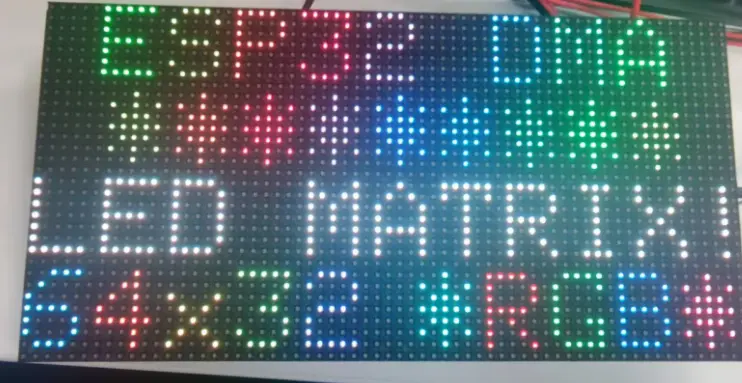 | 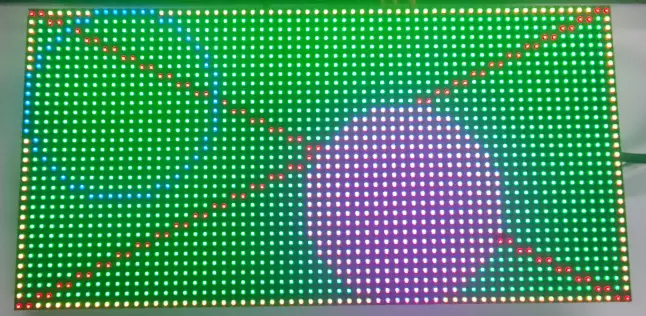 |
|---|