RGB-Matrix-Px-64x32 Working with R7FA4 PLUS A
Working with R7FA4 PLUS A
Hardware Connection
Required Components
- RGB-Matrix-P4-64x32 (included in this product)
- 2 × 8PIN 2.54mm pitch cable (included in this product)
- R7FA4 PLUS A (must be purchased separately)
Hardware Connection
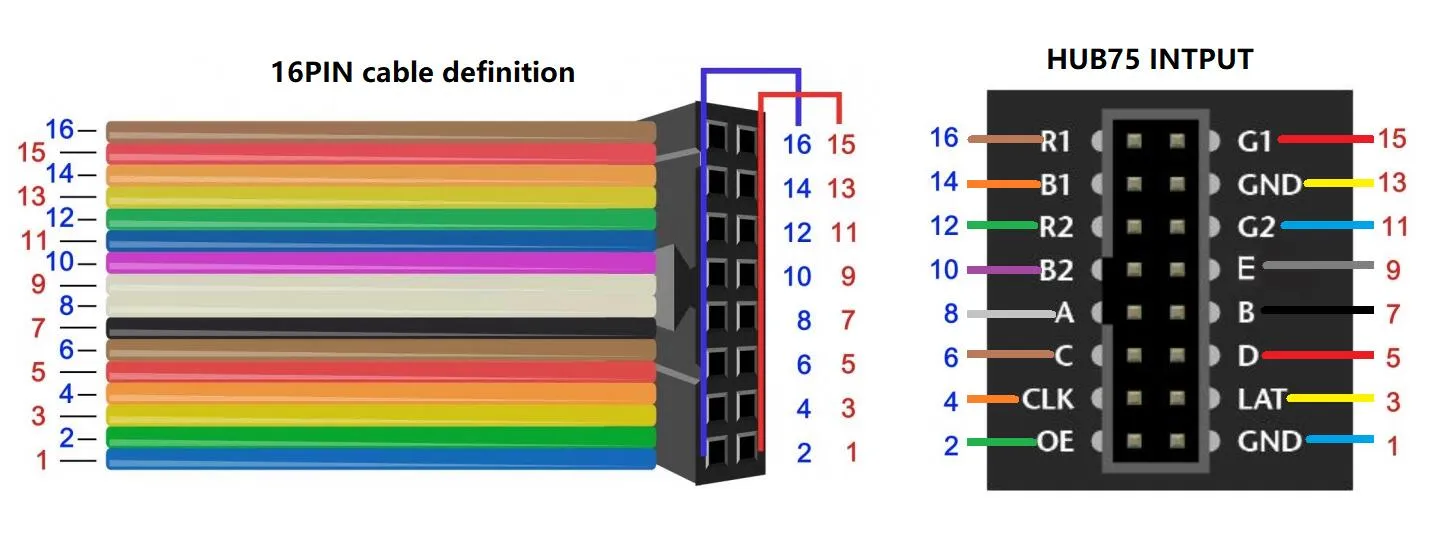
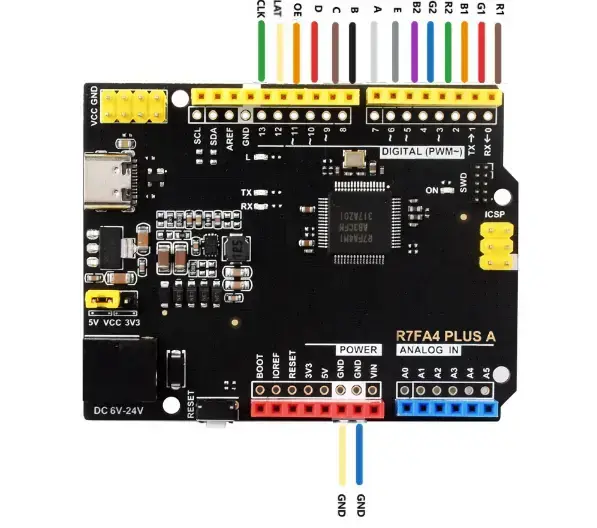
tip
- The performance of this development board is limited, and cascading effects may be poor. If necessary, consider using a higher-performance board of the same type.
Code Description
R7FA4-PLUS-A .ino
#define Matrix_Width 64
#define Matrix_Height 32

void Demo_0() {
  int16_t panel_width = matrix.width();
  int16_t panel_height = matrix.height();
  int16_t min_size = (panel_width < panel_height) ? panel_width : panel_height;
  int16_t circle_radius = min_size / 6;
  if (circle_radius < 2) {
    circle_radius = 2;
  }

  // draw a pixel in solid white
  screen_clear();
  matrix.setFont(NULL);
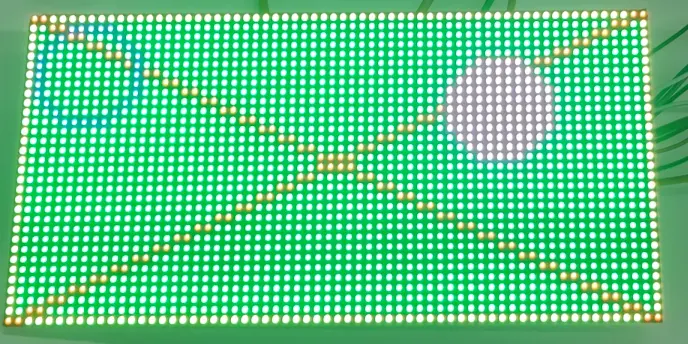
  matrix.drawPixel(0, 0, matrix.Color333(7, 7, 7));
  panel_delay(500);

  matrix.fillRect(0, 0, matrix.width(), matrix.height(),
                  matrix.Color333(0, 7, 0));
  panel_delay(500);

  matrix.drawRect(0, 0, matrix.width(), matrix.height(),
                  matrix.Color333(7, 7, 0));
  panel_delay(500);

  // draw an 'X' in red
  matrix.drawLine(0, 0, matrix.width() - 1, matrix.height() - 1,
                  matrix.Color333(7, 0, 0));
  matrix.drawLine(matrix.width() - 1, 0, 0, matrix.height() - 1,
                  matrix.Color333(7, 0, 0));
  panel_delay(500);

  // draw a blue circle
  matrix.drawCircle(circle_radius + 1, circle_radius + 1, circle_radius,
                    matrix.Color333(0, 0, 7));
  panel_delay(500);

  // fill a violet circle
  matrix.fillCircle((panel_width * 3) / 4, panel_height / 3, circle_radius,
                    matrix.Color333(7, 0, 7));
  panel_delay(500);

  // fill the screen with 'black'
  screen_clear();

  // draw some text!
  matrix.setTextSize(1);      // size 1 == 8 pixels high
  matrix.setTextWrap(false);  // Don't wrap at end of line - will do ourselves

  uint8_t draw_y = Matrix_Height / 4;
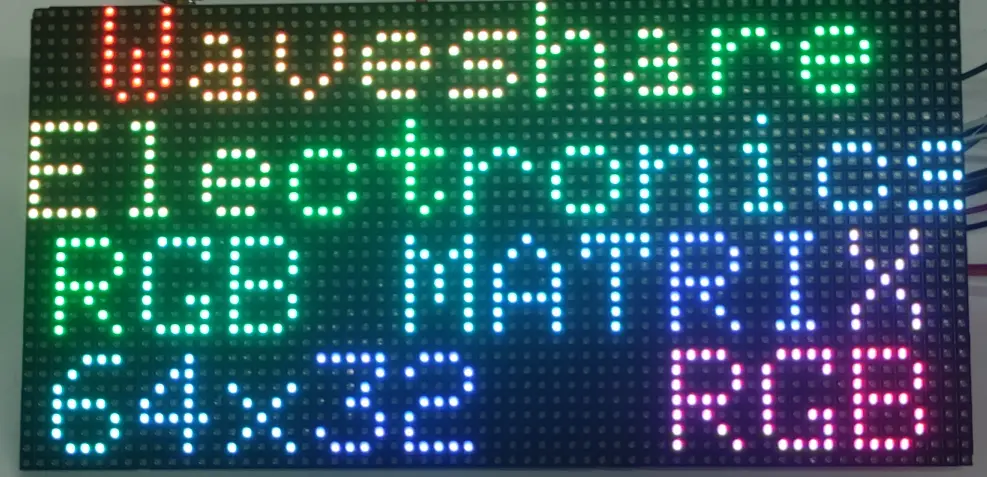
  print_centered_rainbow_text(draw_y * 0, "Waveshare", 0);
  print_centered_rainbow_text(draw_y * 1, "Electronics", 4);
  print_centered_rainbow_text(draw_y * 2, "RGB MATRIX", 8);
  char resolution_text[24];
  snprintf(resolution_text, sizeof(resolution_text), "%dx%d  RGB",
          panel_width, panel_height);
  print_centered_rainbow_text(draw_y * 3, resolution_text, 12);

  panel_delay(2000);
}
Code Analysis
Matrix_Width / Matrix_Height:- Defines the panel resolution (64×32), used for calculating layout parameters such as text row positions.
panel_width / panel_height:- Reads the actual panel width and height from the driver object to avoid mismatches with the configuration.
circle_radius:- Calculates the circle radius based on the shorter side, ensuring a minimum radius of 2 to prevent the circle from being invisible.
screen_clear():- Clears the screen and prepares for the next drawing step, allowing each step to be observed.
drawPixel / fillRect / drawRect / drawLine / drawCircle / fillCircle:- Sequentially draws a pixel, a filled rectangle, a rectangle outline, crossed lines, and circles, quickly verifying basic primitive and color rendering.
matrix.setTextSize(1) / matrix.setTextWrap(false):- Sets the font size and disables automatic text wrapping, making it easy to output multiple lines at specified positions.
print_centered_rainbow_text():- Prints rainbow-colored text centered at different Y positions, and uses
snprintf()to generate a resolution string for display.
- Prints rainbow-colored text centered at different Y positions, and uses
panel_delay(...):- Delays after each drawing step, allowing the user to observe the screen effect.
Operation Result
 |  |
|---|