RGB-Matrix-Px-64x32 Working with STM32
Working with STM32F103RBT6
Hardware Connection
Required Components
- RGB-Matrix-P4-64x32 (included in this product)
- 2 × 8PIN 2.54mm pitch cable (included in this product)
- STM32F103RB (must be purchased separately)
Hardware Connection
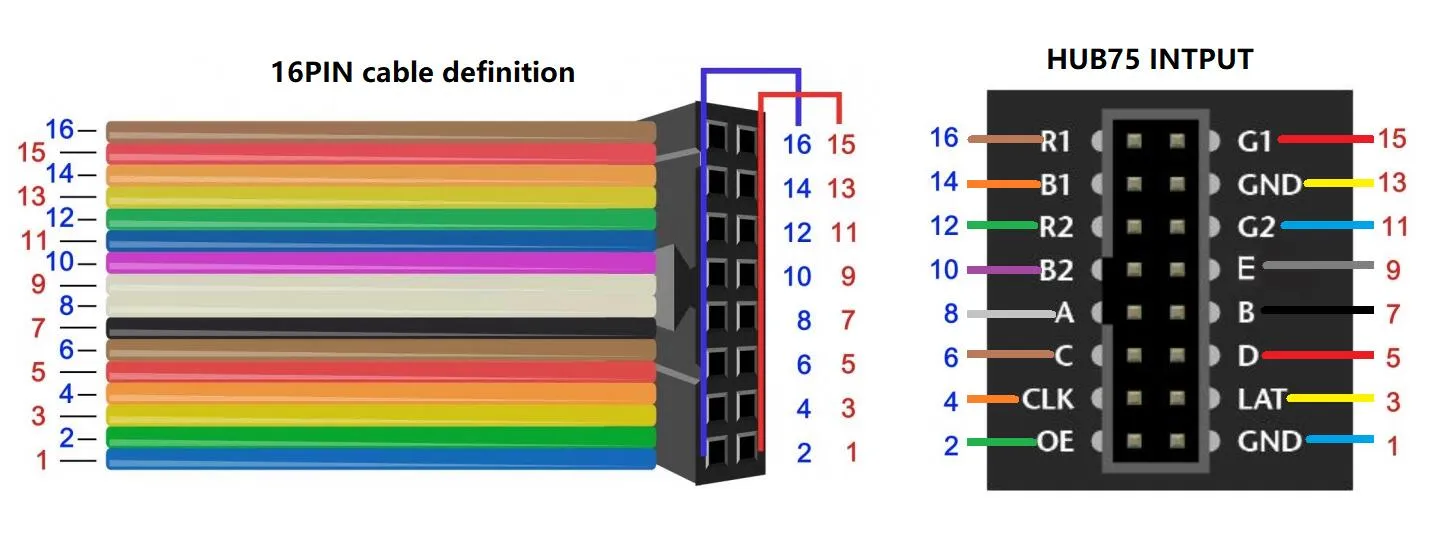
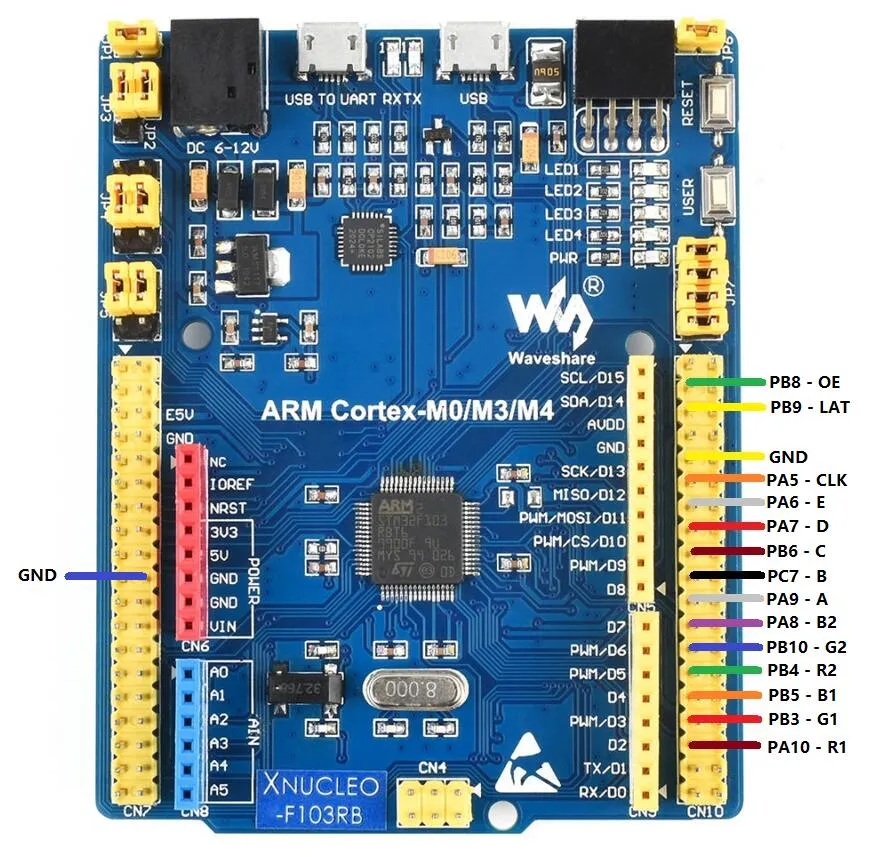
tip
- The example is developed based on the HAL library. Download the program, locate the STM32 program file directory, and open
HUB75.uvprojxin theSTM32\STM32F103RBT6\MDK-ARMdirectory to view the program. - Compile and download, then connect the screen to start the display (make sure to connect an external 5V 4A power supply; otherwise, the drive current will be drawn from the STM32 GPIO, which may damage the I/O pins).
STM32 Project Parameter Settings
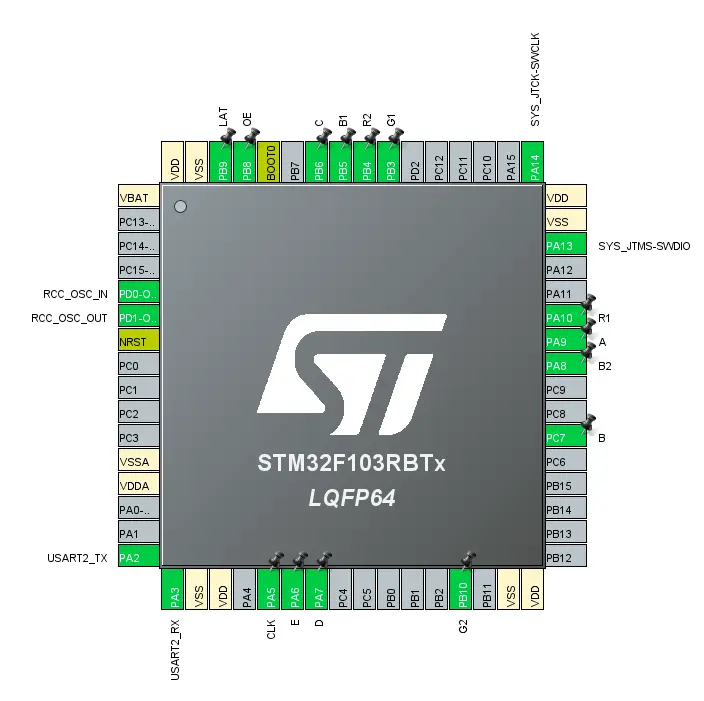
Code Description
main.c
int main(void)
{
  /* USER CODE BEGIN 1 */

  /* USER CODE END 1 */

  /* MCU Configuration--------------------------------------------------------*/

  /* Reset of all peripherals, Initializes the Flash interface and the Systick. */
  HAL_Init();

  /* USER CODE BEGIN Init */

  /* USER CODE END Init */

  /* Configure the system clock */
  SystemClock_Config();

  /* USER CODE BEGIN SysInit */

  /* USER CODE END SysInit */

  /* Initialize all configured peripherals */
  MX_GPIO_Init();
  MX_USART2_UART_Init();
  MX_TIM1_Init();
  /* USER CODE BEGIN 2 */

  DWT_Init();
  HUB75_Init();
  HUB75_SetBrightness(255); // the parameter is 0-255, the higher the number, the brighter the screen is
  HUB75_SetRefreshRate(1); // the parameter is 1-4, the higher the number, the brighter the screen is
  App_DrawGuiScreen();

  /* USER CODE END 2 */

  /* Infinite loop */
  /* USER CODE BEGIN WHILE */
  UWORD page = 0U;
  while (true)
  {
    App_WaitMsWithRefresh(1000U);
    page = (UWORD)((page + 1U) % 3U);
    App_DrawPage(page);
    /* USER CODE END WHILE */

    /* USER CODE BEGIN 3 */
  }
  /* USER CODE END 3 */
}
Code Analysis
App_DrawPage():- Draws different display content based on the page number.
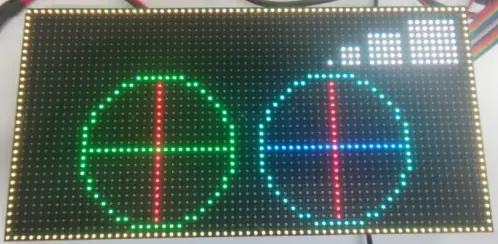
- Page 1 displays basic graphics such as points, lines, circles, and borders;
- Page 2 displays the text "Hello" and "world";
- Page 3 displays "Page3" and a number.
- After drawing, the buffer content is loaded to the HUB75 screen.
HUB75_LoadRGB565Frame(gui_framebuffer, HUB75_PANEL_WIDTH, HUB75_PANEL_HEIGHT):- Transfers the RGB565 image data from the current frame buffer to the HUB75 display driver, preparing it for display on the LED matrix screen.
App_WaitMsWithRefresh():- Continuously calls
HUB75_Display()while waiting for the specified time, ensuring the screen refreshes during the delay to avoid flicker or blanking.
- Continuously calls
HUB75_SetBrightness(255):- Sets the screen brightness to the maximum value, making the display content clearer and brighter.
HUB75_SetRefreshRate(1):- Sets the HUB75 screen refresh parameter to control display stability and refresh speed.
while (true):- Main program loop, switches pages every 1 second, causing the three interface contents to cycle in order.
Operation Result
 | 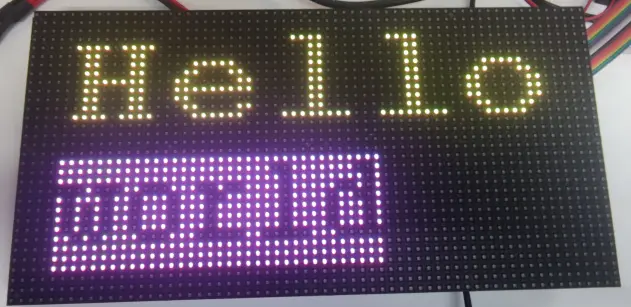 | 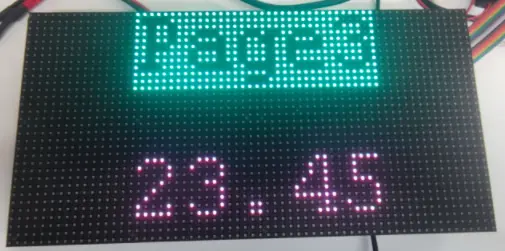 |
|---|