Working with Raspberry Pi
This chapter includes the following sections:
Setting Up the Development Environment
1. Installation and Configuration
- For Raspberry Pi system installation and usage instructions, please refer to the Raspberry Pi Documentation.
- After successful boot, configure the Raspberry Pi environment.
2. Downloading the Example
# Download the Example
wget https://files.waveshare.com/wiki/TOF-MINIF-Range-Sensor/TOF_MINIF_Range_Sensor_Demo.zip
unzip TOF_MINIF_Range_Sensor_Demo.zip
cd TOF_MINIF_Range_Sensor_Demo/
3. Enabling UART on Raspberry Pi
- Enter the command in the Raspberry Pi terminal:
sudo raspi-config nonint do_serial 2. - In the pop-up window, select NO for the first option and YES for the second, then select OK.


Example
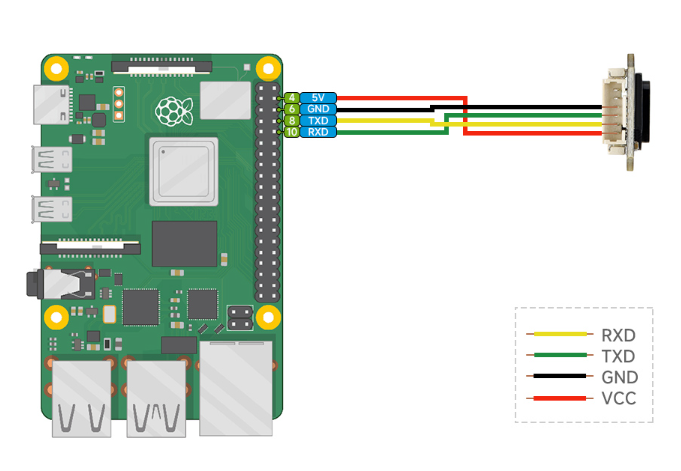
Hardware Connection
Connect as shown in the figure below.
Running the C Example
cd ~/TOF_MINIF_Range_Sensor_Demo/Raspberry/c/
make
./main
Below is the output of the C program:

Running the Python Example
cd ~/TOF_MINIF_Range_Sensor_Demo/Raspberry/python/example
python main.py
Below is the output of the Python program:
