Thermal Camera ESP32 Module
- Thermal-45 Camera ESP32 Module (Basic version 45° FOV)
- Thermal-90 Camera ESP32 Module (Wide angle version 90° FOV)
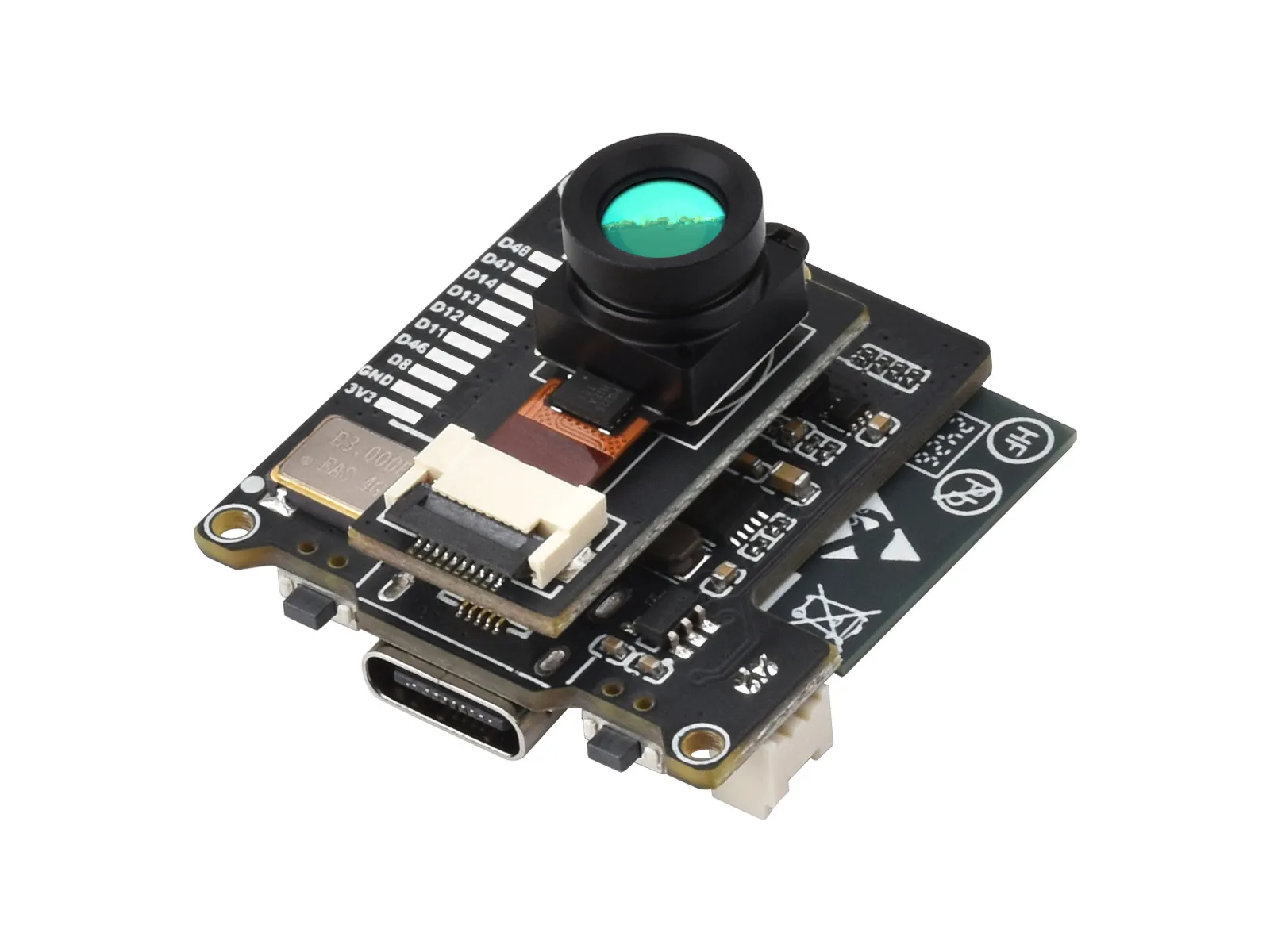
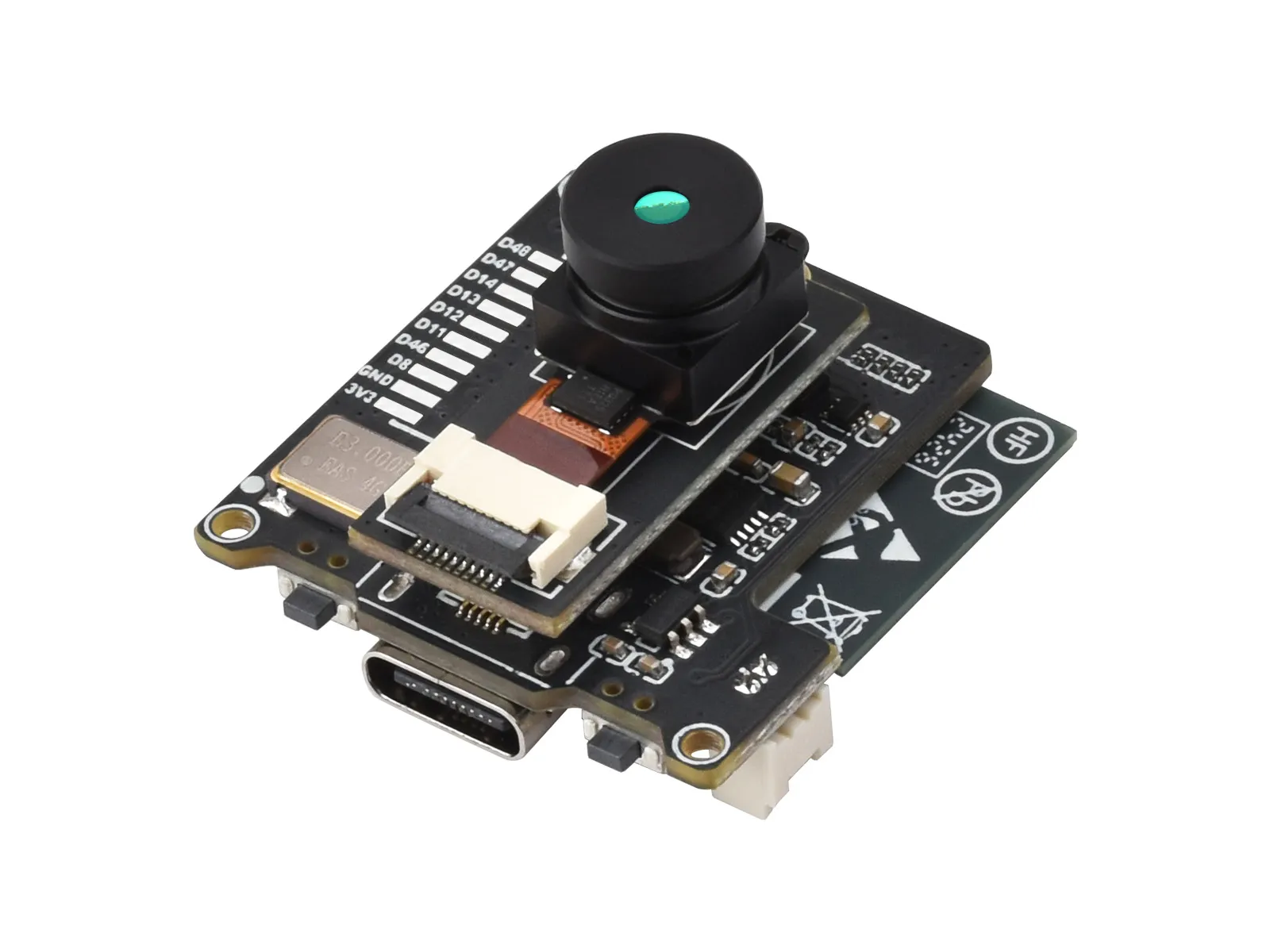
If you are looking for:
- Coding with AI tools: Click Ask AI and select an AI tool to ask questions about this page, or choose Copy page to copy its content and paste it into an AI tool for coding assistance.
- Schematics, datasheets, and example code: See Resources
- ESP-IDF development: See Working with ESP-IDF
- Troubleshooting: Contact Technical Support
| SKU | Product |
|---|---|
| 30136 | Thermal-45 Camera ESP32 Module |
| 30139 | Thermal-90 Camera ESP32 Module |
Product Overview
This is a wireless IR thermal imaging camera based on the ESP32-S3-WROOM-1 chip, adopts the hybrid technology of microbolometer and thermopile pixel, features 80x62 array pixels. It will detect the IR radiation energy distribution of objects in the field of view of the lens in real time, and generate temperature distribution maps and thermal imaging images of the surface of the objects through quantization processing. In addition, the module integrates a charge/discharge circuit and reserves a battery interface, allowing connection of a battery module for power supply.
Features
- Equipped with the ESP32-S3-WROOM-1 module and an Xtensa 32-bit LX7 dual-core microprocessor, with a clock speed of up to 240 MHz
- Onboard antenna, supporting dual-mode 2.4 GHz Wi-Fi (802.11 b/g/n) and Bluetooth 5 (LE) communication
- Built-in 512 KB SRAM and 384 KB ROM, with stacked 8 MB PSRAM and external 16 MB Flash
- Type‑C port
- Onboard RGB LED indicator light, displaying the module's operating status in real time, facilitating device monitoring and maintenance
- Onboard 3.7 V MX1.25 lithium battery charge/discharge interface
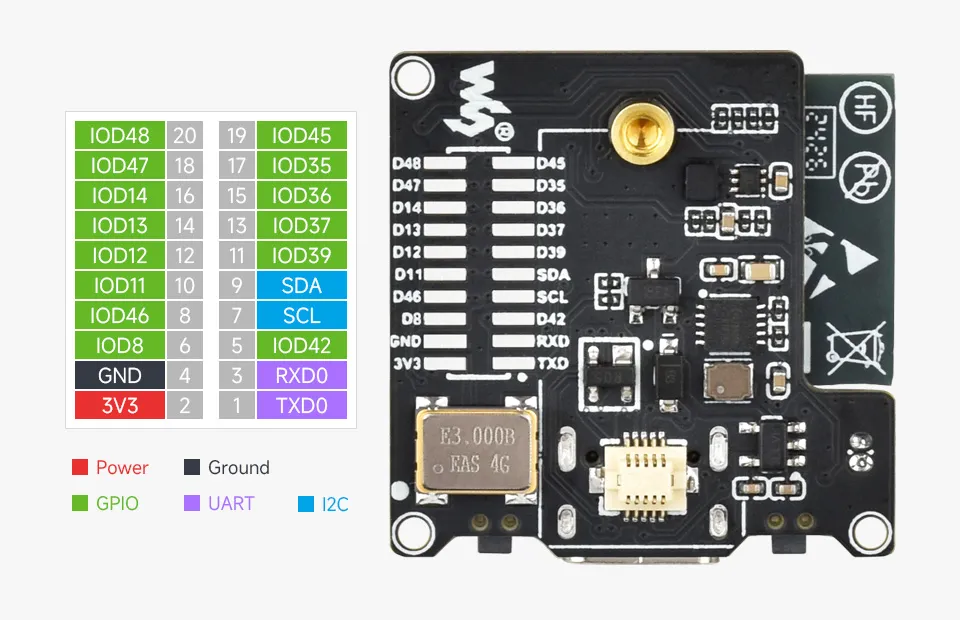
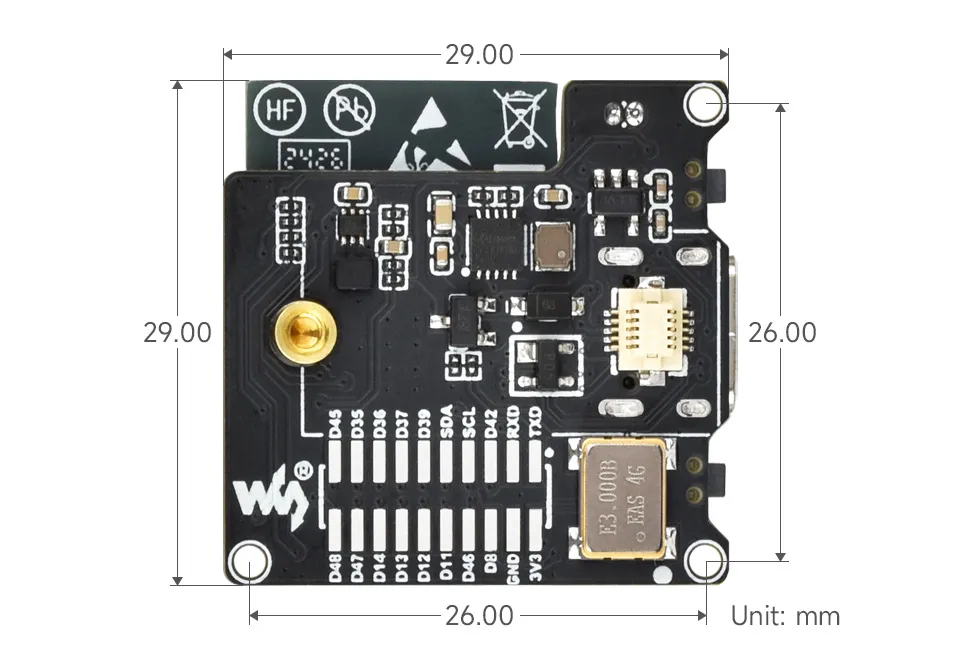
- Onboard 2 × 10 solder pads, including 14 × GPIO, 1 × I2C, and 1 × UART, for external device expansion
- Suitable for embedded application scenarios
Specifications
- Operating Voltage: 5 V
- Operating Current: 127 mA (5 V supply)
- Wavelength Range: 8 - 14 μm
- Field of View:
- 56°(D) × 45°(H) × 34°(V) (Basic version)
- 122°(D) × 90°(H) × 67°(V) (Wide angle version)
- Operating Temperature: -40℃ - 85℃
- Target Temperature: -40℃ - 400℃
- Measurement Accuracy: ±1.5℃ (room temperature 10℃-70℃)
- Refresh Rate: 25 FPS (Max)
- Due to the influence of Wi-Fi signals, the actual frame rate may vary; the usage environment shall prevail.
- Product Dimensions: 29.0 × 29.0 (mm)
- Noise Equivalent Temperature Difference: 125 mK
Pinout
Reserved GPIO
The module exposes the idle pins of the ESP32-S3, which can be used by soldering pin headers yourself. If additional soldering is needed, please remove the lens module first. A 1.27 mm pitch, 2x10 SMD pin header can be used.
SPI Bus
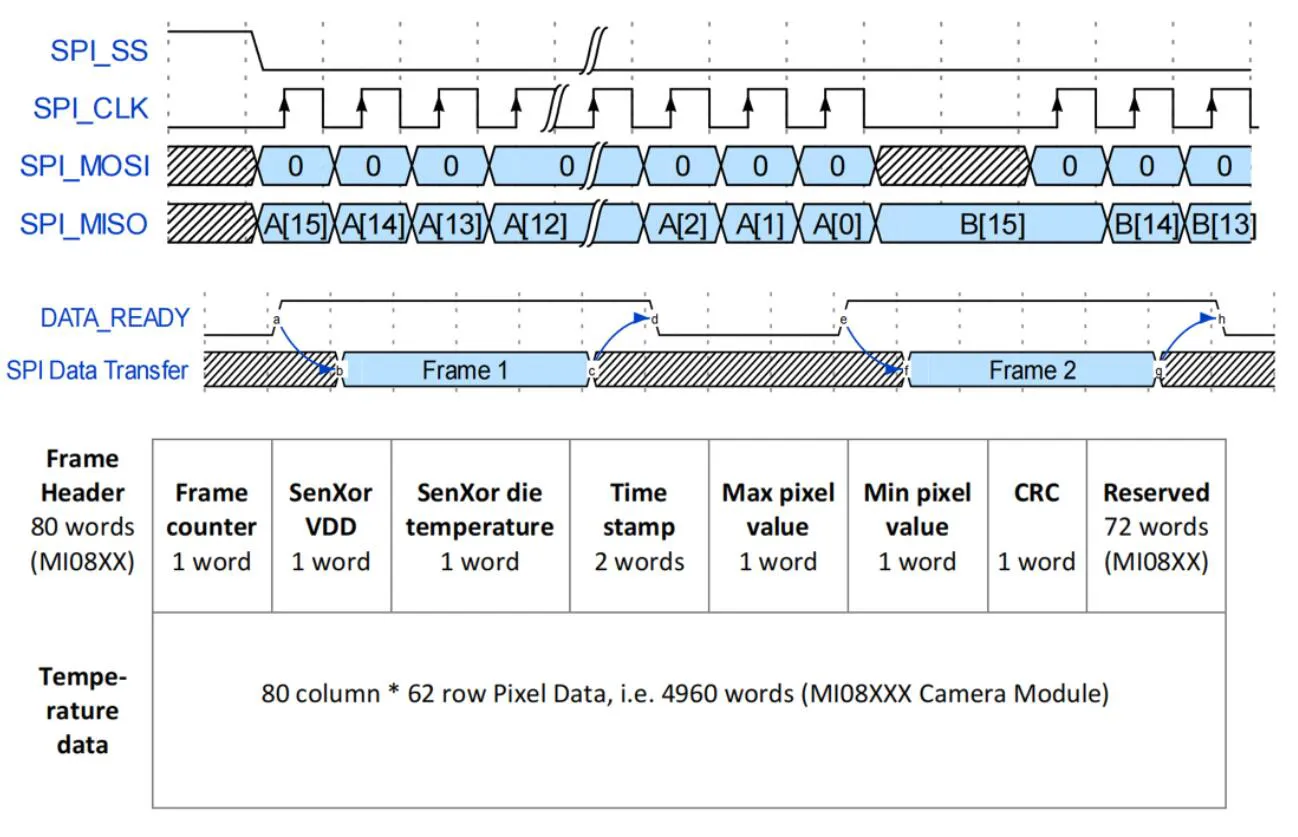
The ESP32 S3 module controls the thermal imaging module via SPI
- The SPI read timing diagram of the module is shown in the figure below. For more details, please refer to the MI0802 Datasheet
Hardware Interfaces
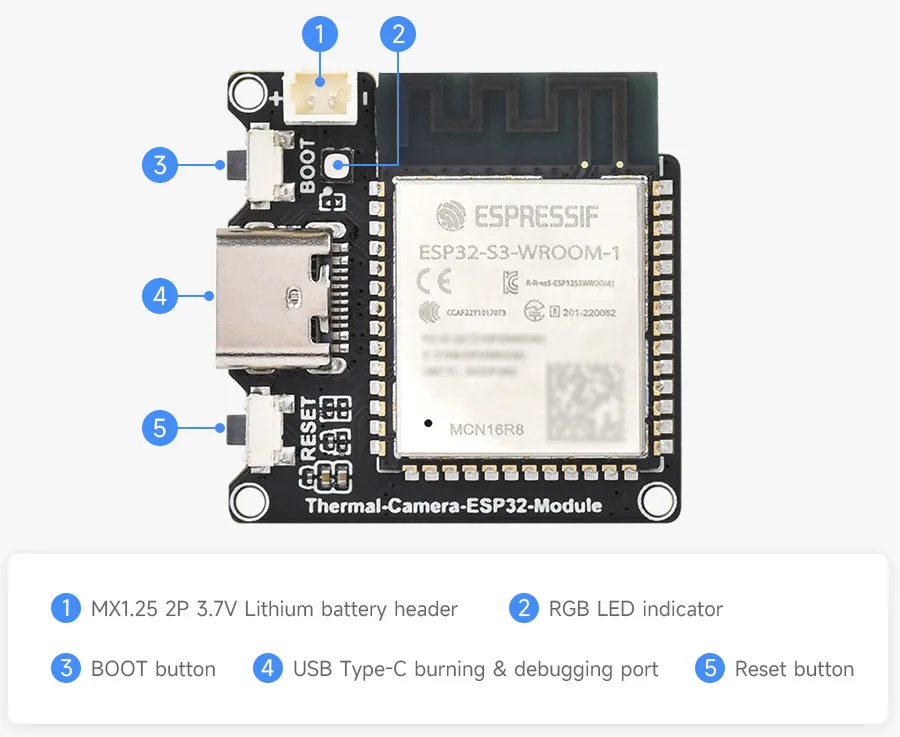
Dimensions
Temperature Measurement Principle
What is infrared temperature measurement? (Refer to OPTRIS)
In the field of measurement, "temperature" is one of the most commonly used physical parameters, second only to "time". Based on the principles of Planck and Boltzmann radiation laws, infrared thermometers determine temperature by absorbing the infrared radiation emitted by the object being measured. So how is non-contact temperature measurement achieved?
All objects with a temperature above absolute zero (0 K or -273.15℃) emit electromagnetic radiation from their surfaces, and this radiation is proportional to the object's inherent temperature. This radiation includes the infrared radiation used for temperature measurement. After this radiation passes through the atmosphere, it can be focused onto a detector with the help of a dedicated lens. The detector then generates an electrical signal proportional to this radiation. The signal is amplified and converted, through continuous digital signal processing, into an output signal proportional to the object's temperature. In this way, the measured temperature value is displayed on a screen or output as a signal.
When using radiation for temperature measurement, emissivity ε (Epsilon) plays a crucial role. It indicates the relationship between the radiation of a real object and that of a blackbody. The emissivity of a blackbody is 1 (the maximum value). However, few objects can satisfy the ideal blackbody condition. When calibrating sensors, the contact surface of a radiating body is generally used (including the recommended wavelength: 0.99).
In terms of wavelength, many objects usually have a constant emissivity, but their radiating capability is far inferior to that of a blackbody. They are called gray bodies. If an object's emissivity depends on its temperature and wavelength (such as metals), such objects are called selective radiators. In both cases, the missing radiation portion is compensated for by the emissivity value. When using selective radiators, it is important to keep in mind the measured wavelength (for metals, choose short wavelengths).
In addition to the radiation emitted from the object's surface, the infrared sensor can also receive reflected radiation from the surrounding environment, and possibly transmitted infrared radiation from the measured object.
Measurement Distance
- Using a 175 cm human model as the standard, at a test distance of about 12 m, the human outline can no longer be distinguished
Measurement Accuracy
- When the target object exceeds 25% or more of the module's FOV, the relative humidity should be below 95%, and there should be no condensed water vapor or moisture on the lens
| Product | Measurement Accuracy | Condition |
|---|---|---|
| Thermal-45 Camera ESP32 Module | ±1.5℃ | Room temperature 10℃-70℃ |
| Thermal-90 Camera ESP32 Module | ±1.5℃ | Room temperature 10℃-70℃ |
The above specifications can be found in the related product parameter comparison on the Thermal-45 Camera ESP32 Module product page and the Thermal-90 Camera ESP32 Module product page.
APP Usage Instructions
This product provides source code and factory firmware. The module has been tested and flashed with factory firmware before shipment, and you can use the Bluetooth APP to configure Wi-Fi parameters and perform testing.
1. Bluetooth APP Configuration Instructions
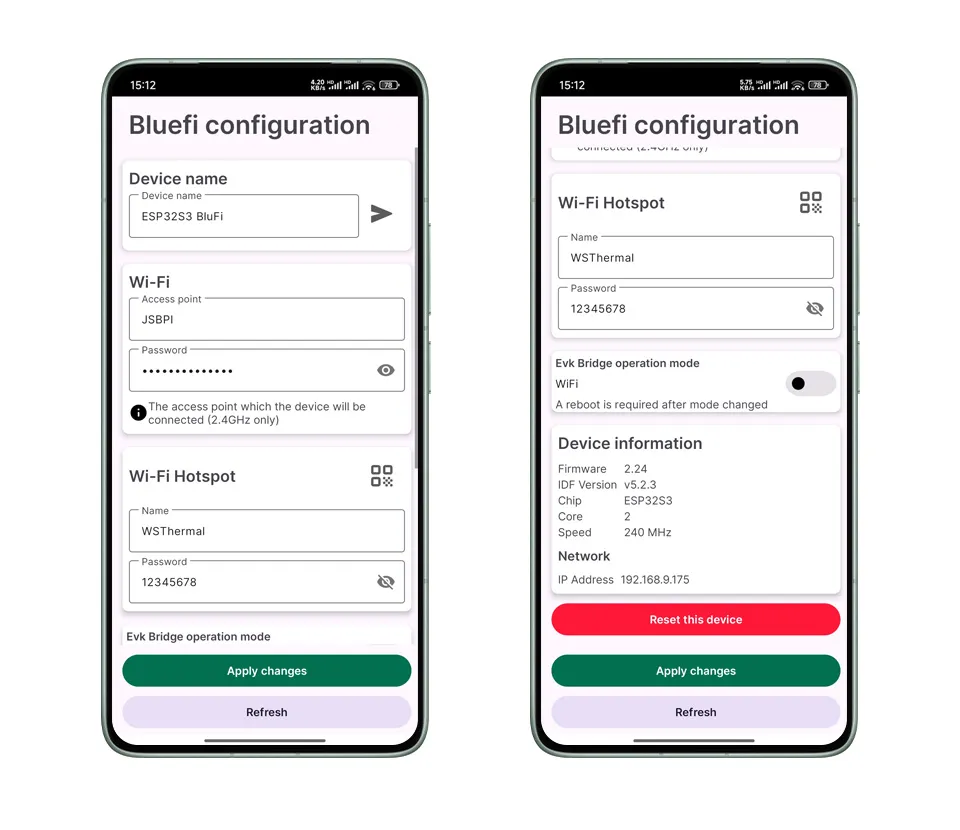
The program supports setting Wi-Fi parameters via Bluetooth, so there is no need to recompile and download the program when switching Wi-Fi environments. The APP only supports Android phones.
-
Download the Thermal Camera ESP32 Module Bluetooth Configuration APP (Android). After extracting the apk file, copy it to your Android phone for installation.
-
After installation, you will be prompted for APP permissions; please set up the module according to the prompts.
-
Click Refresh to scan for nearby Bluetooth devices. The default device name is "ESP32S3 BlueFi". Tap the device to enter configuration.
-
Modify the Wi-Fi that the device needs to connect to according to the page information, then click "Apply changes" to configure the module.
2. PC Preview
After successfully configuring the module, you can view the device's IP through the serial debug output, or directly on the Bluetooth APP page. In AP mode, the module's IP is 192.168.4.1 by default, and the port number is 3333.
STA Mode Test
-
The computer needs to connect to the same Wi-Fi network as the module.
-
Download the software and open the PC application for preview testing.
-
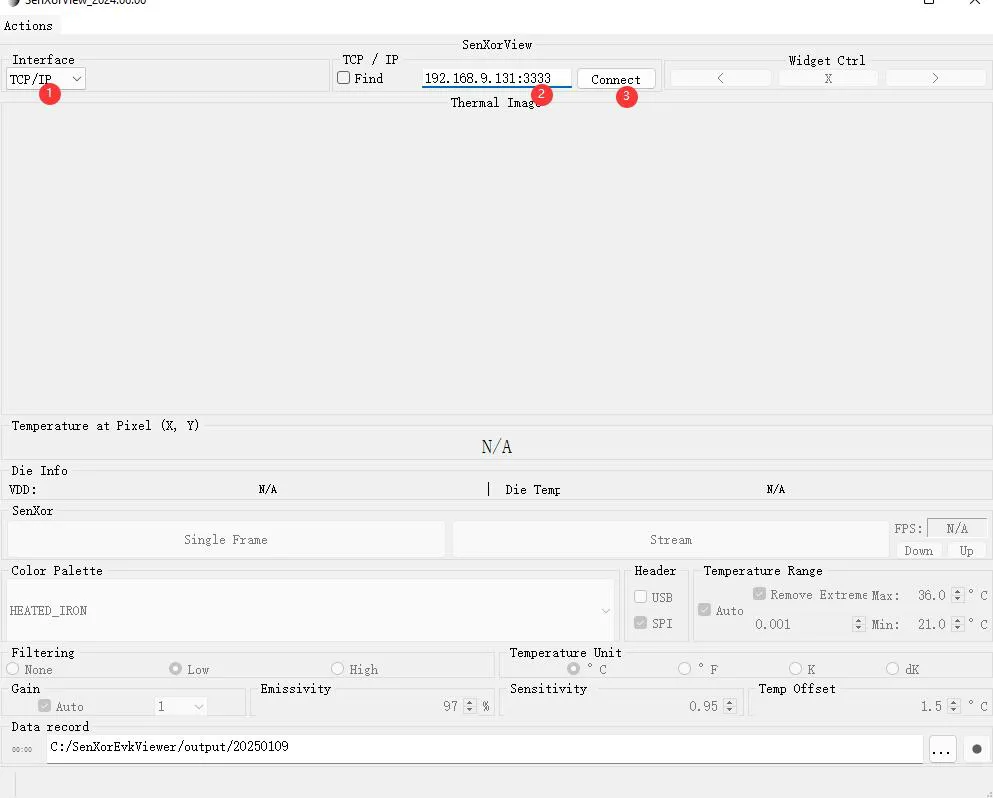
Select "TCP/IP" mode in "Interface".
-
Enter the module's IP address and port number in the IP input box, for example
192.168.9.131:3333. -
Click "Connect" to connect to the module and preview.
-
AP Mode Test
- The module supports hotspot mode. The default hotspot name is WSThermal and the password is 12345678.
- The computer scans for and connects to the WSThermal hotspot. Since the hotspot does not support internet access, some computers may automatically disconnect after connecting and need to reconnect.
- After the connection succeeds, use the PC software to connect to 192.168.4.1:3333 to connect to the module for preview.
Note: After using AP mode to obtain thermal images, you must press the Reset button to restart the module before it can switch back to STA mode.
3. Program Compilation and Download
The firmware source code is provided in the Resources chapter and can be downloaded for secondary development as needed.
- Select "File" > "Open Folder" and find the SENXORESP32S3 directory in the program and open it.
- After the folder is opened, the software will automatically detect the program environment configuration.
- After the environment is adapted, select the ESP-IDF v5.4.1 version SDK, and select the corresponding COM port according to the Device Manager interface.
- Select esp32s3 as the mainboard model.
- After successful configuration, select "Build Project" to compile the program, then click "Flash Device" to download the program to the development board.
Web Preview Instructions
In STA mode, open the sdkconfig file and configure the two parameters CONFIG_ESP_WIFI_STA_SSID (Wi-Fi name) and CONFIG_ESP_WIFI_STA_PASSWORD (password). After successful configuration, you can view the device IP output by the serial port. In AP mode, the module's IP is 192.168.4.1 by default.
1. Web Configuration Instructions
STA Mode Test
- Open the sdkconfig file and configure the two parameters
CONFIG_ESP_WIFI_STA_SSID(Wi-Fi name) andCONFIG_ESP_WIFI_STA_PASSWORD(password). Save, compile, and upload the program. - Check the IP address in the serial output.
- The computer needs to connect to the same Wi-Fi network as the module.
- Open a browser, enter
http://<device-ip>/thermalin the address bar, and press Enter to preview the image.
AP Mode Test
- The module supports hotspot mode. The default hotspot name is WSThermal and the password is 12345678.
- The computer scans for and connects to the WSThermal hotspot. Since the hotspot does not support internet access, some computers may automatically disconnect after connecting and need to reconnect.
- After the connection succeeds, open a browser, enter http://192.168.4.1/thermal in the address bar to connect to the module for preview.
Note: After using AP mode to obtain thermal images, you must press the Reset button to restart the module before it can switch back to STA mode.
2. Program Compilation and Download
The firmware source code is provided in the Resources chapter and can be downloaded for secondary development as needed.
- Select "File" > "Open Folder" and find the Thermal-ESP32-Web-Demo directory in the program and open it.
- After the folder is opened, the software will automatically detect the program environment configuration.
- After the environment is adapted, select the ESP-IDF v5.4.4 version SDK, and select the corresponding COM port according to the Device Manager interface.
- Select esp32s3 as the mainboard model.
- After successful configuration, select "Build Project" to compile the program, then click "Flash Device" to download the program to the development board.