ESP32-C6-GEEK
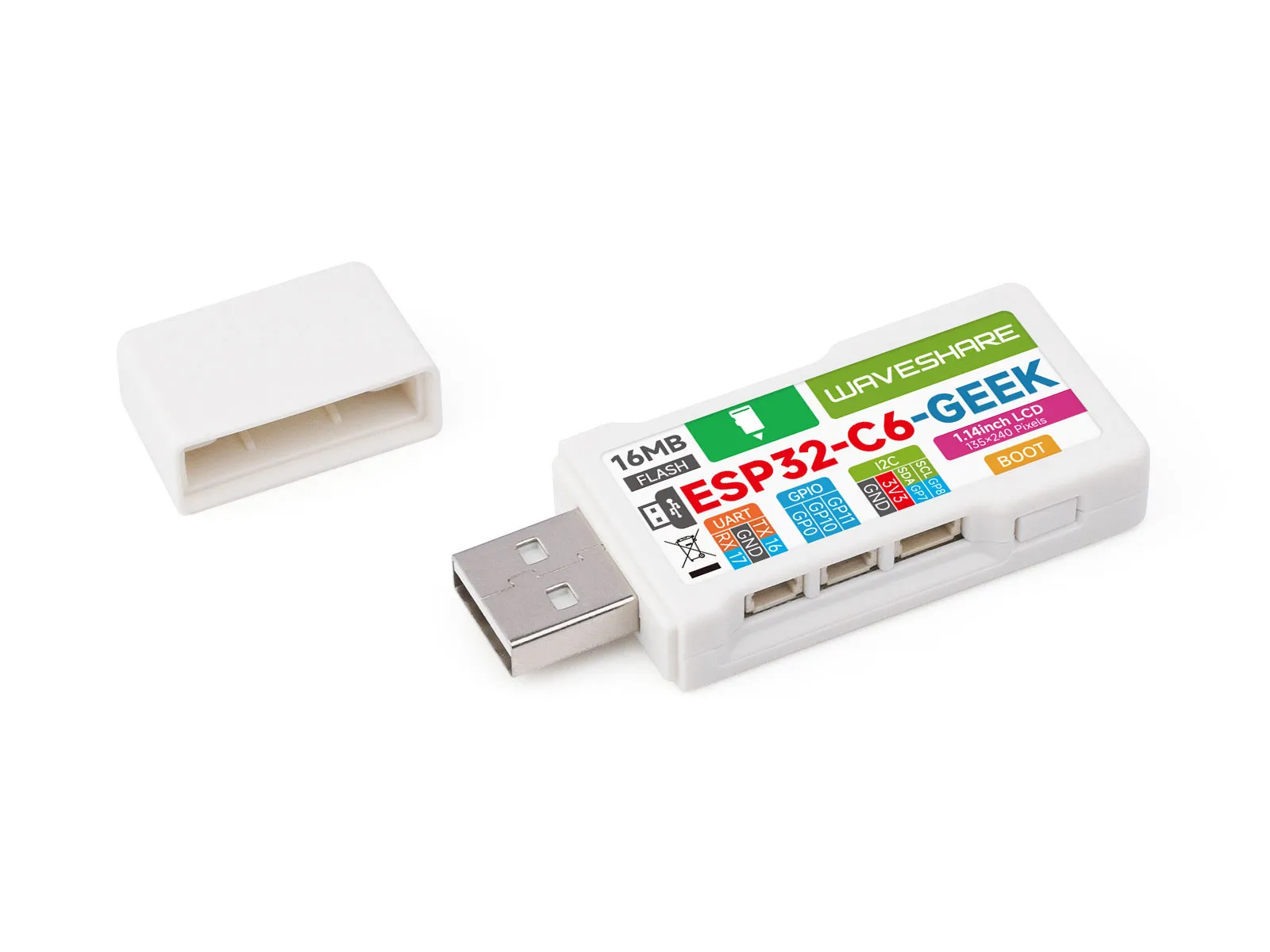
The ESP32-C6-GEEK is a development board designed by Waveshare for geeks. It features onboard peripherals such as a USB-A male port, a 1.14inch LCD screen, a TF card slot, etc. It supports 2.4GHz Wi-Fi 6 and BLE 5, integrates 16MB Flash, and provides I2C, UART, and GPIO interfaces, offering more possibilities for your projects.
- Starting from March 23, 2026, V2 version has been shipped. The products labeled V2 on the back indicate the V2 version; otherwise, they are V1. Examples for different versions are not compatible with each other.
- The difference between V1 and V2: The TF card interface pin assignment has been redesigned. It now shares the SPI bus with the LCD, instead of using dedicated pins.
| SKU | Product |
|---|---|
| 33675 | ESP32-C6-GEEK |
Features
- Adopts Espressif ESP32-C6 as the main chip
- Equipped with a high-performance 32-bit RISC-V processor, clock frequency up to 160MHz
- Built-in 512 KB SRAM, 320 KB ROM, onboard 16MB Flash
- Onboard 1.14inch 240×135 pixels, 65K colors, IPS LCD display
- Integrated 2.4 GHz Wi-Fi 6 and Bluetooth 5 (LE) dual-mode wireless communication
- Onboard TF card slot for external TF card storage of images or files
- Onboard 3PIN UART, 3PIN GPIO, and 4PIN I2C interfaces
- Includes a plastic case and relevant connecting cables
- Provides comprehensive open-source examples and resources, facilitating programming learning and project development
Onboard Resources
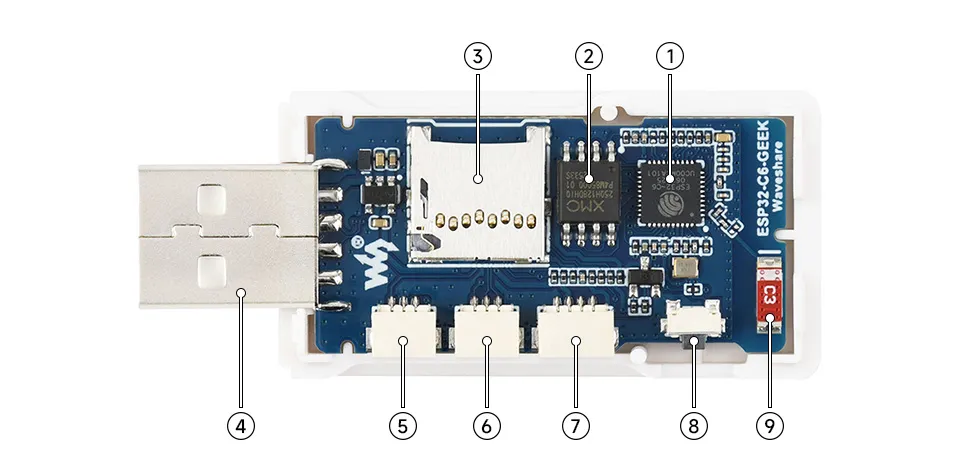
- ESP32-C6 supports Wi-Fi and Bluetooth SoC, operating at 160MHz
- 16MB NOR-Flash for data storage
- TF card slot
- USB-A Port
- UART header can be used to implement a USB-to-serial adapter function
- GPIO header brings out available IO functional pins for easy expansion
- I2C header can be used to test target boards
- BOOT button used for device startup and functional debugging
- Onboard antenna supports 2.4GHz Wi-Fi 6 (802.11 b/g/n) and Bluetooth 5 (LE)
LCD Screen Specifications
| Operating Voltage | 3.3V / 5V | Resolution | 240 × 135 pixels |
|---|---|---|---|
| Communication Interface | 4-wire SPI | Display Size | 24.91 × 14.86 (mm) |
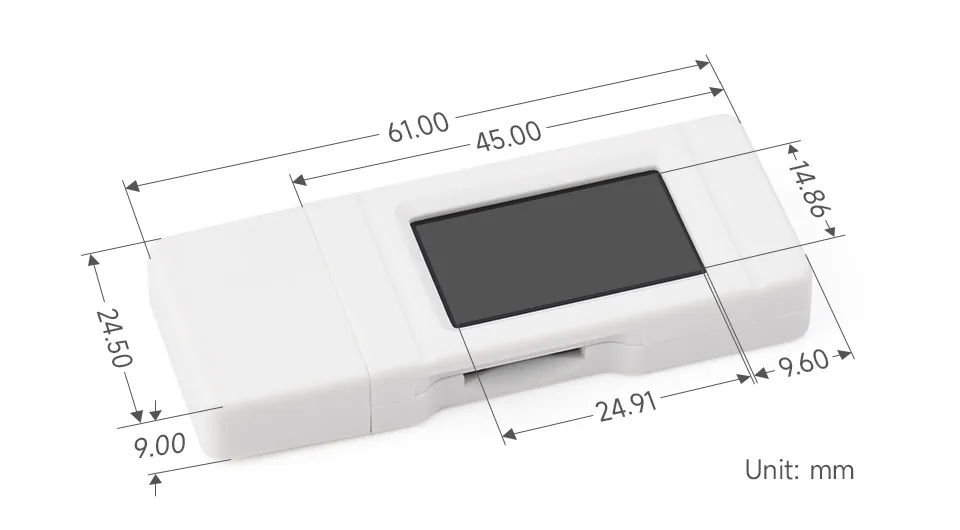
| Display Panel | IPS | Pixel Size | 0.1101 × 0.1035 (mm) |
| Controller IC | ST7789 | Product Size | 61.00 × 24.50 (mm) |
SPI Communication Protocol:
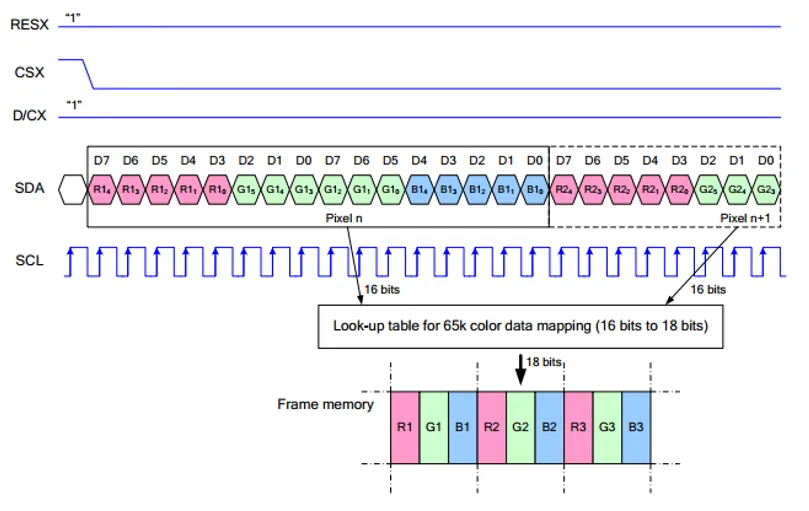
Note: The SPI interface here is specifically designed for screen display, therefore the data line from slave to master (MISO) is omitted.
-
RESX is the Reset pin; it is pulled low during module power-up and is normally set to 1.
-
CSX is the slave chip select pin; the chip is enabled only when CS is low
-
D/CX is the data/command control pin of the chip. When DC = 0, commands are written; when DC = 1, data is written.
-
SDA is the data transmission pin, specifically for RGB data.
-
SCL is the SPI communication clock pin.
For SPI communication, data transmission follows a specific timing sequence, which are determined by the combination of clock phase (CPHA) and clock polarity (CPOL):
-
The level of CPHA determines whether data is captured on the first or second clock transition edge of the serial synchronous clock. When CPHA = 0, data is captured on the first transition edge;
-
The level of CPOL determines the idle level of the serial synchronous clock. CPOL = 0 means the idle state is low level.
As can be seen from the diagram, data transmission begins at the first falling edge of SCL. One clock cycle transmits 1 bit of data, using SPI0 mode, transmitted bit by bit with the Most Significant Bit (MSB) first and the Least Significant Bit (LSB) last.
Dimensions
Development Methods
The ESP32-C6-GEEK supports both the Arduino IDE and ESP‑IDF development frameworks, giving developers flexible options. You can choose the development tool that best suits your project needs and personal preferences.
Both development methods have their own advantages. Developers can choose based on their needs and skill levels. Arduino is simple to learn and quick to start, suitable for beginners and non-professionals. ESP-IDF provides more advanced development tools and stronger control capabilities, suitable for developers with professional backgrounds or higher performance requirements, and is more appropriate for complex project development.
-
Arduino IDE is a convenient, flexible, and easy-to-use open-source electronics prototyping platform. It requires minimal foundational knowledge, allowing for rapid development after a short learning period. Arduino has a huge global user community, providing a vast amount of open-source code, project examples, and tutorials, as well as a rich library ecosystem that encapsulates complex functions, enabling developers to implement various features rapidly. You can refer to the Working with Arduino to complete the initial setup, and the tutorial also provides related example programs for reference.
-
ESP-IDF, short for Espressif IoT Development Framework, is a professional development framework launched by Espressif Systems for its ESP series of chips. It is based on C language development and includes compilers, debuggers, flashing tools, etc. It supports development via command line or integrated development environments (such as Visual Studio Code with the Espressif IDF plugin), which provides features like code navigation, project management, and debugging. We recommend using VS Code for development. For the specific configuration process, please refer to the Working with ESP-IDF. The tutorial also provides relevant example programs for reference.