Traffic Light
The core logic of this tutorial applies to all ESP32 boards, but all the operation steps are explained using the example of the Waveshare ESP32-S3-Zero mini development board. If you are using a development board of another model, please modify the corresponding settings according to the actual situation.
Project Introduction
This project demonstrates a traffic light simulation program. It controls three LED lights using the ESP32's GPIO pins, simulating the switching process of traffic light red, yellow, and green lights.
Hardware Connection
Components required:
- LED * 3
- 330Ω resistor * 3
- Breadboard * 1
- Wires
- ESP32 development board
Connect the circuit according to the wiring diagram below:
ESP32-S3-Zero Pinout Diagram

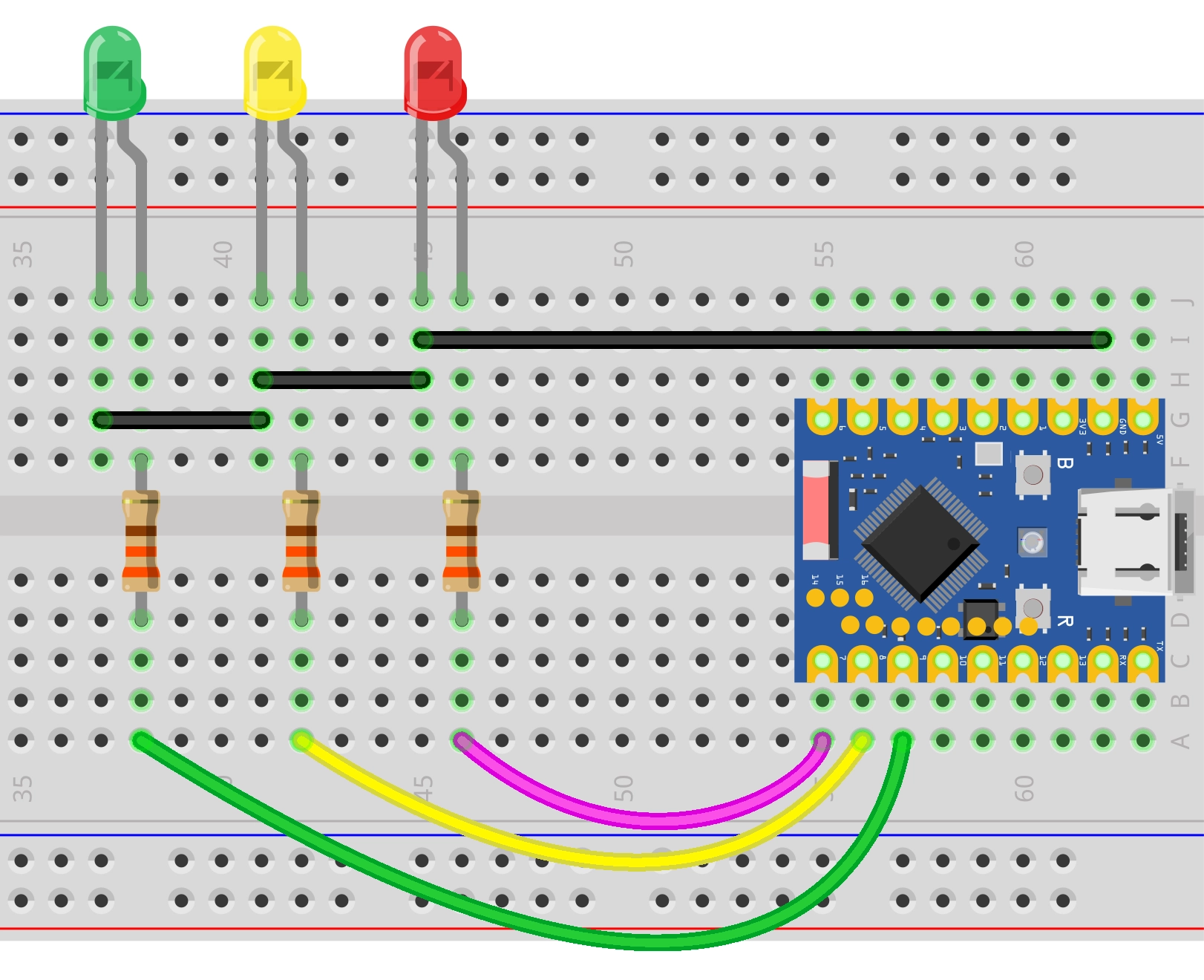
Code Implementation
import time
import machine

# Define the GPIO pin numbers connected to the red, yellow, and green LEDs
RED_LED_PIN = 7
YELLOW_LED_PIN = 8
GREEN_LED_PIN = 9

# Define the duration for each light phase
RED_LIGHT_DURATION = 10    # Red light stays on for 10 seconds
GREEN_LIGHT_DURATION = 8    # Green light stays on for 8 seconds
YELLOW_LIGHT_DURATION = 3   # Yellow light phase lasts for 3 seconds total
YELLOW_BLINK_INTERVAL = 0.5 # Yellow light blinking interval

# Initialize LED pins as output mode
red_led = machine.Pin(RED_LED_PIN, machine.Pin.OUT)
yellow_led = machine.Pin(YELLOW_LED_PIN, machine.Pin.OUT)
green_led = machine.Pin(GREEN_LED_PIN, machine.Pin.OUT)

def all_lights_off():
    """A helper function to turn off all LEDs."""
    red_led.off()
    yellow_led.off()
    green_led.off()

# Program starts
print("Traffic light simulation program starting...")
print(f"Configuration: Red={RED_LIGHT_DURATION}s, Green={GREEN_LIGHT_DURATION}s, Yellow={YELLOW_LIGHT_DURATION}s")
print(f"Yellow light blink interval: {YELLOW_BLINK_INTERVAL}s")

try:
    # Create an infinite loop to simulate the continuous operation of the traffic light
    while True:
        # --- Green Light Phase ---
        print("Green light ON")
        All_lights_off()  # First turn off all lights to ensure a clean state
        green_led.on()   # Turn on the green light
        time.sleep(GREEN_LIGHT_DURATION) # Wait for the configured green light time

        # --- Yellow Blinking Phase ---
        print("Yellow light blinking")
        green_led.off() # Turn off the green light

        # Calculate how many times the yellow light should blink within the specified total yellow duration
        # A complete blink cycle is (ON + OFF), with a duration of YELLOW_BLINK_INTERVAL * 2
        # Divide the total duration by a single cycle duration to get the number of blinks
        num_blinks = int(YELLOW_LIGHT_DURATION / (YELLOW_BLINK_INTERVAL * 2))

        # Ensure it blinks at least once even if the total time set is very short
        if num_blinks == 0:
            num_blinks = 1

        for _ in range(num_blinks):
            yellow_led.on()  # Turn on the yellow light
            time.sleep(YELLOW_BLINK_INTERVAL) # Stay on for a while
            yellow_led.off() # Turn off the yellow light
            time.sleep(YELLOW_BLINK_INTERVAL) # Stay off for a while

        # Ensure the yellow light is off before entering the red light phase
        yellow_led.off()

        # --- Red Light Phase ---
        print("Red light ON")
        # At this point, the yellow and green lights are already off, just turn on the red light
        red_led.on()
        time.sleep(RED_LIGHT_DURATION) # Wait for the configured red light time

except KeyboardInterrupt:
    print("\n Program interrupted by user.")

finally:
    # Whether the program ends normally or is interrupted, ensure all lights are turned off
    all_lights_off()
    print("All traffic lights are off. Program ended.")
Code Analysis
-
Import Libraries: The
machinelibrary is used for hardware control, and thetimelibrary is used for implementing delays. -
Constant Definitions: The beginning of the program defines GPIO pin numbers (
RED_LED_PIN, etc.) and the duration for each light phase (RED_LIGHT_DURATION, etc.). Centralizing these parameters facilitates quick adjustments based on actual needs without delving deep into modifying logic code.# Define the GPIO pin numbers connected to the red, yellow, and green LEDsRED_LED_PIN = 7YELLOW_LED_PIN = 8GREEN_LED_PIN = 9# Define the duration for each light phaseRED_LIGHT_DURATION = 10 # Red light stays on for 10 secondsGREEN_LIGHT_DURATION = 8 # Green light stays on for 8 secondsYELLOW_LIGHT_DURATION = 3 # Yellow light phase lasts for 3 seconds totalYELLOW_BLINK_INTERVAL = 0.5 # Yellow light blinking interval -
Pin Initialization: The
machine.Pinclass is used to create three objects corresponding to the red, yellow, and green lights. Themachine.Pin.OUTparameter configures the pins as output mode, allowing the program to control their high/low levels.# Initialize LED pins as output modered_led = machine.Pin(RED_LED_PIN, machine.Pin.OUT)yellow_led = machine.Pin(YELLOW_LED_PIN, machine.Pin.OUT)green_led = machine.Pin(GREEN_LED_PIN, machine.Pin.OUT) -
Helper Function: The
all_lights_off()function is used to turn off all LEDs simultaneously. Calling this function before state transitions ensures no light is accidentally on, improving the robustness of the code.def all_lights_off():"""A helper function to turn off all LEDs."""red_led.off()yellow_led.off()green_led.off() -
Main Loop Logic: The program executes three phases sequentially within an infinite loop
while True:- Green Light Phase: First, call
all_lights_off()to clear the state, turn on the green light, and delay forGREEN_LIGHT_DURATIONseconds. - Yellow Blinking Phase: Calculate the number of blinks (total duration divided by single cycle duration). Control the yellow light to alternately turn on and off through a
forloop to simulate a warning effect. - Red Light Phase: Turn on the red light and delay for
RED_LIGHT_DURATIONseconds. Since the yellow light was turned off at the end of the previous phase, simply turning on the red light is sufficient here.
- Green Light Phase: First, call
-
Exception Handling: The
try...except...finallystructure enhances program stability.except KeyboardInterrupt: Catches user interrupt signals (e.g., Ctrl+C), allowing the program to exit gracefully.finally: Executesall_lights_off()to turn off all lights whether the program ends normally or is interrupted, preventing the hardware from being left in an uncertain state.