Motion Sensor Light
The core logic of this tutorial applies to all ESP32 boards, but all the operation steps are explained using the example of the Waveshare ESP32-S3-Zero mini development board. If you are using a development board of another model, please modify the corresponding settings according to the actual situation.
Project Introduction
This project uses a PIR (Passive Infrared) sensor to detect human presence and automatically control the switching of a WS2812 LED strip, achieving intelligent motion-sensing lighting. When the sensor detects human movement, the LED strip automatically turns on; when no movement is detected for a continuous period, the strip automatically turns off.
Hardware Connection
Components required:
- PIR motion sensor * 1
- WS2812 LED strip * 1
- Breadboard * 1
- Wires
- ESP32 development board
Connect the circuit according to the wiring diagram below:
ESP32-S3-Zero Pinout Diagram

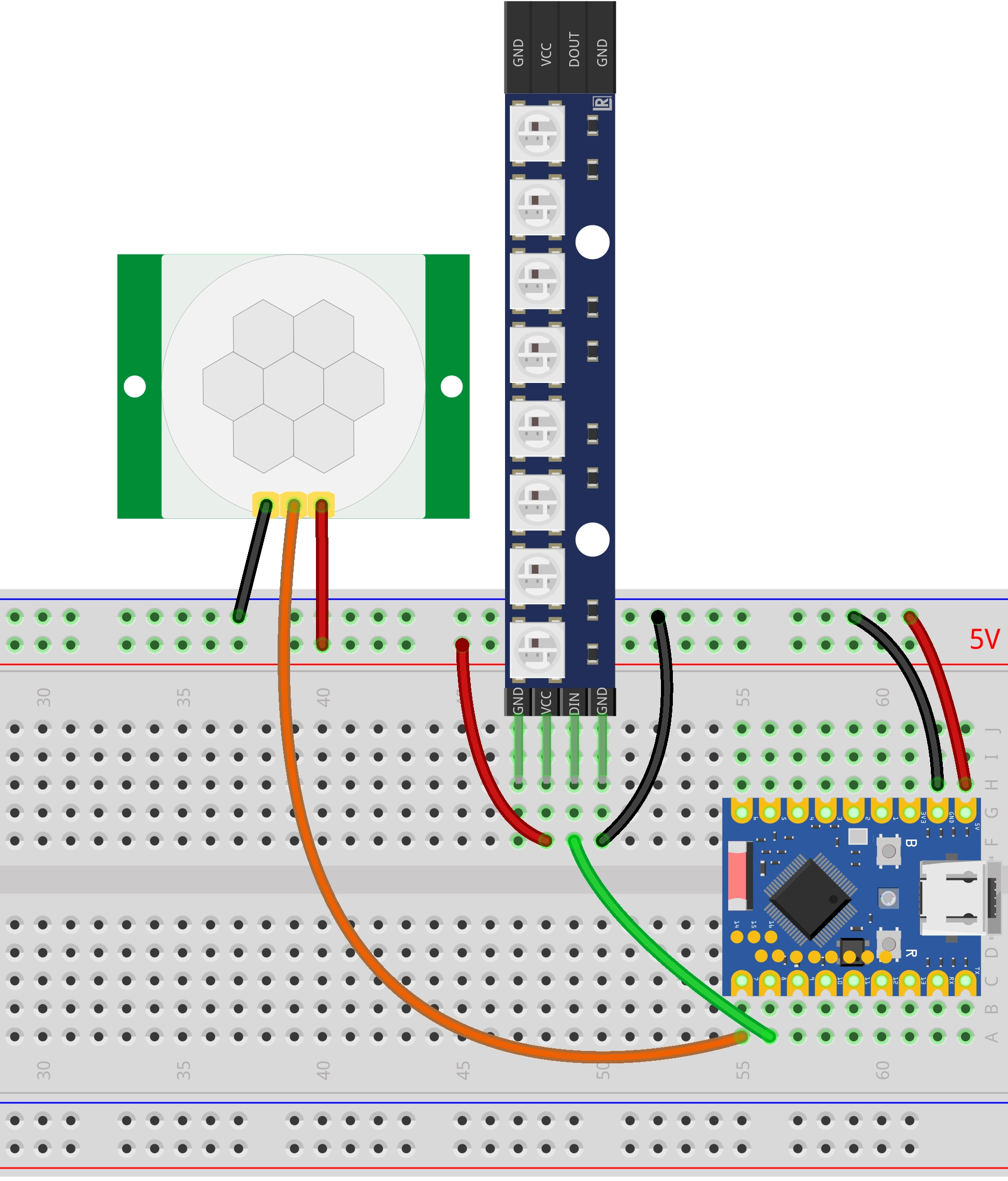
- Power Connection: Both the PIR sensor and the WS2812 LED strip need to be connected to a 5V power source.
- Jumper Setting: The jumper on the PIR module should be set to H mode (High-level trigger mode).
- Debugging Suggestion: For initial debugging, it is recommended to set the detection distance of the PIR module to its minimum first to avoid false triggers. Adjust according to actual needs after the functionality is verified.
Code Implementation
import time
import machine
import neopixel

# --- Configuration ---
PIR_PIN = 7
LED_PIN = 8
NUM_LEDS = 8
TIMEOUT = 5000      # How long the light stays on after a person leaves (milliseconds)
COLOR = (128, 0, 128)

# --- Initialization ---
pir = machine.Pin(PIR_PIN, machine.Pin.IN, machine.Pin.PULL_DOWN)
np = neopixel.NeoPixel(machine.Pin(LED_PIN), NUM_LEDS)

def switch_light(on):
    color = COLOR if on else (0, 0, 0)
    np.fill(color)
    np.write()

# --- Main Program ---
try:
    print("System starting...  (Press Ctrl+C to stop)")
    is_on = False
    last_motion_time = time.ticks_ms()

    # Start by forcing the light off to prevent state desynchronization
    switch_light(False)

    while True:
        current_time = time.ticks_ms()

        # --- Core Logic Correction ---

        # 1. As long as the sensor is high level (someone present), keep refreshing the timestamp
        if pir.value() == 1:
            last_motion_time = current_time
            # If the light is off, turn it on immediately
            if not is_on:
                print("Motion detected -> Turn on light")
                switch_light(True)
                is_on = True

        # 2. Only when the sensor is low level (no one), start calculating timeout
        else:
            # Only need to check for timeout if the light is currently on
            if is_on:
                # Calculate: current time - last detection time
                duration = time.ticks_diff(current_time, last_motion_time)

                if duration > TIMEOUT:
                    print("Timeout - no motion -> Turn off light")
                    switch_light(False)
                    is_on = False
                    # Add a small delay here to prevent momentary false triggers caused by voltage fluctuations when turning off
                    time.sleep_ms(1000)

        # Loop check frequency, 100ms is sufficient, fast response and low power consumption
        time.sleep_ms(100)

except KeyboardInterrupt:
    print("\nManually stopped by user")

finally:
    # Ensure the light strip is off no matter what happens
    print("Cleaning up resources, turning off LED strip...")
    switch_light(False)
Code Analysis
-
Import Libraries: The
machinelibrary is used for hardware control (GPIO), theneopixellibrary is used for controlling the WS2812 LED strip, and thetimelibrary is used for implementing delays and managing timestamps. -
Constant Definitions: The beginning of the program defines the GPIO pin numbers for the PIR sensor and LED strip, the number of LEDs, the timeout duration, and the light color. Centralizing these parameters facilitates quick adjustments based on actual needs without delving deep into modifying logic code.
# --- Configuration ---PIR_PIN = 7LED_PIN = 8NUM_LEDS = 8TIMEOUT = 5000 # How long the light stays on after a person leaves (milliseconds)COLOR = (128, 0, 128) -
GPIO Initialization: The
machine.Pinclass is used to create a PIR sensor object, configured as an input mode with a pull-down resistor enabled. Theneopixel.NeoPixelclass is used to create the LED strip object for controlling the WS2812 LEDs.# --- Initialization ---pir = machine.Pin(PIR_PIN, machine.Pin.IN, machine.Pin.PULL_DOWN)np = neopixel.NeoPixel(machine.Pin(LED_PIN), NUM_LEDS)The PIR (Passive Infrared) sensor detects human presence by sensing infrared radiation emitted by the human body. Configuring it as input with a pull-down resistor ensures the pin reads a low level when no signal is present.
-
Helper Function: The
switch_light(on)function encapsulates the control of the LED strip's on/off state.def switch_light(on):color = COLOR if on else (0, 0, 0)np.fill(color)np.write()- When the parameter
onisTrue, all LEDs are set toCOLOR; whenFalse, they are set to(0, 0, 0)(off). np.fill(color)sets all LEDs to the specified color.np.write()writes the color data to the LED strip, making it display.
- When the parameter
-
Main Loop Logic: The program continuously monitors the PIR sensor and controls the light within an infinite loop
while True.-
Initial State: When the program starts, it forces the light off (
switch_light(False)) to ensure state synchronization. -
Core Logic:
-
Motion Detected (PIR High Level):
- Immediately refresh the timestamp
last_motion_time = current_time. - If the light is off, turn it on and set
is_on = True.
- Immediately refresh the timestamp
-
No Motion Detected (PIR Low Level):
- Calculate the timeout duration only if the light is currently on.
- Use
time.ticks_diff()to calculate the duration since the last motion detection. - If it exceeds the duration set by
TIMEOUT, turn off the light and setis_on = False. - Delay for 1 second after turning off to prevent false triggers caused by voltage fluctuations.
-
-
Loop Check Frequency: Checks every 100ms, ensuring fast response without excessive CPU usage.
-
-
Exception Handling: The
try...except...finallystructure enhances program stability.except KeyboardInterrupt: Catches a user interrupt (Ctrl+C), allowing the program to exit gracefully.finally: Regardless of how the program ends, it forces a call toswitch_light(False)to turn off the LED strip, preventing the hardware from being left in an uncertain state.