Motion Sensor Light
The core logic of this tutorial applies to all ESP32 development boards. However, all operational steps are explained using the Waveshare ESP32-S3-Zero Mini Development Board as an example. If you are using a different model of development board, please modify the relevant settings according to your actual situation.
Project Introduction
This project uses a PIR (Passive Infrared) sensor to detect human presence and automatically controls a WS2812 LED strip to enable smart, motion-activated lighting. When the sensor detects human movement, the LED strip turns on automatically. The strip will automatically turn off after a period of time when no further activity is detected.
Hardware Connection
The components required are:
- PIR motion sensor * 1
- WS2812 LED strip * 1
- Breadboard * 1
- Wire
- ESP32 development board
Connect the circuit according to the wiring diagram below:
ESP32-S3-Zero Pinout Diagram

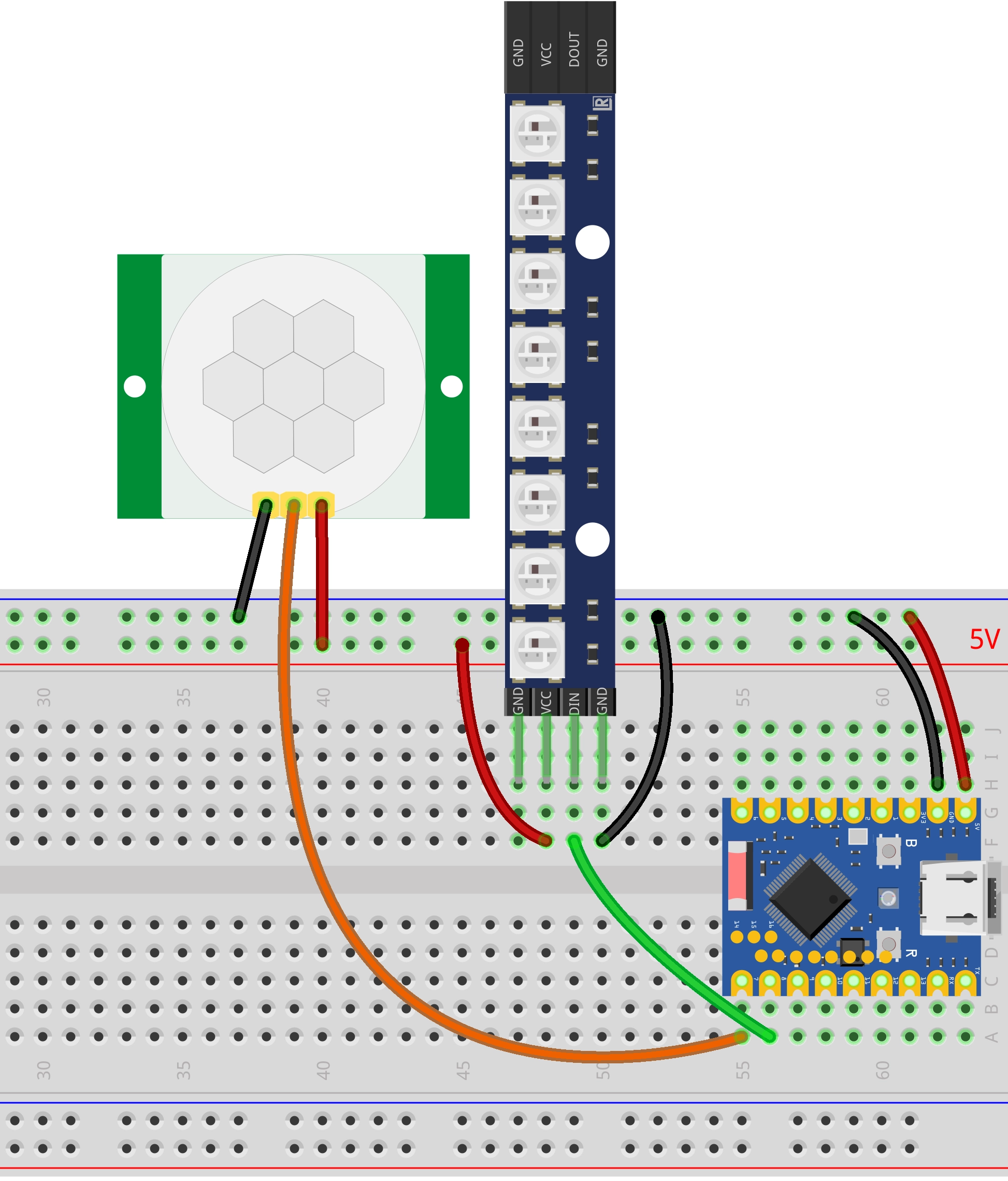
- Power Connection: Both the PIR sensor and the WS2812 LED strip need to be connected to the 5V power supply.
- Jumper Cap Setting: The jumper cap on the PIR module needs to be set to H mode (High-level trigger mode).
- Debugging Suggestion: For initial debugging, it is recommended to first set the PIR module's detection distance to its minimum to avoid false triggers. Adjust it according to your actual needs once the basic functionality is verified.
Motion Sensor Light
This code example depends on the "FastLED" library. Please search for and install the "FastLED" library via the Library Manager in Arduino IDE.
For installation instructions, please refer to: Arduino library manager tutorial.
/*
 Motion Sensor Light

  When the PIR sensor detects human motion, it turns on the WS2812 LED strip.
  If no further motion is detected within the set time period, the light will automatically turn off.

  Circuit Connection:
  * PIR sensor signal pin -> Pin 8

  Wulu (Waveshare Team)
*/

#include <FastLED.h>

// --- Configure parameters ---
const int pirPin = 7;             // Pin connected to the PIR sensor
const int ledPin = 8;             // Pin connected to the LED strip
const int numLeds = 8;            // Number of LEDs in the strip
const unsigned long lightDuration = 5000; // Light duration in milliseconds

// Define the LED array
CRGB leds[numLeds];

// --- State variables ---
boolean isLightOn = false;        // Record whether the light is currently on
unsigned long lastMotionTime = 0; // Record the time when motion was last detected

void setup() {
  Serial.begin(115200);

  // Configure the PIR pin as INPUT_PULLDOWN (stays LOW when not triggered)
  pinMode(pirPin, INPUT_PULLDOWN);

  // Initialize the LED strip
  FastLED.addLeds<WS2812, ledPin, GRB>(leds, numLeds);
  FastLED.setBrightness(50);
  FastLED.clear();
  FastLED.show();

  Serial.println("System started...");
  turnLightOff(); // Ensure the light is off on startup
}

void loop() {
  unsigned long currentTime = millis();
  int motionState = digitalRead(pirPin);

  // 1. If motion is detected, reset the timer
  if (motionState == HIGH) {
    lastMotionTime = currentTime;

    // If the light is not on, turn it on
    if (!isLightOn) {
      Serial.println("Motion detected -> Turning light ON");
      turnLightOn();
      isLightOn = true;
    }
  }
  // 2. If no motion is detected, check for timeout
  else {
    if (isLightOn) {
      unsigned long duration = currentTime - lastMotionTime;

      // If the elapsed time since the last motion exceeds the set duration
      if (duration > lightDuration) {
        Serial.println("No motion for set duration -> Turning light OFF");
        turnLightOff();
        isLightOn = false;
        delay(1000); // Brief delay to prevent flickering near the threshold
      }
    }
  }

  delay(100); // Simple loop delay
}

// Function to turn on the lights
void turnLightOn() {
  fill_solid(leds, numLeds, CRGB::Purple);
  FastLED.show();
}

// Function to turn off the lights
void turnLightOff() {
  fill_solid(leds, numLeds, CRGB::Black);
  FastLED.show();
}
Code Analysis
-
Library Inclusion: Includes the
FastLED.hlibrary, which is a powerful and easy-to-use library for LED control.tipThis demo depends on the "FastLED" library. Please search for and install the "FastLED" library via the Library Manager in Arduino IDE.
For installation instructions, please refer to: Arduino library manager tutorial.
-
Configuration Parameters & Global Variables:
- Uses the
constkeyword to define constants, including pin numbers, LED count, and duration. - Creates a
CRGBarrayledsto store the color data for each LED. - Defines global variables
isLightOnandlastMotionTimefor state management.
const int pirPin = 7;
const int ledPin = 8;
const int numLeds = 8;
const unsigned long lightDuration = 5000;

CRGB leds[numLeds]; - Uses the
-
Initialization (
setup):- Initializes serial communication and the PIR pin.
- Uses
FastLED.addLedsto configure the LED strip. Here, the LED type (WS2812), data pin (ledPin), and color order (GRB). FastLED.setBrightness(50)sets the global brightness to avoid being too harsh or drawing excessive current.
void setup() {
  // ...
  FastLED.addLeds<WS2812, ledPin, GRB>(leds, numLeds);
  FastLED.setBrightness(50);
  // ...
} -
Functional Functions (
turnLightOn/turnLightOff):- Splits the logic for turning the light on and off into two separate functions, avoiding boolean parameters to make the code's intent clearer.
- Uses the
fill_solidfunction to quickly set the color for the entire strip. CRGB::Purpleis a predefined purple color from the library; you can also useCRGB(128, 0, 128)for custom colors.FastLED.show()sends the data to update the LED strip display.
void turnLightOn() {
  fill_solid(leds, numLeds, CRGB::Purple);
  FastLED.show();
} -
Main Loop (
loop):- The logic remains the same as before: checks the PIR sensor state, turns the light on and refreshes the timer if motion is detected, and turns the light off if no motion is detected for the timeout period.
- Uses
millis()for non-blocking time calculations.